Home Categories Deals Sign Up
Updated: June 4, 2026

How Video Tap Works

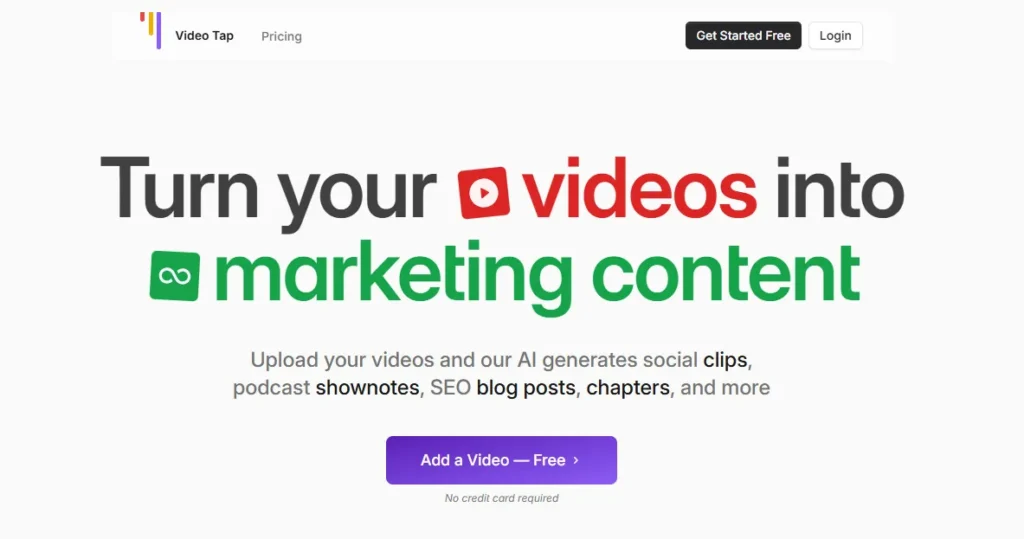
Video Tap">Video Tap AI tool – Video Tap is built around one insight: the most underused content asset most creators own is the video they already made.

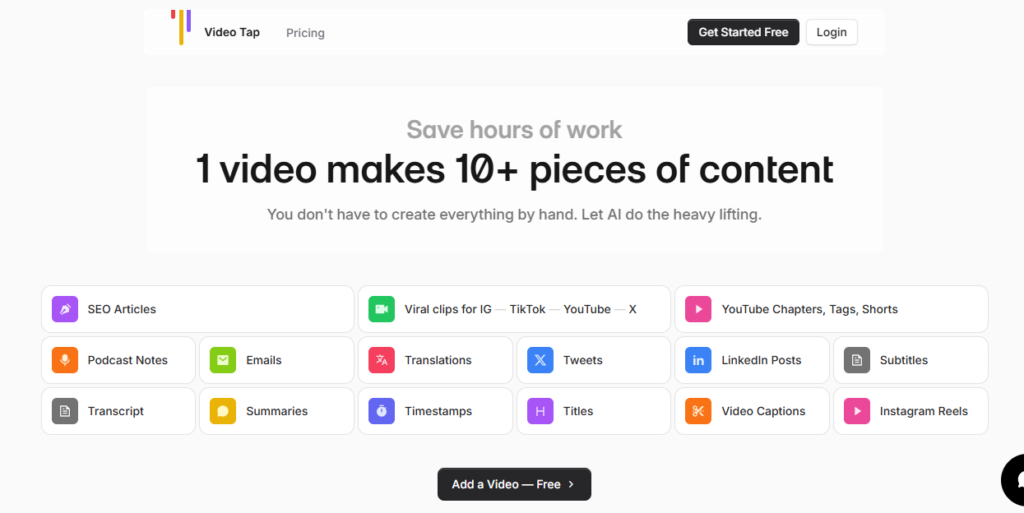
You upload a video — by file, YouTube URL, or Vimeo link — and the platform's AI generates everything you'd normally spend 2+ hours producing manually: viral short clips reformatted for Reels and TikTok, an SEO-optimized blog post, YouTube chapters, timestamps, tags, a description, podcast show notes, email copy, tweets, LinkedIn posts, translated subtitles, and a full transcript.

The homepage estimates this takes 20 minutes with Video Tap versus 2+ hours the traditional way — and for most content types, that estimate is generous to the manual process.

Key Capabilities

The clip engine identifies the strongest moments from a long-form video and auto-generates vertical and horizontal short-form clips ready for Instagram Reels, YouTube Shorts, and TikTok — no timeline editing required.

The blog post generator converts the video content into structured, SEO-focused articles that “search engines love,” with the platform getting you 90% of the way to a publishable draft. A built-in editor lets you add images, links, and custom edits before you publish.

Translation is a native feature, not a bolt-on: Video Tap supports content generation in 10+ languages including Spanish, French, German, Italian, Portuguese, Dutch, Hindi, Japanese, Russian, Chinese, and Korean — enabling a single upload to serve multiple language markets from one workflow.

A custom prompt feature lets you override the default AI outputs and generate specialized content formats specific to your brand voice.

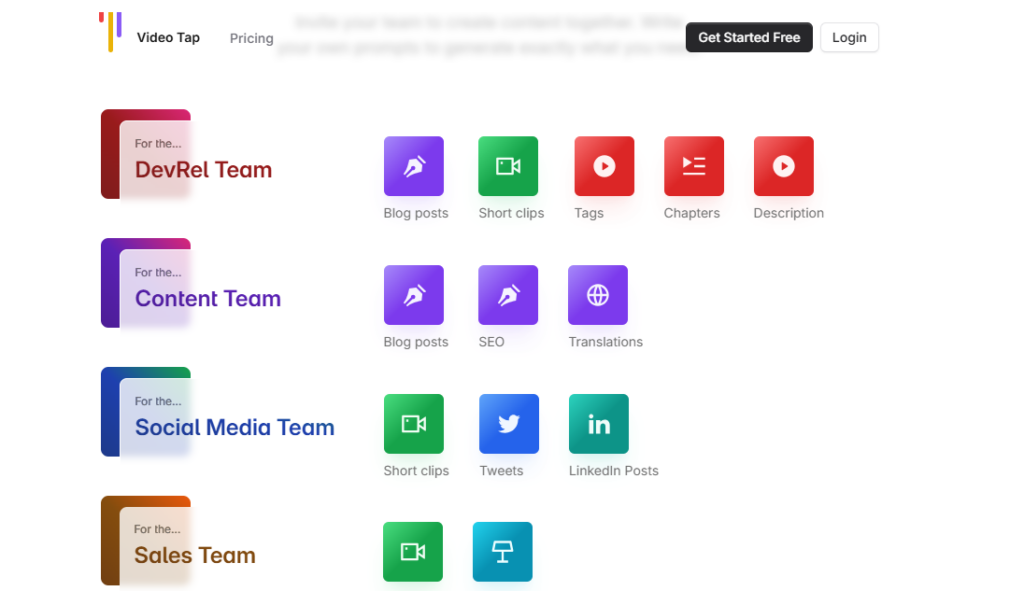
Video Tap also distinguishes its output by team function: clips and descriptions for the DevRel team, SEO blog posts and translations for the Content team, tweets and LinkedIn posts for Social, summaries and clips for Sales, and email blurbs for the Email team — all sourced from the same video upload.

Who Gets the Most Out of It

Solo creators who publish on YouTube and want consistent blog, social, and newsletter presence without hiring a team are the platform's clearest fit — one video upload simultaneously fills their editorial calendar across five channels.

Marketing teams at SaaS companies and developer-relations teams find the multi-output workflow eliminates the back-and-forth of routing video content to different department queues.

Podcasters get show notes, transcript, clips, and social posts from each episode without separate tools for each task.

Is It Worth It?

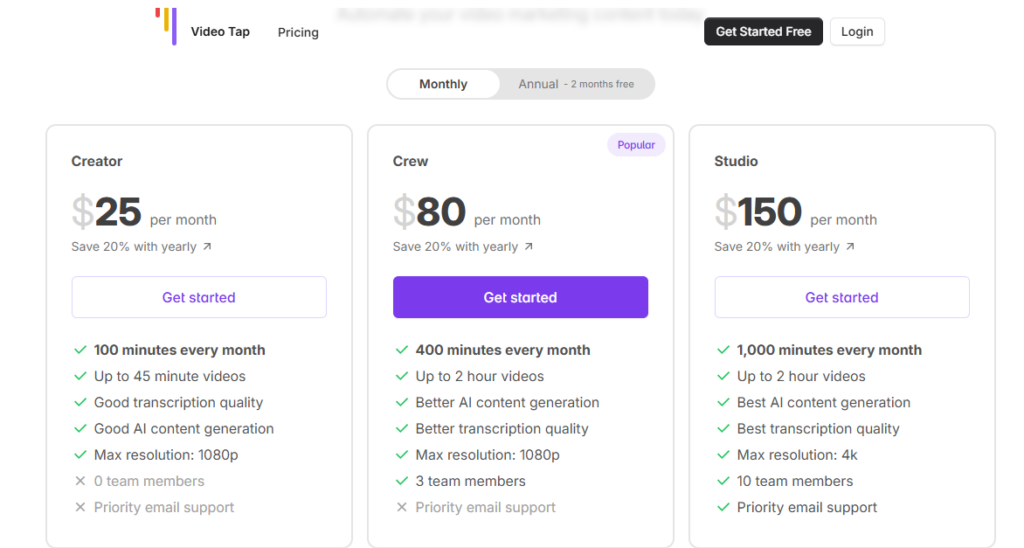
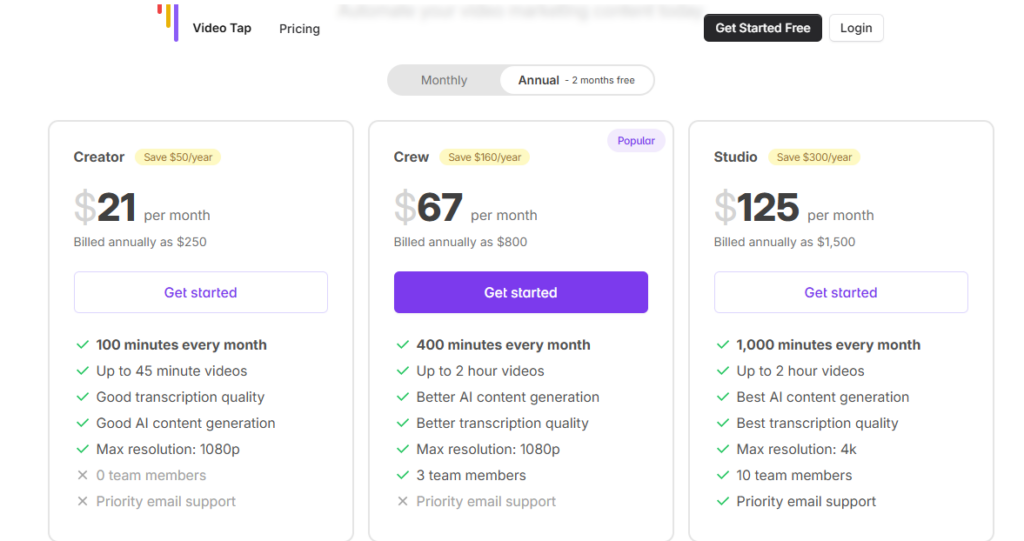
The Starter plan at $250/year ($20.83/month) covers 100 processing minutes per month — enough for approximately two to three long-form videos per week at 45 minutes max each.

All content outputs (clips, blogs, social posts, transcripts, chapters, translations, subtitles, show notes) are unlimited across every plan, which means the only constraint is total video upload time.

At $20.83/month for unlimited output generation from 100 minutes of video, the ROI against hiring even a part-time editor is immediate.

The Agency plan at $125/month unlocks 1,000 minutes, 4K export, and 10 team members — suitable for content teams and agencies managing multiple video clients under one account.

Video Tap">Video Tap is a web-based AI video repurposing platform that converts long-form video uploads into 10+ content formats automatically — including short clips for TikTok and Reels, SEO blog posts, podcast show notes, YouTube chapters, social media posts, email copy, transcripts, and multilingual subtitles.

The tool is designed for solo content creators, marketers, and teams who want to maximize the reach of every video without manual editing or writing. All content outputs are unlimited across every paid plan, with pricing structured around monthly video processing minutes.

• AI Short Clip Generation — Automatically identifies the strongest moments in long videos and creates vertical and horizontal short clips optimized for Instagram Reels, TikTok, YouTube Shorts, and X, with subtitle overlays and resizing included.

SEO Blog Post Creator — Converts video content into structured, SEO-optimized blog posts with a built-in editor for adding images, links, and final tweaks before publishing; the platform delivers a 90%+ publish-ready draft for most videos.

• Podcast Show Notes Generator — Produces formatted podcast episode show notes from video or audio uploads, covering key topics, timestamps, and summaries without manual note-taking.

• YouTube Chapters, Tags & Descriptions — Automatically generates timestamped chapters, keyword-optimized tags, and YouTube descriptions for any uploaded video, reducing the manual pre-publish metadata workflow to zero.

• Social Post Suite — Generates platform-specific posts for Twitter/X, LinkedIn, and other channels from the video transcript; each post is tailored to the tone and format conventions of the target platform.

• Multilingual Translation & Subtitles — Translates content outputs and subtitles into 10+ languages including Spanish, French, German, Italian, Portuguese, Dutch, Hindi, Japanese, Russian, Chinese, and Korean; exports in SRT and VTT formats.

• Full Transcript Generation — Produces a complete word-for-word transcript of any uploaded video or audio file; available for download and usable as a foundation for custom content creation.

• Custom Prompt Engine — Lets you write your own AI prompts to generate specialized outputs beyond the default templates, tailoring content generation to specific brand voice, audience, or format requirements.

Pros
  • All content outputs — clips, blogs, show notes, chapters, social posts, translations, subtitles, transcripts — are unlimited on every paid plan with no per-output fees
  • One upload generates 10+ distinct content formats simultaneously, replacing workflows that typically require three to five separate tools and team handoffs
  • Multilingual content generation in 10+ languages from a single upload enables global publishing without a separate localization workflow
  • Custom prompt engine lets you override default AI outputs and generate brand-specific content formats no other template covers
  • Free first video requires no credit card — you can evaluate real output quality on your actual content before entering payment details
  • Pricing is structured purely around processing minutes, not features — the cheapest plan gets the same unlimited output types as the most expensive
Cons
  • ×Starter plan's 45-minute maximum video length excludes long webinars, conference keynotes, and full interview episodes that commonly run 60–90 minutes
  • ×All plans are billed annually only — there is no monthly billing option, meaning you must commit to a full year upfront with no refund for unused time
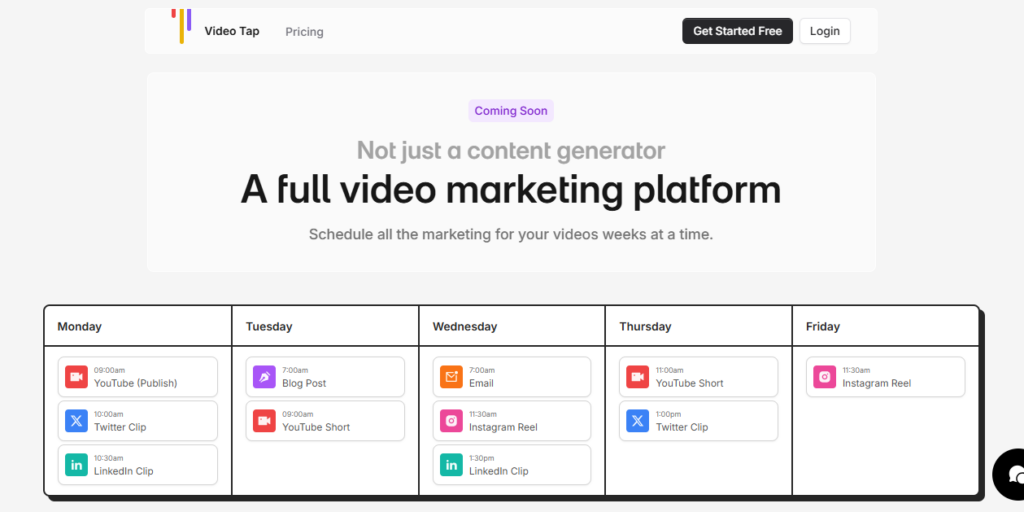
  • ×Content scheduling (publishing directly to social platforms on a scheduled cadence) is listed as "Coming Soon" — it is not yet a live feature despite being prominently shown on the homepage
  • ×Transcription quality is tiered by plan ("Good," "Better," "Best") — Starter plan users receive lower accuracy than Pro and Agency users on the same content
  • ×0 team member seats on the Starter plan makes it a solo-only tool at entry level — any collaboration requires upgrading to Pro at $800/year
  • ×No mobile app and no desktop app — the platform is browser-only with no offline or on-device processing capability

Video Tap">Video Tap is best suited for video-first creators, content marketers, and small teams who need to extract maximum written and short-form content value from every video they produce.

• Solo YouTubers and podcasters — They get blog posts, show notes, clips, social posts, and subtitles from every upload simultaneously, filling their entire editorial calendar without hiring additional support.

• SaaS marketing and DevRel teams — Teams that record product demos, webinars, and technical talks can use Video Tap to route each recording automatically into blog posts for SEO, clips for social, and email copy for nurture sequences.

• Content agencies managing multiple video clients — The Agency plan at $125/month provides 1,000 processing minutes, 4K export, and 10 team member seats — enough to manage several client video accounts under one dashboard.

• Multilingual content creators — Creators targeting international audiences can translate blog posts, social content, and subtitles into 10+ languages from a single upload without a separate localization tool.

Sales and marketing teams repurposing video testimonials and case studies — Short clips and written summaries generated from customer videos can be immediately deployed across email sequences, social campaigns, and sales decks.

Free Trial (No credit card required)1 free video processing credit to evaluate output quality; access to all content generation types on that single video.
Starter ($250/year — $20.83/mo equivalent)100 processing minutes per month, max video length 45 minutes, Good transcription quality, Good AI content generation, max 1080p export resolution, 0 team member seats, unlimited clips + blog posts + podcast show notes + chapters + social posts + translations + subtitles + transcripts, priority email support.
Pro ($800/year — $66.67/mo equivalent)400 processing minutes per month, max video length 2 hours, Better transcription quality, Better AI content generation, max 1080p export resolution, 3 team member seats, unlimited all content outputs, priority email support.
Agency ($1,500/year — $125/mo equivalent)1,000 processing minutes per month, max video length 2 hours, Best transcription quality, Best AI content generation, max 4K export resolution, 10 team member seats, unlimited all content outputs, priority email support.

Video Tap">Video Tap's defining advantage is unlimited content output generation across all plans — the only billing variable is total video processing minutes, not the number or type of outputs you generate.

• Unlimited outputs on every paid plan — Unlike competitors that charge per clip, per blog post, or per social post generated, Video Tap's pricing is purely minute-based; every content type is unlimited regardless of plan, which removes the hesitation of “spending” credits on each output.

• Team-function-specific content routing — The platform explicitly organizes outputs by team role (DevRel, Content, Social, Sales, Email) from a single video, making it a workflow coordination tool, not just a content generator — a positioning that most single-use repurposing tools don't address.

• Custom prompt engine for brand-specific outputs — Beyond fixed templates, users can write their own AI prompts to generate any custom content format — a feature uncommon at this price point that gives brand-conscious creators full control over voice and format.

• 10+ language translation built in natively — Full translation of blog posts, social content, and subtitle files into 10+ languages is included at no additional cost on all plans, covering a localization workflow that competitors charge separately for or omit entirely.

• Single URL import from YouTube and Vimeo — You can paste a YouTube or Vimeo URL directly without downloading and re-uploading the file, enabling instant repurposing of existing published video libraries without any file management overhead.

Video Tap">Video Tap is a fully browser-based web app that imports from major video platforms and exports content ready for publishing across multiple channels.

• YouTube — Import any YouTube video directly by URL; Video Tap fetches the video and processes it for transcription and content generation without requiring a file download or YouTube account connection.

• Vimeo — Supports direct Vimeo URL import for the same URL-based workflow available for YouTube, enabling repurposing of professionally hosted video libraries.

• Desktop File Upload — Accepts standard video file uploads from your local device for videos not hosted on YouTube or Vimeo, including MP4 and other common formats.

• Subtitle Export Formats (SRT / VTT) — Subtitle and transcript downloads are available in SRT and VTT formats, ensuring compatibility with YouTube Studio, Vimeo, and most other video hosting platforms for caption upload.

• Social Platforms (Content Export) — Generated clips, posts, and captions are formatted for export to Instagram Reels, TikTok, YouTube Shorts, Twitter/X, and LinkedIn; direct publish and scheduling integrations are listed as Coming Soon.

CategoryScoreWhy It Matters
Accuracy & Reliability3.8/5Transcription accuracy varies by plan tier — Starter users receive "Good" quality while Agency users receive "Best" — which means entry-level subscribers experience noticeably lower accuracy than higher-tier users on identical content. Blog post generation is reliable at the 90%+ publish-ready benchmark for clear, well-paced videos. Abstract or technical content with heavy jargon may require more manual editing before publishing.
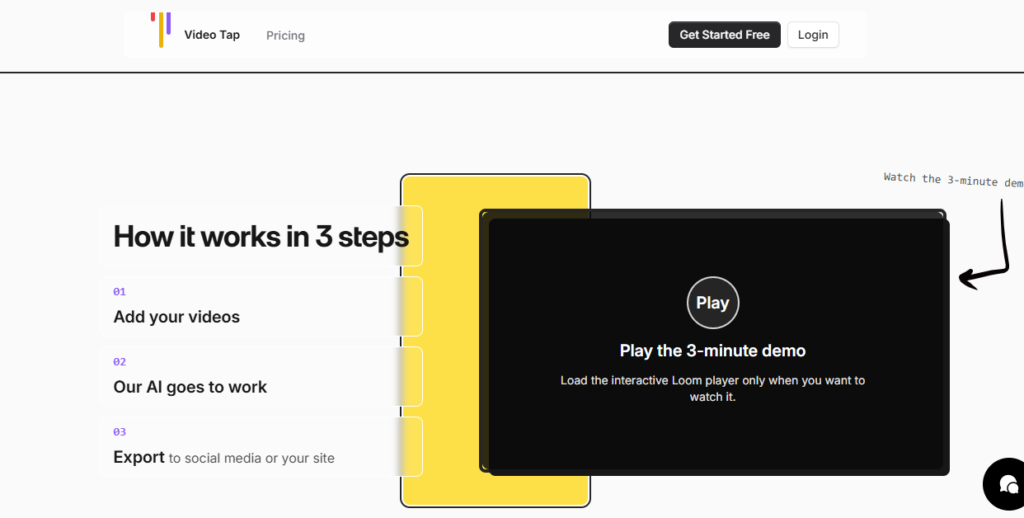
Ease of Use4.5/5The three-step workflow (add video → AI processes → export) requires no editing skills or technical knowledge. YouTube URL import eliminates file management entirely. Multiple reviewers on Product Hunt and AppSumo specifically praise the clean, intuitive dashboard. The only user friction reported is navigating between the different content output types within the dashboard for first-time users.
Functionality & Features4.1/5The breadth of output types is genuinely wide for the price: clips, blog posts, show notes, chapters, tags, descriptions, email copy, tweets, LinkedIn posts, summaries, timestamps, titles, transcripts, and multilingual subtitles all from one upload. The key functional gap is that content scheduling (direct-to-social publishing) is listed as Coming Soon but is not yet live, and the Starter plan's 45-minute video cap excludes many common long-form formats.
Performance & Speed4.1/5The official FAQ states that content generation typically completes within a few minutes of upload, with variance based on video length and complexity. User reviews confirm this for videos under 30 minutes, with processing for longer videos running 5–10 minutes. No significant generation failures or extended queue delays were flagged in available reviews.
Customization & Flexibility3.9/5The custom prompt engine is a meaningful differentiator — users can write their own prompts to generate any content format beyond the built-in templates, giving brand-specific outputs that no fixed template library can match. The built-in blog post editor supports image insertion, link addition, and copy rewrites. Caption and clip styling customization is more limited compared to dedicated clip editors like Submagic or CapCut.
Data Privacy & Security3.8/5The official FAQ explicitly states: "Your videos and generated content are securely stored and are never shared with third parties." A dedicated Privacy Policy is referenced. The platform processes videos server-side, which is standard for browser-based video tools. No SOC 2 or ISO 27001 certification is listed on the public site, and the tool's independent developer status means there is less institutional transparency than larger funded platforms.
Support & Resources3.6/5Priority email support is included on all paid plans, including Starter. An active third-party review and tutorial ecosystem from AppSumo-era coverage provides useful how-to content for new users. There is no live chat, no dedicated help center visible on the homepage, and no documented response SLA for email support. The independent developer context means support capacity may be limited compared to funded competitors.
Cost-Efficiency4.4/5At $250/year ($20.83/month), the Starter plan provides unlimited outputs across all 14+ content types from 100 processing minutes monthly — a cost that covers what would otherwise require separate transcription, clip editing, blog writing, and social media tools. The unlimited output model removes the per-generation cost anxiety common on credit-based platforms. The annual-only billing commitment is the main cost-efficiency caveat, as there is no monthly option for lower-volume users.
Overall Score4.0/5Video Tap delivers genuine, measurable value for video-first creators who need consistent multi-format content output without separate tools for each job — at $20.83/month with unlimited outputs, the ROI case is straightforward for anyone publishing two or more long-form videos per month. The Starter plan's 45-minute video cap, annual-only billing, and the absence of live scheduling features prevent a higher score, but the core repurposing workflow is reliable and fast.

Video Tap">Video Tap delivers on its core promise — one video upload genuinely produces a full set of marketing content including clips, SEO blog posts, social posts, show notes, transcripts, and multilingual subtitles, all with unlimited output generation on every plan.

The annual-only billing commitment, the Starter plan's 45-minute video cap, and the still-absent scheduling feature are real friction points to evaluate before purchasing.

At $20.83/month equivalent for unlimited content outputs from 100 minutes of video, it offers strong ROI for solo creators and small content teams who publish consistently.

Q1.Is Video Tap free to use?
Ans:-Video Tap does not offer a permanent free plan, but you get one free video processed when you sign up — no credit card required. This lets you evaluate the actual output quality on your own content before committing. Paid plans start at $250/year ($20.83/month equivalent) and are billed annually only.
Q2.What content does Video Tap generate from a single video upload?
Ans:-From a single video, Video Tap generates short clips for Reels, TikTok, and YouTube Shorts, an SEO blog post, podcast show notes, YouTube chapters, timestamps, tags, a description, email copy, tweets, LinkedIn posts, multilingual subtitles, and a full transcript. All of these output types are unlimited on every paid plan — the only limit per plan is total video processing minutes per month.
Q3.What languages does Video Tap support?
Ans:-Video Tap supports content generation and translation in 10+ languages including English, Spanish, French, German, Italian, Portuguese, Dutch, Hindi, Japanese, Russian, Chinese, and Korean. Subtitle files are exportable in SRT and VTT formats for direct upload to YouTube Studio, Vimeo, or other captioning platforms.
Q4.How does Video Tap pricing work?
Ans:-Video Tap pricing is based entirely on monthly video processing minutes — the Starter plan ($250/year) gives you 100 minutes per month, Pro ($800/year) gives 400 minutes, and Agency ($1,500/year) gives 1,000 minutes. All content outputs (clips, blog posts, social posts, transcripts, translations, subtitles, show notes) are unlimited on every plan regardless of tier. All plans are billed annually with no monthly billing option available.
Q5.What is the maximum video length Video Tap can process?
Ans:-The Starter plan supports videos up to 45 minutes long. The Pro and Agency plans both support videos up to 2 hours in length, making them suitable for full webinars, long interviews, and conference recordings. If your video exceeds 45 minutes and you're on the Starter plan, you'll need to upgrade to Pro or above.
Q6.Can I use Video Tap to repurpose existing YouTube videos?
Ans:-Yes — Video Tap lets you paste a YouTube URL directly to import and process any publicly available YouTube video. You can also import from Vimeo by URL or upload video files directly from your desktop. The YouTube import workflow means you can repurpose your entire existing video library without downloading and re-uploading individual files.
Q7.Does Video Tap support team collaboration?
Ans:-The Starter plan has zero team member seats — it is a solo-use plan only. The Pro plan ($800/year) supports 3 team members and the Agency plan ($1,500/year) supports 10 team members. Team workspaces allow multiple users to upload videos, generate content, and manage outputs under a shared account. A custom prompt feature also lets teams standardize brand voice across all generated content.
Q8.How accurate is the AI-generated blog content from Video Tap?
Ans:-Video Tap states that its AI gets you 90% of the way to a publishable blog post for most videos. The built-in editor lets you add images, links, and custom revisions before publishing. Transcription quality varies by plan — Starter users receive "Good" quality, Pro users receive "Better," and Agency users receive "Best" — which directly affects the accuracy of all generated content.
Q9.Can Video Tap schedule and publish content automatically?
Ans:-Not yet — content scheduling (publishing clips and posts directly to social platforms on a scheduled calendar) is listed as a Coming Soon feature on the Video Tap homepage. Currently, all generated content is exported from the dashboard for manual publishing. The scheduling interface is shown on the homepage as a visual preview of the planned functionality.
Q10.How does Video Tap compare to Opus Clip and Castmagic?
Ans:-Video Tap differentiates itself through unlimited content outputs across all plans and a broader written content suite — including SEO blog posts, email copy, podcast show notes, and LinkedIn posts — that Opus Clip does not generate. Opus Clip specializes more deeply in viral clip scoring and clip quality than Video Tap. Castmagic is the closer competitor on written content depth (show notes, Q&A, summaries), but Video Tap's minute-based unlimited output model is more cost-efficient for teams needing both clips and written content from the same videos.

Promote This Tool

Help others discover this tool by sharing this page.

✓ Link copied to clipboard!

Video Tap Reviews

0.0
Based on 0 reviews
5 star
0%
4 star
0%
3 star
0%
2 star
0%
1 star
0%

Write a Review

Your Rating:

No reviews yet. Be the first to share your thoughts!

40 Similar Video Tap Tools