Home Categories Deals Sign Up
Updated: April 22, 2026

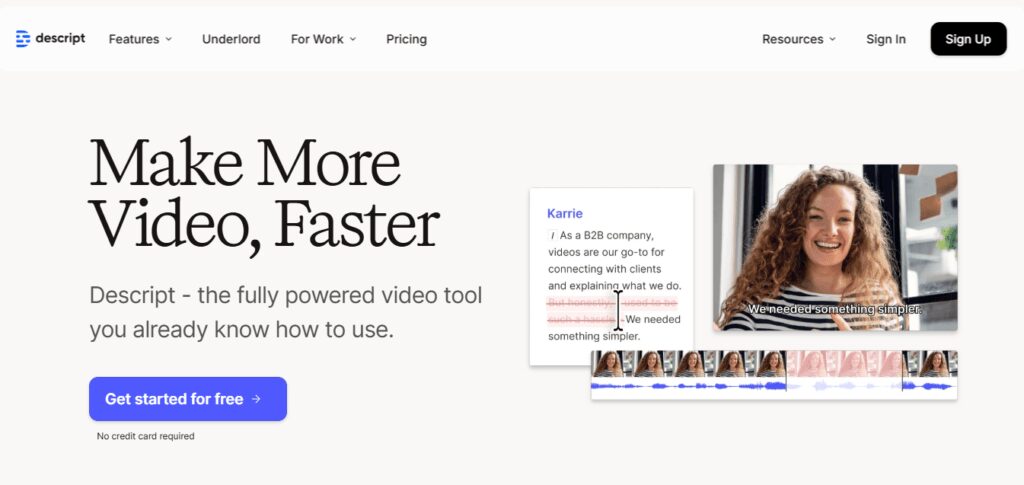
Descript in Action: Editing Video Like a Google Doc

Descript turns your video and audio files into editable transcripts — delete a sentence from the text, and the corresponding footage disappears instantly. That single workflow shift saves podcasters, YouTubers, and marketing teams hours of manual timeline scrubbing every week. Over 7 million creators and businesses now use the platform, from solo content creators to enterprise marketing teams.

Key Capabilities

The AI co-editor, Underlord, handles the heavy lifting: it removes filler words like “um” and “ah” in one click, auto-generates dynamic captions, creates viral-ready short clips from long content, and can even correct your eye contact so you look directly into the camera — even if you were reading a script.

Studio Sound cleans up background noise and enhances speech quality in seconds, turning a budget home-office recording into broadcast-quality audio.

On Business and Enterprise plans, you also get AI video dubbing in 30+ languages, custom avatar generation, and Brand Studio for team-wide visual consistency.

The platform supports multi-language transcription across 25 languages with approximately 95% accuracy and automatic multi-speaker detection.

Who Gets the Most Out of It

Podcasters who publish multiple episodes per week benefit most — editing by transcript cuts production time dramatically compared to traditional DAWs.

YouTubers and course creators use it to repurpose long videos into short social clips in minutes using the Create Clips feature.

Marketing teams rely on the Business plan's brand controls, translation dubbing, and collaborative editing to localize content for global audiences without a separate agency.

Remote teams also use Descript Rooms for high-fidelity recorded interviews, which auto-import into projects with separate speaker tracks ready for editing.

Is It Worth It?

If your workflow revolves around talking-head videos, podcasts, interviews, or course content, Descript's Freemium plan gives you a solid taste, and the $16/mo Hobbyist plan delivers a meaningful AI toolkit watermark-free.

The Creator plan at $24/mo adds 4K export, 30 media hours, and full Underlord access — strong ROI for anyone publishing regularly. Heavy motion graphics designers or cinematic colorists will hit Descript's ceiling fast, but for dialogue-heavy content, it's one of the most time-efficient tools available in 2026.

Descript is an AI-powered video and audio editing platform founded in 2017 by Andrew Mason that lets you edit media by editing its auto-generated transcript. Built for podcasters, YouTubers, and marketing teams, it combines text-based editing, AI voice cloning, transcription, screen recording, and team collaboration in one desktop and web application.

• Text-Based Editing — Edit video and audio by deleting or rearranging words in the auto-generated transcript; cuts apply to the media file instantly.

• Underlord AI Co-Editor — Descript's built-in AI agent removes filler words, auto-generates chapters, creates short clips, writes show notes, and can produce a full video from a text prompt.

• Studio Sound — One-click audio enhancement that removes background noise, boosts speech clarity, and delivers broadcast-quality audio from any recording setup.

• Eye Contact Correction — AI subtly adjusts your gaze in post so you appear to look directly into the camera, even if you were reading off a script or teleprompter during recording.

• AI Voice Cloning & Regenerate — Clone your own voice to fix mispronounced words or fill gaps in narration without re-recording a single line.

AI Dubbing in 30+ Languages — Translate and dub your video with native-sounding AI speakers in 30 languages, with a built-in proofread editor to verify accuracy before export.

• Remote Recording (Descript Rooms) — Record high-fidelity separate audio and video tracks from up to 10 participants, with automatic transcription and project setup on completion.

• Dynamic Captions & Stock Library — Auto-generate animated, fully customizable captions and access a royalty-free library of videos, images, GIFs, music, and sound effects.

Pros
  • Text-based editing cuts dialogue-heavy video production time by up to 70% compared to timeline-only editors
  • Studio Sound reliably salvages noisy home-office recordings in one click, no audio engineering knowledge required
  • Underlord handles filler word removal, clip creation, chapter generation, and script writing in a single AI sidebar
  • AI dubbing in 30+ languages with proofread editor makes global localization accessible without third-party agencies
  • Free plan is genuinely usable — 1 hour of transcription and 1 watermark-free export per month, no credit card required
  • SOC 2 Type II compliance gives teams confidence when uploading sensitive corporate recordings
Cons
  • ×AI credit system limits batch processing of filler words and AI tools on lower-tier plans — heavy users burn through credits quickly
  • ×Not suited for cinematic editing: no advanced color grading, complex motion graphics, or multi-layer compositing
  • ×Desktop app can be slow on older machines when processing large 4K files, with occasional stability issues reported by users
  • ×Transcription accuracy drops noticeably with heavy accents, technical jargon, or low-quality source audio despite the 95% average
  • ×Business plan jumps to $50/mo per person — team costs scale fast for organizations with 5+ editors

Descript is built for creators and teams who produce dialogue-driven content and need to move fast without a steep editing learning curve.

• Podcasters — Edit hour-long interviews in minutes by cutting transcript text instead of hunting through waveforms in a DAW.

• YouTubers and course creators — Use Underlord to auto-generate clips, chapters, and descriptions, then publish directly to YouTube without switching apps.

Marketing and content teams — The Business plan's Brand Studio, team collaboration, and AI dubbing make it ideal for companies producing video at scale across multiple languages.

• Journalists and researchers — Multi-language transcription in 25 languages with speaker detection makes it a fast, accurate tool for interview documentation and media production.

• Remote-first teams — Descript Rooms records every participant on a separate track with automatic project setup, removing hours of manual syncing work after each call.

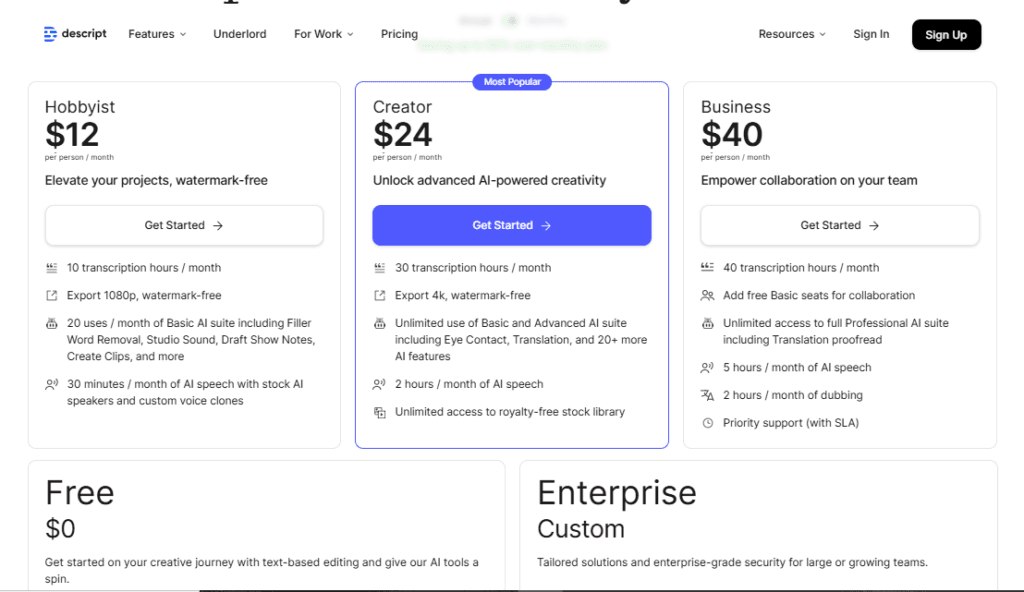
Free ($0/mo)60 minutes of media per month, 100 AI credits (one-time), 720p watermark-free export (1 export), 5GB cloud storage, basic AI tools (limited usage), up to 2-hour recording sessions, 10 room participants.
Hobbyist ($16/mo billed annually, $24/mo monthly)10 media hours per month, 400 AI credits per month, 1080p watermark-free export, access to Underlord AI co-editor, Studio Sound, Remove Filler Words, Create Clips, AI Speech with custom voice clones and video regenerate, 100GB cloud storage.
Creator ($24/mo billed annually, $35/mo monthly)30 media hours per month (+5 bonus hours), 800 AI credits per month (+500 bonus credits), 4K watermark-free export, full Underlord access with 20+ AI tools, AI video generation with latest models, unlimited royalty-free stock media library, top-ups available, up to 3 seats, 1TB cloud storage.
Business ($50/mo per person billed annually, $65/mo monthly)40 media hours per month (+10 bonus hours), 1,500 AI credits per month (+1,000 bonus credits), 4K export, team-wide Brand Studio access, AI video dubbing in 30+ languages with proofread, custom avatar generation via photo upload or text prompt, priority support with SLA, up to 5 seats, 2TB cloud storage.
Enterprise (Custom pricing)Advanced security with SSO/SCIM, granular brand controls, custom AI credits and media minutes, custom legal terms, custom AI controls, flexible licensing and billing model.

Descript stands apart from traditional video editors by treating the transcript as the primary editing surface — a workflow no other mainstream editor replicates at this level.

• Underlord Agentic Editing — Descript's Agent Underlord (released 2025) can read your script, analyze visuals, and make autonomous edits from a chat prompt — functioning more like an AI editor than a simple assistant.

• Regenerate (AI Voice Repair) — Rather than re-recording, you type the corrected words and Descript's AI regenerates your voice in context, matching the surrounding tone and pacing seamlessly.

• Overdub / Custom Voice Clones — Clone your voice once and generate any spoken narration from text in the future — a capability most standalone TTS tools charge separately for.

• Integrated Record-Edit-Publish Workflow — From remote recording in Descript Rooms to transcript editing to publishing directly to YouTube or exporting to Premiere Pro/Final Cut Pro, the entire production chain lives in one app with no format juggling.

Descript works as both a web app and desktop app (Mac and Windows) and integrates with key tools across the content production stack.

• Adobe Premiere Pro & Audition — Export your Descript timeline directly into Premiere Pro or Audition via XML/AAF, keeping separate tracks and cut points intact for advanced post-production.

• Final Cut Pro & Logic Pro — Timeline export to Final Cut Pro and Logic Pro lets Apple ecosystem editors move seamlessly between Descript's text-based cuts and their preferred NLE or DAW.

• Pro Tools & Samplitude/Reaper — Audio professionals can export multitrack sessions to Pro Tools, Samplitude, and Reaper for mixing and mastering workflows beyond Descript's native audio tools.

• YouTube Direct Publish — Publish finished videos straight to YouTube from inside Descript, with AI-generated titles, descriptions, chapters, and tags auto-populated before upload.

• Zapier & API Access — Descript supports workflow automation via Zapier and offers API access for teams building custom integrations into their content or transcription pipelines.

CategoryScoreWhy It Matters
Accuracy & Reliability4.2/5Descript's transcription delivers roughly 95% accuracy in good recording conditions across 25 languages, which is competitive with dedicated tools like Otter.ai. However, accuracy drops with accents, jargon, or noisy audio, and the AI voice regeneration occasionally produces audible artifacts on complex sentences. SOC 2 Type II compliance signals solid infrastructure reliability.
Ease of Use4.5/5The transcript-based editing workflow has almost no learning curve for anyone who can use a word processor. Descript's interface consolidates recording, editing, captioning, and publishing into one app, eliminating the tool-switching that frustrates most creators. New users can produce a polished, exported video within their first session.
Functionality & Features4.6/5Descript packs an exceptional feature set for its price point: AI filler word removal, Studio Sound, Eye Contact correction, voice cloning, AI dubbing in 30 languages, short clip generation, avatar creation, remote recording, and direct YouTube publishing. The Underlord agent (2025) further extends capability into autonomous agentic editing. The main gap is advanced color grading and motion graphics, which professional video editors will miss.
Performance & Speed3.9/5Transcription typically completes within 1–2 minutes for a standard 30-minute file. However, multiple users report the desktop app slowing down or occasionally crashing when processing large 4K files on mid-range hardware. Cloud rendering for AI features adds latency during peak usage periods, which can interrupt fast-paced editing workflows.
Customization & Flexibility4.1/5Descript offers custom layout packs, Brand Studio on Business plans, custom voice clones, a transcription glossary for domain-specific terms, and timeline export to Premiere Pro, Final Cut Pro, Pro Tools, and Logic. The AI credit system, however, caps how far you can push AI customization on lower tiers without buying top-ups.
Data Privacy & Security4.3/5Descript is SOC 2 Type II certified, which means independent auditors have verified their security controls around data access, availability, and confidentiality. The platform states that project content is confidential even from Descript employees. Enterprise plans add SSO/SCIM and custom legal terms for stricter data governance requirements.
Support & Resources4.0/5Descript provides a comprehensive self-serve knowledge base, an active Discord community, and in-app live chat for paid users (Monday–Friday, 5am–5pm PT). The Business plan includes priority support with a guaranteed SLA response time. Free and Hobbyist users rely on the knowledge base and community, which is well-maintained but not always fast enough for production deadlines.
Cost-Efficiency4.4/5At $16/mo for the Hobbyist plan and $24/mo for Creator (billed annually), Descript bundles transcription, AI editing, voice cloning, and publishing tools that would otherwise cost $50–$100+/mo across separate platforms. The Free plan is genuinely usable for low-volume creators. The main cost concern is the Business plan scaling to $50/mo per person — a team of five spends $250/mo before credits top-ups.
Overall Score4.3/5Descript is the most practical AI video editor available in 2026 for creators who work primarily with spoken-word content. Its text-based editing workflow, Underlord AI tools, and integrated record-to-publish pipeline deliver genuine time savings that justify the subscription cost. The primary limitations — AI credit caps, occasional performance issues, and lack of advanced color tools — prevent a perfect score but don't undermine the tool's core value for its target audience.

Descript is the strongest text-based video editor available in 2026, purpose-built for podcasters, YouTubers, and marketing teams who produce dialogue-heavy content at volume.

The Hobbyist plan at $16/mo delivers a capable AI toolkit, while the Creator and Business tiers scale well for teams needing dubbing, brand controls, and higher output.

If you need advanced color grading or heavy motion graphics, look elsewhere — but for everyone else, Descript dramatically cuts editing time and lowers the skill floor for professional-looking video.

Q1.Is Descript free to use?
Ans:-Yes, Descript has a permanent Free plan that includes 60 minutes of media per month, 100 AI credits (one-time), and one watermark-free 720p export. No credit card is required to sign up. It's a real working plan, not just a trial — though serious creators will quickly need the Hobbyist tier at $16/mo for higher limits.
Q2.What is Underlord in Descript?
Ans:-Underlord is Descript's built-in AI co-editor. It automates tasks like removing filler words, generating short clips from long videos, writing show notes, adding chapters, and producing video from a text prompt. The latest version, Agent Underlord (released 2025), can make autonomous edits by analyzing your script, audio, and visuals from a simple chat instruction.
Q3.How accurate is Descript's transcription?
Ans:-Descript transcribes audio and video in 25 languages with approximately 95% accuracy under good recording conditions. Accuracy drops with heavy accents, strong background noise, or fast overlapping speech. The platform also includes a transcription glossary feature to improve recognition of brand names, jargon, and custom terms.
Q4.Can Descript translate and dub videos into other languages?
Ans:-Yes — on the Business plan and above, Descript can dub your video in 30 languages using native-sounding AI voices. A proofread editor lets you compare the translated script to the original before export. Caption translation is available in 61 languages across all paid plans.
Q5.Does Descript work on Mac and Windows?
Ans:-Yes, Descript is available as a desktop app for both macOS and Windows, and also as a web app accessible from any modern browser. The desktop app handles large 4K file processing more smoothly, though some users report occasional slowdowns on older hardware.
Q6.What are AI credits in Descript and how fast do they run out?
Ans:-AI credits track your usage of AI features like Underlord, Studio Sound, Green Screen, Eye Contact, and AI-generated media. The Free plan gives 100 credits one-time; Hobbyist gets 400/month; Creator gets 800/month; Business gets 1,500/month. Heavy batch users — especially those removing filler words across dozens of long videos — tend to exhaust credits before the month ends on lower plans.
Q7.Can I clone my own voice in Descript?
Ans:-Yes. Descript's AI Speech feature lets you create a custom voice clone of yourself. Once cloned, you can type any text and generate narration that sounds like you — useful for fixing mispronounced words, filling gaps, or adding new content without re-recording. This feature is available on the Hobbyist plan and above.
Q8.How does Descript compare to traditional video editors like Premiere Pro?
Ans:-Descript's text-based editing workflow is significantly faster for dialogue-heavy content — interviews, podcasts, and talking-head videos — but it lacks the advanced color grading, motion graphics, and multi-layer compositing of Premiere Pro. Many professional editors use both: Descript for rough cuts and AI cleanup, then export the timeline to Premiere or Final Cut Pro for final polish.
Q9.Is Descript suitable for teams and businesses?
Ans:-Yes. The Business plan ($50/mo per person) includes team collaboration, Brand Studio for company-wide design consistency, priority support with an SLA, AI dubbing in 30+ languages, and custom avatar generation. Enterprise plans add SSO/SCIM, custom legal terms, and flexible billing for larger organizations.
Q10.Does Descript have a mobile app?
Ans:-Descript does not currently offer a dedicated mobile app. It runs as a web app and desktop app on Mac and Windows. Mobile users can access basic review and comment features via the browser, but full editing requires a desktop or laptop device.

Promote This Tool

Help others discover this tool by sharing this page.

✓ Link copied to clipboard!

Descript Reviews

0.0
Based on 0 reviews
5 star
0%
4 star
0%
3 star
0%
2 star
0%
1 star
0%

Write a Review

Your Rating:

No reviews yet. Be the first to share your thoughts!

48 Similar Descript Tools