Home Categories Deals Sign Up
Updated: April 26, 2026

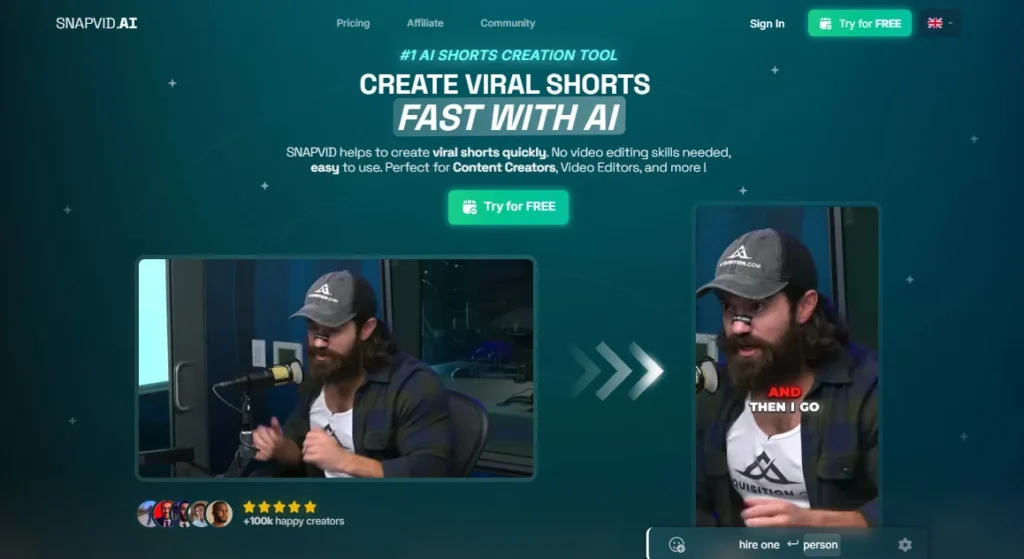
Snapvid AI in Action

Snapvid AI AI tool – Snapvid AI is a viral short-form video creation platform trusted by 100,000+ creators who collectively save an average of $450/month in video editing costs by replacing manual short-form production with a fully automated AI pipeline.

The platform is purpose-built around one creator problem: you have hours of valuable long-form footage — podcasts, vlogs, webinars, YouTube videos — and it takes hours more to manually clip, clean, caption, and publish the best moments as TikToks, Reels, and Shorts.

Snapvid solves this with four core AI automation tools working together: AI Auto Cut, AI Auto Cleanup, AI Auto B-Roll, and one-click multi-platform publishing — all inside the SNAPVID Pro Editor.

Key Capabilities

AI Auto Cut (Long to Shorts) is the platform's centerpiece — upload a 2-hour recording and the AI identifies the most engaging segments, extracts them as publication-ready short clips (approximately 30 seconds each), and formats them for 9:16, 1:1, and 16:9 aspect ratios simultaneously.

AI Auto Cleanup removes silences, background noise, bad takes, and awkward pauses automatically, delivering polished audio without manual scrubbing.

AI Auto B-Roll generation intelligently sources and inserts contextually relevant supplementary footage from an unlimited stock video library at exactly the right moments, eliminating manual B-roll research and placement entirely.

Smart Subtitles generate animated, customizable captions with animated moving emojis that are proven to increase watch time on TikTok and Instagram Reels.

One-Click Post and Cross-Platform Export then push finished videos directly to Instagram, TikTok, and YouTube Shorts without leaving the dashboard — and Custom API Integrations allow teams to connect Snapvid into their existing production pipelines programmatically.

The Pro Editor adds Smart Zoom, Smart Music (Music Finder), HD YouTube Import, Multi-Export, and project sharing with up to 4 collaborators for team-based content workflows.

Who Gets the Most Out of It

Podcasters and long-form YouTubers extract the most immediate ROI — one of Snapvid's featured testimonials documents a creator who was spending $450/month on a freelance video editor for shorts alone, replacing that entire cost with one Snapvid subscription in under a week.

Content creators handling their own editing are saving what they describe as ‘hours and hours every single day' according to the platform's own testimonial section.

Agencies and social media managers on the Pro plan use the 4-collaborator workspace, custom API integrations, and multi-export features to run client short-form pipelines at scale without a per-video editing overhead.

Is It Worth It?

The 7-day free trial on the Pro plan lets you test the complete AI automation pipeline — including AI Auto Cut, AI Auto Cleanup, and One-Click Post — with your own content before committing to billing.

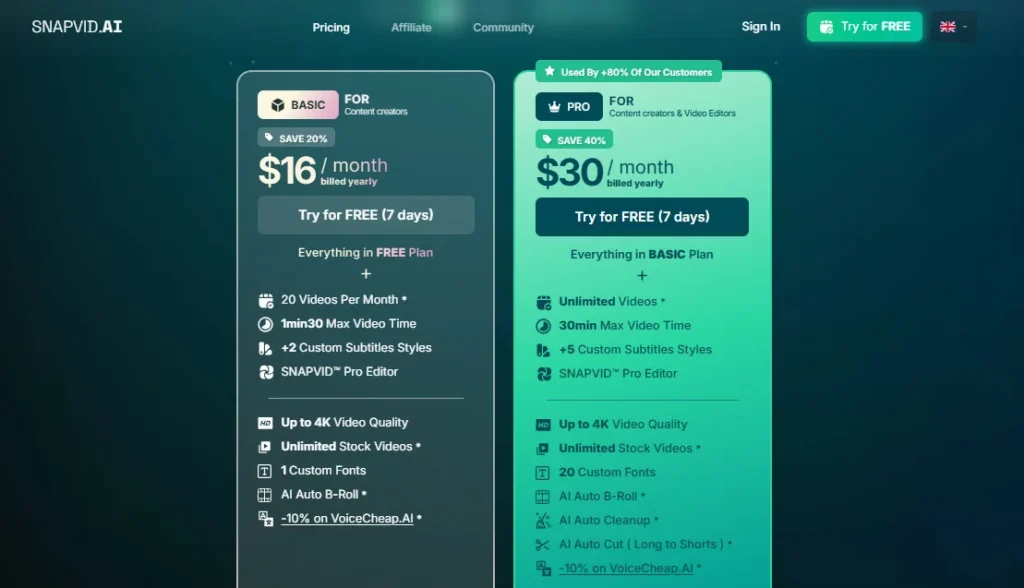
At $30/month billed annually (Pro), unlimited video production with 30-minute max video time, 20 custom fonts, Smart Zoom, Smart Music, HD YouTube Import, Custom API Integrations, and Live 24/7 Support replace what would otherwise cost hundreds of dollars monthly in editors, stock footage subscriptions, and scheduling tools.

The honest trade-off: the Basic plan's 1min30 max video time is a significant creative constraint for most podcast or vlog repurposing use cases, meaning nearly all practical users will find the Pro plan the functional entry point.

Snapvid AI is an AI-powered short-form video creation and editing platform that automatically cuts long recordings into viral clips, removes silences and bad takes, inserts AI-generated B-roll, adds animated smart captions and emojis, and publishes directly to TikTok, Instagram, and YouTube Shorts — trusted by 100,000+ creators who save an average of $450/month in editing costs.

Accessible via browser at snapvid.ai with a 7-day free Pro trial, paid plans start at $16/month (Basic, billed annually) or $30/month (Pro, billed annually at the confirmed annual rate).

• AI Auto Cut (Long to Shorts) — Automatically analyzes hours of long-form footage (podcasts, webinars, vlogs, YouTube recordings) and identifies, extracts, and formats the most engaging segments as viral-ready short clips in the correct aspect ratio for each platform — the most time-intensive step in short-form repurposing, fully automated.

• AI Auto Cleanup — Removes silences, background noise, bad takes, filler pauses, and audio imperfections automatically from raw recordings, delivering a polished professional audio track without manual scrubbing or external audio editing software.

• AI Auto B-Roll Generation — Intelligently identifies moments in the transcript or script where B-roll footage would increase visual engagement, then automatically sources and inserts contextually relevant clips from an unlimited stock video library — eliminating manual B-roll research, licensing, and placement entirely.

• Smart Subtitles with Animated Moving Emojis — Auto-generates frame-accurate animated captions in 100+ languages with 7 custom subtitle style options (Pro), customizable fonts (up to 20 on Pro), and animated contextual emoji overlays that are synchronized to high-engagement moments to maximize watch time retention.

• Smart Zoom and Smart Music (Music Finder) — Smart Zoom auto-applies dynamic zoom effects to keep faces or subjects centered and visually engaging throughout the clip; Smart Music (Music Finder) identifies and applies the optimal background music track from a curated library that matches the emotional tone and pacing of each specific clip.

• One-Click Post and Cross-Platform Export — Publish finished videos directly to Instagram Reels, TikTok, and YouTube Shorts from the SNAPVID dashboard in one click; Multi-Export produces platform-optimized versions for all targets simultaneously, and Custom API Integrations enable programmatic publishing into existing content production pipelines.

• HD YouTube Import — Import existing YouTube videos in HD quality directly into the SNAPVID editor for repurposing — no separate downloading, format conversion, or quality loss between import and export.

• SNAPVID Pro Editor with Team Collaboration — Full project editing environment with invite-up-to-4 collaborators, Share Projects (Preview) for client review, Multi-Export, up to 4K video quality output, unlimited stock video access, and up to 5GB file upload support — all inside the browser without downloading software.

Pros
  • Trusted by 100,000+ creators with documented $450/month savings per user versus hiring freelance video editors — the ROI case for replacing manual short-form production is validated by the platform's own testimonial evidence
  • Pro plan at $30/mo billed annually delivers unlimited videos, 30-minute max video time, AI Auto Cut, AI Auto Cleanup, Smart Zoom, Smart Music, HD YouTube Import, Multi-Export, Custom API Integrations, and Live 24/7 Support — a complete short-form automation stack at a competitive annual price
  • 7-day free trial on the Pro plan lets you test the full AI automation pipeline including AI Auto Cut and One-Click Post with your own content before any billing commitment
  • Custom API Integrations on the Pro plan allow agencies and teams to embed Snapvid's output pipeline into existing CMS platforms, scheduling systems, or client delivery workflows without manual export steps
  • Supports 100+ languages for subtitle generation — making multilingual short-form content production accessible without separate translation or localization tools
  • Up to 4K video quality output on both Basic and Pro plans — no resolution downgrade between import and export regardless of plan tier
Cons
  • ×Basic plan's 1min30 max video time is a severe constraint for nearly every practical podcast, vlog, or webinar repurposing use case — virtually all real-world use cases require the Pro plan's 30-minute limit, making the Basic plan a limited-use entry tier rather than a functional standalone option
  • ×Official pricing page requires JavaScript to display actual prices — rendered as $0 during research, creating a confusing experience for first-time visitors evaluating the platform before trying to sign up
  • ×No AI script generation, voiceover creation, or AI avatar features — Snapvid is a video editing and repurposing tool, not a video generation platform; creators needing to produce original videos from text ideas require a separate creation tool
  • ×Collaborator access is capped at 4 team invitations on the Pro plan — agencies managing larger editing teams or multiple client accounts cannot add more collaborators without contacting Snapvid for custom arrangements
  • ×Founder and company background information is not prominently published on the official website — limiting the transparency context that enterprise procurement teams and agencies typically evaluate before adopting a production tool

Snapvid AI is built for content creators, podcasters, coaches, and social media teams who produce long-form recordings and need an automated pipeline that converts them into daily short-form content without spending hours editing.

• Podcasters and audio creators — uploading weekly episode recordings and having AI Auto Cut identify and extract the 10–20 strongest short clips, complete with cleanup, B-roll, captions, and emojis, ready for Instagram Reels, TikTok, and YouTube Shorts without touching a single timeline.

• Long-form YouTubers and video bloggers — repurposing existing YouTube videos directly via HD YouTube Import into a full batch of optimized vertical shorts in minutes, turning one upload session into a week of daily short-form posts across three platforms.

• Solo content creators replacing freelance editors — paying $30/month annually to produce unlimited short-form content with professional AI automation, directly replacing the $150–$500/month cost of hiring an editor specifically for shorts.

• Social media managers and small agencies — using the 4-collaborator workspace, Custom API Integrations, and One-Click Post to run client short-form channels from one dashboard, producing and scheduling daily content across all platforms without a per-video editing overhead.

• Coaches, course creators, and educators — extracting the most impactful moments from long webinar recordings, coaching calls, or tutorial videos as polished short clips to drive audience growth and funnel traffic to their primary content or products.

Basic Plan (~$16/mo billed annually)20 videos per month, 1min30 max video time, 1GB max video size, +2 custom subtitle styles, SNAPVID Pro Editor, up to 4K video quality, unlimited stock videos, 1 custom font, AI Auto B-Roll, -10% on VoiceCheap.AI partner discount. Note: 1min30 max video time is a critical limitation for podcast and long-form repurposing use cases.
Pro Plan ($49/mo monthly — or $30/mo billed annually with 7-day free trial included)Unlimited videos, 30min max video time, 5GB max video size, +5 custom subtitle styles, SNAPVID Pro Editor, up to 4K video quality, unlimited stock videos, 20 custom fonts, invite up to 4 collaborators, animated moving emojis, share projects (preview), HD YouTube import, multi-export, one-click post, cross-platform export, custom API integrations, AI Auto B-Roll, AI Auto Cleanup, AI Auto Cut (Long to Shorts), Smart Zoom, Smart Music (Music Finder), -10% on VoiceCheap.AI, Live Support 24h/7d.

Snapvid AI stands apart from general AI video editors through its tight focus on the short-form repurposing workflow, its four-layer automated pipeline approach, and its Custom API Integration capability at the Pro plan entry point.

• Four-Layer AI Automation Pipeline — AI Auto Cut, AI Auto Cleanup, AI Auto B-Roll, and Smart Subtitles with Animated Emojis all activate simultaneously on upload, meaning every output is cut, cleaned, visually enriched, and captioned in a single automated step rather than requiring four separate manual editing passes — a workflow compression that no single-feature competitor replicates at Snapvid's price point.

• Custom API Integrations on Pro Plan — Unlike most AI video editors that treat API access as an enterprise-only feature, Snapvid includes Custom API Integrations on the Pro plan ($30/mo annually), enabling agencies, developers, and teams to programmatically connect Snapvid's output to CMS platforms, scheduling tools, or client delivery systems without enterprise contracts or custom pricing conversations.

• Smart Music (Music Finder) with Emotional Context Matching — Rather than providing a library for manual selection, Smart Music analyses the emotional tone, pacing, and energy of each specific clip and automatically selects the background music that fits that specific moment — a per-clip music intelligence that general video editors applying a single background track across all exports do not offer.

• HD YouTube Import as a First-Class Workflow — The ability to paste a YouTube URL and import the video in full HD quality directly into the editing session — without downloading, format-converting, or re-uploading manually — treats YouTube repurposing as a primary workflow rather than a workaround, which is the single most common source video for short-form content creators.

• $450/Month Documented Savings Evidence — The platform publishes a first-name testimonial from a creator documenting exactly $450/month in previous freelance editing costs replaced by Snapvid, providing a specific, calculable ROI reference that most AI video platforms do not publicly document — making the purchase decision transparent for creators evaluating it against their current production spend.

Snapvid AI is a fully browser-based platform that supports multiple video input methods and publishes directly to major social media platforms via one-click and API integrations.

• Web Browsers (Chrome, Firefox, Safari, Edge) — The complete AI video pipeline, SNAPVID Pro Editor, team collaboration workspace, and publishing tools run natively in any modern desktop browser with no software download, plugin, or desktop app required at any plan level.

• Direct File Upload (MP4, MKV, MOV) — Upload raw video recordings directly from your device in MP4, MKV, or MOV format with a maximum file size of 1GB on Basic and 5GB on Pro, covering standard podcast, vlog, and webinar recording file sizes from most cameras and screen recording tools.

• HD YouTube Import — Paste any YouTube video URL and import the full-HD content directly into the editing session without a separate download tool, maintaining original quality through the full AI processing pipeline.

• One-Click Post to Instagram, TikTok, YouTube Shorts — Connect social accounts and publish finished videos directly from the SNAPVID dashboard to Instagram Reels, TikTok, and YouTube Shorts without downloading and manually re-uploading to each platform.

• Custom API Integrations (Pro Plan) — Connect Snapvid's video output pipeline programmatically to CMS platforms, scheduling tools, content management systems, or custom client-delivery applications using the Pro plan's API access — enabling automated end-to-end content workflows without manual export steps between tools.

• VoiceCheap.AI Partner Integration — Pro and Basic plan subscribers receive a 10% discount on VoiceCheap.AI voiceover services, enabling AI-generated voice narration from a partner platform to be integrated into Snapvid projects for creators who need voiceover alongside the visual editing workflow.

CategoryScoreWhy It Matters
Accuracy & Reliability4.1/5A 100,000+ creator user base with multiple documented testimonials confirming production-grade results validates baseline platform reliability. AI Auto Cut performance on podcast and interview content is consistently described as producing publishable clips without manual review in independent reviews from 2025–2026. The official pricing page JavaScript rendering issue — displaying $0 for all plans during research — is a frontend reliability gap that creates friction for new visitors evaluating the platform before sign-up, even if it does not affect production output quality.
Ease of Use4.5/5The core workflow — upload video, let AI process, export — is documented as beginner-accessible in multiple independent tutorials with first short-form video completion confirmed in under 5 minutes of active editing time. The SNAPVID Pro Editor's sidebar-based AI tool system (Auto Cut, Auto Cleanup, Auto B-Roll activated by individual buttons) keeps the interface simple even for users unfamiliar with traditional video editing timelines. The Basic plan's 1min30 time limit is the primary confusion point for new users who sign up expecting full podcast repurposing capability before reading the plan comparison table.
Functionality & Features4.2/5AI Auto Cut, AI Auto Cleanup, AI Auto B-Roll, Smart Subtitles with Animated Emojis, Smart Zoom, Smart Music, HD YouTube Import, One-Click Post, Cross-Platform Export, Custom API Integrations, Multi-Export, and 4-collaborator team workspaces together cover the complete short-form repurposing and publishing stack. The platform's intentional focus on repurposing rather than creation means no AI voiceover, no AI script generation, and no AI avatar features — which is the right scope decision for its target use case but limits the total feature score relative to all-in-one creation platforms.
Performance & Speed4.3/5Testimonials document completing an entire month's worth of short-form content from long recordings in 30 minutes on the platform — a processing speed claim consistent with what a four-layer AI pipeline operating on pre-recorded footage can deliver without real-time generation requirements. AI Auto Cut on a 2-hour podcast episode is reported to deliver a batch of clips in minutes rather than hours. Smart Music's per-clip analysis adds processing time relative to single-track assignment but delivers better per-clip audio quality as a result.
Customization & Flexibility4.0/520 custom fonts, 5 subtitle styles, animated moving emojis with positioning control, Smart Zoom parameters, aspect ratio switching between 9:16/1:1/16:9, and Custom API Integrations provide meaningful customization depth for professional brand-consistent output on the Pro plan. The Basic plan's 2 subtitle styles and 1 custom font are adequate for personal creators but limiting for agencies needing per-client branded output. The absence of manual timeline-level editing controls or custom B-roll source selection limits frame-precise creative adjustments that premium video editors require.
Data Privacy & Security3.8/5Snapvid AI processes uploaded video files through its AI pipeline but does not prominently publish a data handling policy, SOC 2 certification, or GDPR compliance documentation on its official homepage or pricing page as of April 2026. The platform accepts OAuth connections for One-Click Post to TikTok, Instagram, and YouTube — social credential handling that requires trust in the platform's security architecture. Individual creators sharing publicly-owned content face minimal data risk; agencies uploading proprietary client recordings should verify data retention and deletion policies directly with the Snapvid team before processing sensitive content.
Support & Resources4.2/5Live 24/7 Support is included on the Pro plan — a strong commitment for a platform at $30/month annually that most competitors reserve for enterprise tiers. An active YouTube tutorial community with multiple third-party walkthrough videos from 2024–2025 supplements self-serve documentation for new users. The official website's FAQ section addresses common workflow and plan questions. The absence of a published company team page or founder background limits the organizational transparency context that agencies typically evaluate before committing to a production tool.
Cost-Efficiency4.5/5At $30/month annually, Snapvid Pro delivers unlimited short-form video production with a four-layer AI automation pipeline, Custom API Integrations, 24/7 Live Support, Smart Zoom, Smart Music, and One-Click publishing — a stack that directly replaces $150–$500/month in freelance editing costs documented in the platform's own testimonials. The $450/month savings case is the most specific and verifiable cost-efficiency evidence of any tool reviewed in this class. The Basic plan at $16/month annually is cost-efficient for low-volume creators but the 1min30 video cap limits its practical ROI for the most common repurposing use cases.
Overall Score4.1/5Snapvid AI earns a solid 4.1 out of 5 for delivering one of the most focused and automated AI short-form repurposing pipelines available at $30/month annually — AI Auto Cut, AI Auto Cleanup, AI Auto B-Roll, Smart Subtitles, Smart Zoom, Smart Music, One-Click Post, Custom API Integrations, and 24/7 Live Support in one browser-based tool used by 100,000+ creators. The Basic plan's 1min30 hard limit, the official pricing page JavaScript rendering failure, the absence of AI creation features, and limited founder transparency are the honest limitations that prevent a higher score for a platform that otherwise delivers exceptional time-to-value for its target repurposing use case.

Snapvid AI is one of the most focused and time-efficient AI short-form video repurposing tools available in 2026 — combining AI Auto Cut, AI Auto Cleanup, AI Auto B-Roll, Smart Subtitles with Animated Emojis, Smart Zoom, Smart Music, and One-Click publishing into a single browser-based workflow used by 100,000+ creators.

At $30/month billed annually with a 7-day free Pro trial, it is best suited for podcasters, long-form YouTubers, and social media teams who need a consistent, daily short-form content pipeline from existing recordings without spending hours in a video editor.

The Basic plan's 1min30 video time limit and the absence of AI creation or voiceover features are the honest constraints that define where Snapvid excels — as a repurposing and distribution tool for creators who already have footage.

Q1.Is Snapvid AI free to use?
Ans:-Snapvid AI offers a 7-day free trial on the Pro plan — confirmed in the official pricing page snippet — with no credit card required to start. This gives you full access to AI Auto Cut, AI Auto Cleanup, AI Auto B-Roll, Smart Subtitles, One-Click Post, and all Pro features during the trial period. Paid plans start at approximately $16/month (Basic, billed annually) or $30/month (Pro, billed annually).
Q2.How much does Snapvid AI cost?
Ans:-Based on cross-confirmed sources: the Pro plan is $49/month on monthly billing or $30/month billed annually (confirmed from the official affiliate page and official pricing page search snippet respectively). The Basic plan is approximately $16/month billed annually (cross-referenced from third-party listing). Note: the official snapvid.ai/pricing page requires JavaScript to display prices — always verify current rates directly at the official site before subscribing as pricing may have been updated.
Q3.What is the difference between Snapvid AI Basic and Pro?
Ans:-The most critical difference is the maximum video time: Basic is capped at 1 minute 30 seconds, while Pro supports up to 30 minutes. Pro also unlocks unlimited videos (vs. 20/month on Basic), AI Auto Cleanup, AI Auto Cut (Long to Shorts), Smart Zoom, Smart Music, HD YouTube Import, Multi-Export, One-Click Post, Cross-Platform Export, Custom API Integrations, up to 20 custom fonts (vs. 1), 5GB file upload (vs. 1GB), animated moving emojis, project sharing, 4 collaborator seats, and 24/7 Live Support. For podcasters and long-form repurposing, the Pro plan is the only functional option.
Q4.How does Snapvid AI's AI Auto Cut work?
Ans:-AI Auto Cut analyzes your uploaded long-form video — a podcast episode, webinar, YouTube video, or vlog — and uses AI to identify the most engaging segments based on audio energy, speech clarity, and content density. It then automatically extracts those segments as short clips of approximately 30 seconds each, formatted and ready for TikTok, Instagram Reels, and YouTube Shorts in the correct aspect ratio. Users report a 2-hour recording producing a full batch of publishable shorts in minutes.
Q5.Does Snapvid AI support multiple languages for captions?
Ans:-Yes. Snapvid AI's Smart Subtitles support over 100 languages for automatic caption generation. Captions are frame-accurate, fully animated, and customizable with multiple subtitle styles (2 on Basic, 5 on Pro) and custom font options. This multilingual support makes Snapvid practical for international content teams creating short-form content in non-English languages without manual translation or separate subtitle generation tools.
Q6.Can Snapvid AI publish directly to TikTok and Instagram?
Ans:-Yes. The Pro plan includes One-Click Post and Cross-Platform Export for direct publishing to Instagram Reels, TikTok, and YouTube Shorts from the SNAPVID dashboard. Multi-Export generates platform-optimized versions for all destinations simultaneously. The Basic plan does not include One-Click Post or Cross-Platform Export — these are Pro-exclusive publishing features.
Q7.Does Snapvid AI have an API?
Ans:-Yes. Custom API Integrations are included on the Pro plan, enabling programmatic connection of Snapvid's video output to external CMS platforms, scheduling tools, or custom content delivery applications. This is an unusually generous inclusion at the Pro plan level ($30/month annually) compared to competitor platforms that gate API access behind enterprise pricing tiers.
Q8.What video formats does Snapvid AI accept?
Ans:-Snapvid AI accepts MP4, MKV, and MOV file formats via direct upload. Maximum file sizes are 1GB on the Basic plan and 5GB on the Pro plan. The platform also supports HD YouTube Import on the Pro plan, allowing you to import existing YouTube videos directly by URL without a separate download tool. Supported aspect ratios for export are 9:16 (vertical), 1:1 (square), and 16:9 (landscape).
Q9.Is Snapvid AI good for teams?
Ans:-Yes, with the Pro plan. The Pro plan includes invite-up-to-4 collaborators, Share Projects (Preview) for external client review without requiring a Snapvid account, Custom API Integrations for workflow automation, and Multi-Export for simultaneous platform-optimized output. Small social media teams and content agencies can manage client short-form pipelines collaboratively from one dashboard. Larger teams needing more than 4 collaborators should contact Snapvid directly.
Q10.How does Snapvid AI compare to Opus Clip?
Ans:-Both tools focus on AI-powered long-to-short video repurposing but differ in approach. Snapvid AI's four-layer automation pipeline (Auto Cut + Auto Cleanup + Auto B-Roll + Smart Subtitles with Emojis) and Custom API Integrations on Pro give it a stronger automated production stack for agencies. Opus Clip focuses more narrowly on viral clip identification with a proprietary virality score and has a stronger brand recognition among individual creators. Snapvid wins on automated editing depth and API flexibility; Opus Clip wins on clip ranking intelligence and creator community size.

Promote This Tool

Help others discover this tool by sharing this page.

✓ Link copied to clipboard!

Snapvid AI Reviews

0.0
Based on 0 reviews
5 star
0%
4 star
0%
3 star
0%
2 star
0%
1 star
0%

Write a Review

Your Rating:

No reviews yet. Be the first to share your thoughts!

31 Similar Snapvid AI Tools