Record, edit, dub, subtitle, generate AI video, clone your voice, and publish — one AI platform where video, sound, and voice connect, starting free.
Video Tap
Transform videos into diverse content formats instantly with Video Tap AI.
In the fast-paced world of digital content, video has become an indispensable medium for communication, marketing, and education. However, the effort involved in creating high-quality, long-form video content is often immense, and maximizing its reach across various platforms requires extensive repurposing.
Manually extracting clips, writing blog posts, generating social media updates, and creating subtitles can be a time-consuming and labor-intensive process. This is where Video Tap AI steps in, positioning itself as an AI-powered solution designed to automate and streamline the video repurposing workflow, transforming a single video into a multitude of shareable content formats. This Video Tap AI review will explore the platform's core functionalities, examining its strengths and weaknesses, uncovering its diverse use cases, and presenting relevant alternatives.
We will delve into how Video Tap AI leverages artificial intelligence to automatically generate viral clips, SEO-optimized blog posts, podcast show notes, and various social media updates, emphasizing its primary function as a tool for maximizing content reach and saving valuable time for creators and marketers.
What is Video Tap?
Video Tap AI is an AI-powered platform specifically engineered to streamline the process of video content repurposing. Its primary function is to take long-form video content and, through the application of artificial intelligence, automatically transform it into a wide array of shorter, more digestible, and platform-specific content formats.
This eliminates the significant manual effort typically required to adapt video content for different distribution channels.
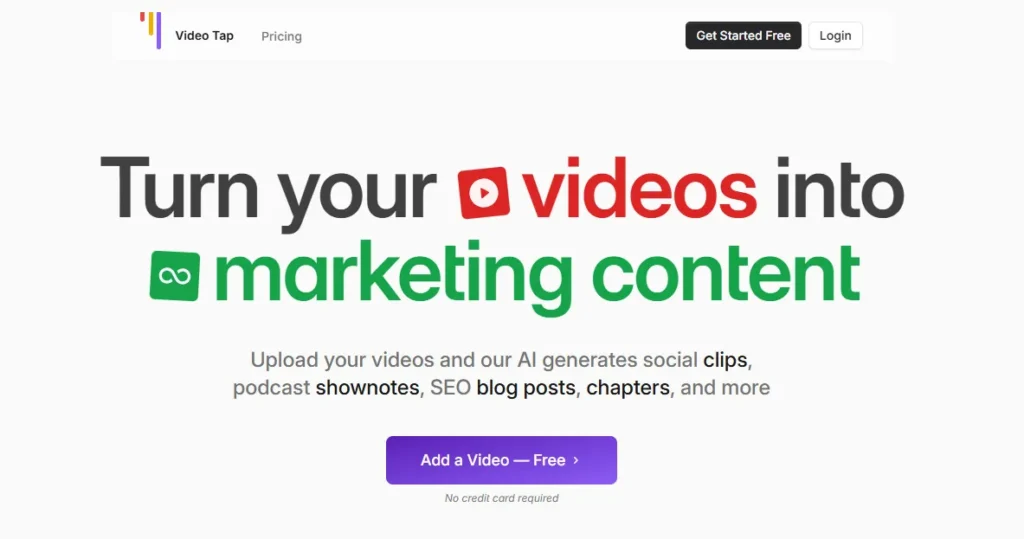
The platform's core features revolve around this transformative capability. Users can upload their videos (or provide a YouTube URL), and Video Tap's AI analyzes the content to generate:
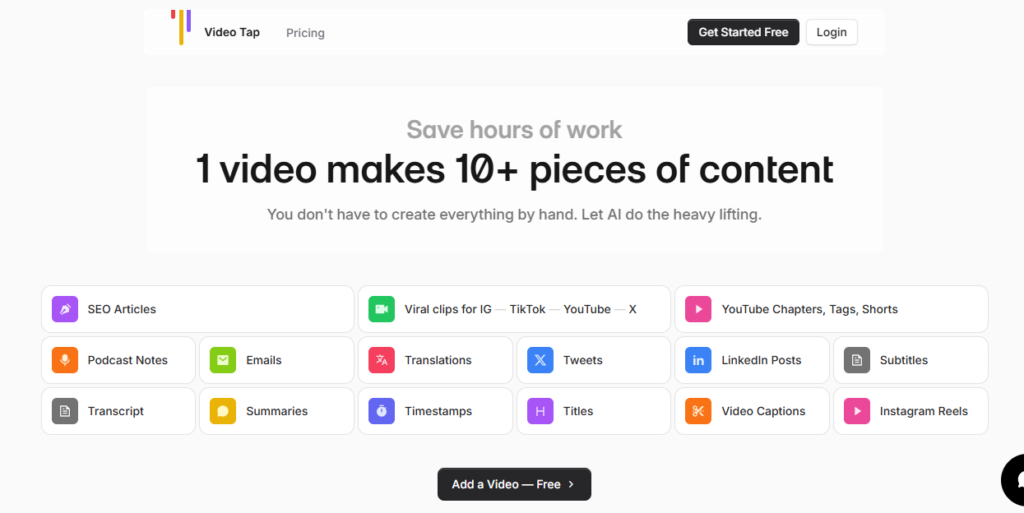
Viral Social Clips: Automatically identifies key moments and creates short, engaging video clips optimized for platforms like Instagram Reels, TikTok, YouTube Shorts, and X (formerly Twitter).
SEO-Optimized Blog Posts: Transcribes the video's audio and converts it into a structured, SEO-friendly blog post, complete with headings, summaries, and potentially even screenshots.
Podcast Show Notes: Extracts key points and timestamps to create comprehensive show notes for podcast episodes.
YouTube Chapters and Tags: Automatically generates chapters and relevant tags to improve video discoverability and user navigation on YouTube.
Email Copy: Creates concise and compelling email content based on the video's highlights, ready for marketing campaigns.
Multilingual Subtitles and Translations: Generates accurate subtitles and offers translations into multiple languages, significantly expanding the content's global reach.
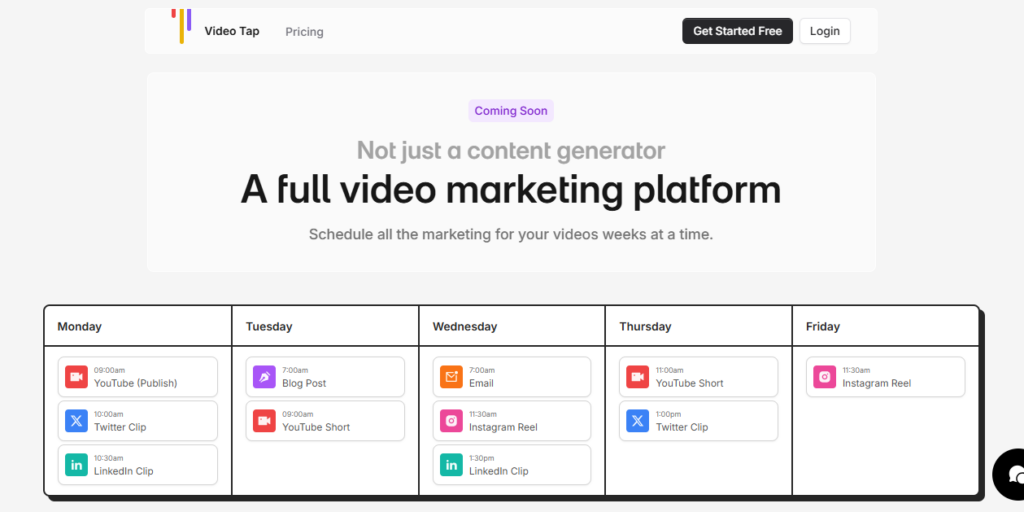
Video Tap AI aims to be more than just a content generator; it aspires to be a full video marketing platform that learns a user's unique style and voice to ensure consistent branding across all generated content.
By automating these labor-intensive tasks, Video Tap AI promises to save creators, marketers, YouTubers, podcasters, and businesses significant time and resources, allowing them to focus on producing more original content.
Top 5 Key Features Video Tap
AI-Powered Video to Blog Post Conversion: This is one of Video Tap AI's standout features. The platform automatically transcribes the audio from an uploaded video (or YouTube URL) and then uses AI to generate a structured, SEO-optimized blog post. This includes extracting key points, creating headings, and often incorporating relevant screenshots from the video, significantly reducing the time and effort required for content creation.
Example: A YouTuber uploads a 20-minute tutorial on “How to Edit Videos in DaVinci Resolve.” Video Tap AI processes it and generates a comprehensive blog post titled “Mastering DaVinci Resolve: A Step-by-Step Guide,” complete with transcribed instructions, relevant screenshots, and SEO-friendly keywords.
Automatic Social Media Clip Generation: Video Tap AI intelligently identifies compelling moments within a longer video and automatically generates short, viral-ready video clips optimized for various social media platforms like Instagram Reels, TikTok, YouTube Shorts, and X. This feature is crucial for capturing attention in short-form content environments and driving traffic back to the original long-form video.
Example: From a 30-minute interview with an industry expert, Video Tap AI might extract 5-7 short clips (15-60 seconds each) featuring impactful quotes or key takeaways, ready for immediate sharing on social media with appropriate captions.
Multilingual Subtitles and Translations: To maximize global reach, Video Tap AI offers the ability to generate accurate subtitles for videos and translate content into multiple languages. This feature is invaluable for creators and businesses looking to connect with diverse audiences worldwide without the need for manual translation services.
Example: A business creates a product demo video in English. Video Tap AI can generate Spanish, French, and German subtitles, along with translated blog posts, allowing the company to effectively market its product in non-English speaking markets.
AI-Learned Brand Voice and Style: Video Tap AI claims to learn the user's unique style and voice, aiming to ensure that all generated content stays true to their brand across various channels. This personalization helps maintain consistency and authenticity, making the AI-generated content feel more natural and aligned with the creator's established persona.
Example: If a content creator has a casual, humorous tone in their videos, Video Tap AI attempts to replicate that tone when generating blog posts or social media captions from their content, rather than producing generic, robotic text.
Comprehensive Content Output for Marketing: Beyond just blog posts and clips, Video Tap AI generates a wide range of content types designed for marketing and distribution. This includes podcast show notes, YouTube chapters and tags, email copy, tweets, and LinkedIn posts. This holistic approach ensures that users have all the necessary assets to promote their video content effectively across their entire digital presence.
Example: After uploading a webinar, Video Tap AI provides not only a full transcript and blog post but also bulleted show notes for a podcast version, pre-written email copy to send to attendees, and several LinkedIn post variations to promote key insights.
How to Use Video Tap Tutorial
Pros and Cons Video Tap
Who Should Use Video Tap AI?
Video Tap AI is designed for individuals and organizations heavily involved in video content creation and distribution, aiming to maximize their content's impact across various platforms:
Ideal Users:
YouTubers and Video Creators: To quickly generate blog posts, social media snippets, and chapter markers from their long-form videos, boosting discoverability and engagement.
Podcasters: To create detailed show notes, social media clips, and promotional content from their audio/video podcasts.
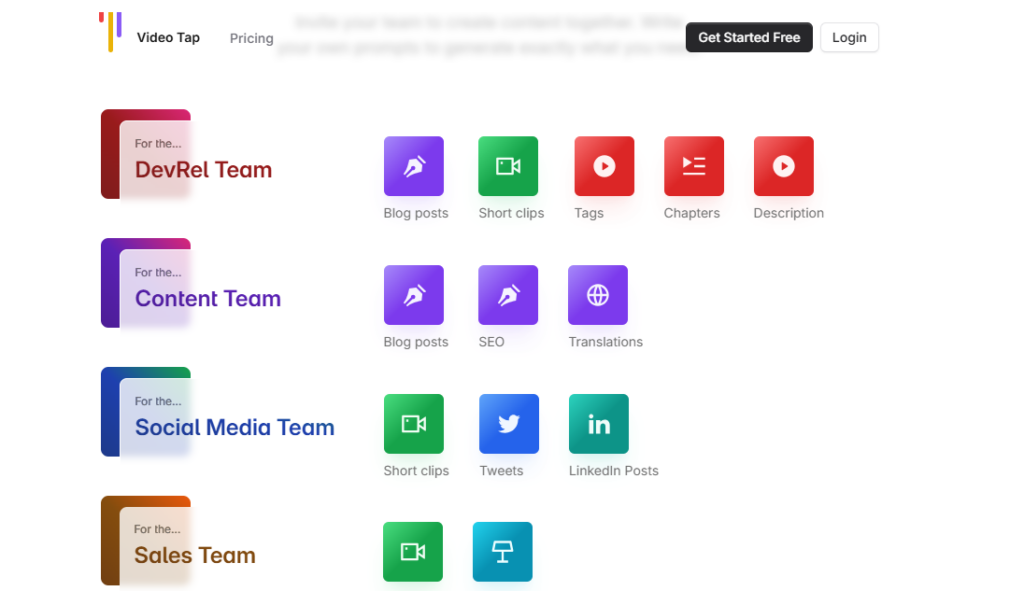
Content Marketing Teams: To efficiently repurpose video assets into written articles, email campaigns, and short-form social content for diverse marketing strategies.
Educators and Online Course Creators: To transform lecture videos into searchable transcripts, summarized notes, and short highlights for easier learning and promotion.
Businesses with Video-Heavy Strategies: Companies that regularly produce webinars, tutorials, product demos, or interviews can use Video Tap to extend the life and reach of their video assets.
Uncommon Use Cases:
Researchers/Academics: Quickly transcribing and summarizing long video interviews or lectures for analysis and documentation.
Journalists/Reporters: Rapidly converting video interviews or press conferences into written articles or social media updates for breaking news.
Churches/Religious Organizations: Repurposing sermons or talks into blog posts, social media snippets, and email summaries for their congregation.
Video Tap Pricing
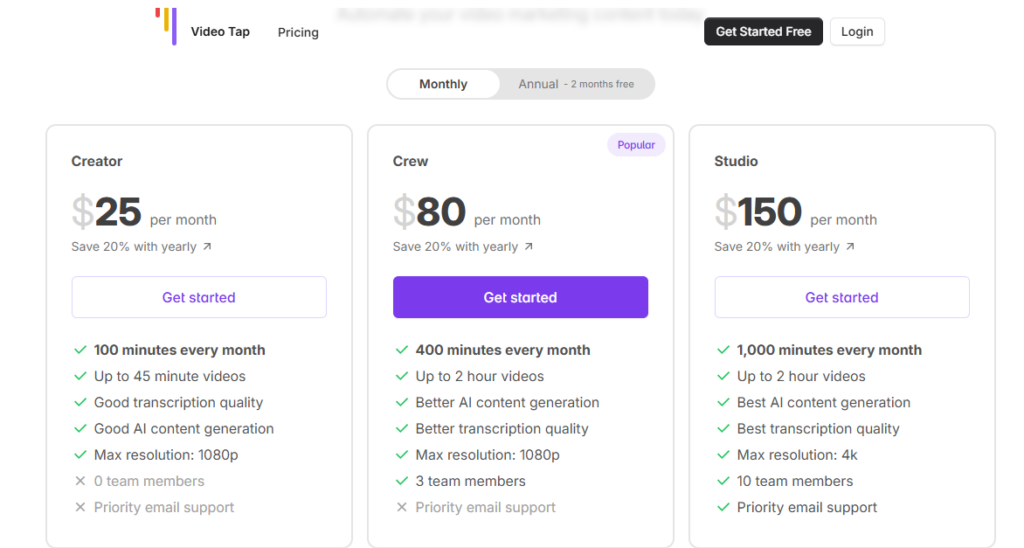
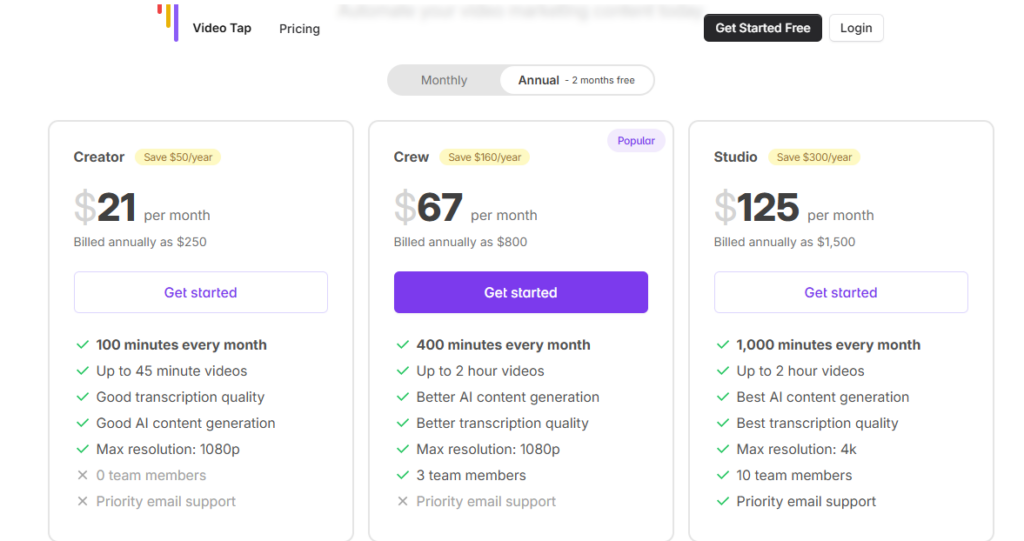
Video Tap AI offers flexible plans for your video content creation and marketing:
Creator ($21/month): For individual creators. This plan includes 100 minutes every month, up to 45-minute videos, good transcription quality, good AI content generation, max resolution of 1080p, 0 team members, and priority email support.
If you're a solo creator who needs a reliable tool to generate and manage video content with good quality outputs, this plan is a great starting point.
Crew ($67/month): For small teams. This plan includes 400 minutes every month, up to 2-hour videos, better AI content generation, better transcription quality, max resolution of 1080p, 3 team members, and priority email support.
If you're a small team looking to scale your video content with enhanced AI and transcription quality, along with team collaboration features, this popular plan is a great choice.
Studio ($125/month): For larger teams and studios. This plan includes 1,000 minutes every month, up to 2-hour videos, best AI content generation, best transcription quality, max resolution of 4k, 10 team members, and priority email support.
If you're a large team or studio needing the highest quality outputs, a significant amount of video minutes, and advanced collaboration features, this plan offers extensive resources.
Disclaimer: Pricing details may change. Visit the official Video Tap website for the latest information.
What Makes Video Tap AI Unique?
All-in-One Repurposing Focus: While many tools offer individual aspects (transcription, clipping), Video Tap aims to be a single platform for converting a video into almost every conceivable content format.
Claimed Brand Voice Learning: The promise of AI adapting to a user's specific voice and style is a significant differentiator, aiming for more authentic output.
Emphasis on SEO-Optimized Text Output: Strong focus on generating text content (blog posts, transcripts) that is designed to perform well in search engine rankings.
Video Tap Compatibilities & Integrations
As a web-based platform, Video Tap AI's primary compatibility is through modern web browsers. Its integrations focus on content input and output:
Video Input: Primarily supports YouTube URLs and direct video file uploads.
Content Output: Generates text in formats suitable for direct pasting into CMS platforms (like WordPress for blog posts), email marketing tools, and social media platforms.
No Direct CRM/Marketing Automation Integrations: While it generates email copy, it doesn't directly integrate with CRM or email marketing platforms for automated sending.
No Direct Social Media Publishing: Content is generated for social media, but direct publishing to platforms is not a core feature; users typically copy and paste.
How We Rated It Video Tap
3 Top Video Tap Alternatives
Looking for Video Tap alternatives? Please Check out below Top 3 Video Tap alternatives options to consider:
Each alternative offers unique features that might better suit your specific needs. Consider your primary use case, budget, and required features when choosing between these options.
Summary Video Tap AI Review
Video Tap AI presents an ambitious vision for simplifying video content repurposing, aiming to be an all-in-one solution for creators and marketers. Its core functionality of transforming long-form videos into a diverse array of shareable content formats, from SEO-optimized blog posts to viral social clips and multilingual subtitles, is highly valuable in today's content-driven landscape. The promise of AI learning a user's brand voice and the comprehensive output options are significant draws.
However, recent user reviews indicate a notable decline in performance, with reports of slow processing, bugs, and a perceived reduction in output quality and features compared to earlier versions. These issues, coupled with reported difficulties in reaching customer support, raise concerns about the platform's current reliability and consistency.
While the concept and potential of Video Tap AI remain strong, potential users should proceed with caution and thoroughly test the current version to ensure it meets their specific needs. If the reported performance and support issues are addressed, Video Tap AI has the potential to be a truly transformative tool for video content repurposing.
Video Tap FQA:
What is Video Tap AI's primary function?
What types of content can Video Tap AI generate from a video?
Does Video Tap AI support multilingual content?
Can Video Tap AI learn my brand's voice?
Is Video Tap AI free to use?
What are some common challenges users face with Video Tap AI?
Can I directly publish content to social media from Video Tap AI?
Is Video Tap AI suitable for generating long blog posts?
What are some alternatives to Video Tap AI?
Where can I find more information about Video Tap AI?
Did you find this content helpful?
Authority Hub
Check complete Video Tap features
Alternatives
Best Video Tap alternatives in 2026
Comparison
Compare Video Tap vs competitors
Best Tools
Best AI tools in Video Editing
Top Tools
Top Video Editing AI tools ranked
Tutorial
Watch Video Tap Step-by-Step Tutorial
AI Tools Directory
Discover 331 AI tools list
Submit Tool
Add your AI tool here for free
AI Tool Coupons
Unlock exclusive deals & discounts
Did you find this content helpful?
Promote This Tool
Help others discover this tool by sharing this page.
Video Tap Reviews
Write a Review
No reviews yet. Be the first to share your thoughts!
48 Similar Video Tap Tools
One platform to publish podcasts, videos, courses, and blogs — and monetize everything with 0% platform fees, private RSS feeds, and memberships built in.
Build, deploy, and monitor enterprise-grade AI agents and agentic workflows — all in your own infrastructure.
Build and deploy autonomous AI agent workforces for sales, marketing, and operations — no code required.
Turn text, scripts, and blog posts into viral-ready videos in minutes — no editing skills needed.
Turn one product photo into high-converting ads and UGC videos in under 60 seconds.
Generate cinematic videos, images, and audio with Luma's AI Agents — using Ray3.14, Veo 3, Kling 2.6, and more in one platform.
Edit talking-head videos 10x faster by letting AI cut silences, filler words, and bad takes automatically.
Translate, dub, and lip-sync your videos into 110+ languages with studio-quality AI.
Edit, enhance, and clip your videos using AI — with a chat-based interface, virality scoring, and professional tools that replace hours of manual work.
Spot viral trends before they explode — the all-in-one intelligence platform for short-form video creators.
Automate your entire TikTok content pipeline — AI generates your slideshows, UGC videos, and hooks, then posts them daily without you lifting a finger.
Turn a text prompt into a fully automated faceless video for TikTok or YouTube — no camera, no editing, no face required.
Turn any text prompt into a viral-ready AI short for YouTube, TikTok, Instagram, or Snapchat — in under a minute, fully automated.
Turn any text, blog post, or news article into a published Instagram Reel, TikTok, or YouTube Short — automatically, in your own cloned voice.
Turn a single text prompt into a fully produced faceless YouTube Short — complete with AI script, images, voiceover, and animated subtitles — in under a minute.
Generate ultra-realistic AI voiceovers, clone your voice, host podcasts, and create text-to-video content — 1,000+ voices in 142+ languages, starting at $19/month with a free trial.
Paste your RSS feed, pick a template, and get a beautiful SEO-optimized podcast website live in under 5 minutes — no coding, no maintenance, ever.
Build, publish, and monetize your podcasts, videos, courses, and blog in one place — with 0% platform fees and a no-code website builder built for creators.
One platform for AI video generation, royalty-free music, text-to-speech, voice cloning, AI song covers, and video translation — powered by Sora2, Veo3, and 3,200+ voices in 190+ languages.
Bulk-generate viral faceless shorts from scripts or long videos — AI story, Reddit, fake texts, dialogue, superhero, and auto-clip from $19/month with a free plan.
Turn talking-head videos into polished, B-roll-enhanced social clips in minutes — with 13.8M+ Getty iStock assets, AI subtitles, and auto music. Free plan available.
Turn any long video into viral shorts in minutes — AI captions, B-roll, faceless video, auto-translation in 48 languages, and social scheduling from $15/month.
Chat with every top AI model, create videos, images, and content — all from one platform, no subscriptions stack required.
Upload any PDF, YouTube video, or image and get 9 AI study formats instantly — quizzes, flashcards, podcasts, summaries, mind maps, games, brainrot videos, and 24/7 AI tutoring with gamified progress tracking across web, iOS, and Android.
AI virtual staging, photo editing, and exterior design for real estate professionals — 4 staged room options in 30 seconds, starting at $10/month.
Record, edit, transcribe, clone your voice, and publish studio-quality podcasts and videos — all in one AI-powered platform, now rebranded as Async.
Generate conversion-optimized ad creatives, product videos, and competitor insights in 60 seconds — powered by AdLLM, the world's first large language model built exclusively for advertising.
Scan your website, launch AI-generated ads on Google, Facebook, and Instagram in under 3 minutes — no design skills, no agency, no guesswork.
Discover winning ads from 20M+ creatives, generate platform-ready image and video ads in 30 seconds, and launch campaigns — all inside one AI-powered ad operating system.
Generate hyper-realistic UGC video ads with 1,000+ AI actors — no cameras, no crews, no waiting.
Turn a script and a product photo into a studio-quality UGC video in under 3 minutes — no cameras, no creators, no waiting.
Generate images, write content, build chatbots, and automate workflows — all from one MCP-native AI platform.
Design a professional logo free — only pay once to download the files you actually want to use.
Automate faceless videos: create, schedule, post, scale.
AI video editor: long to viral shorts, automated & efficient.
AI video platform: text to viral faceless videos & UGC ads.
AI video creator: ideas to viral shorts in minutes.
Automate content repurposing: maximize reach, minimize effort.
AI-powered video editor: viral content, avatars, 1-click creation.
Unified platform for marketing, sales, and support with AI.
AI-powered help desk: smart tickets, omnichannel, rapid resolution.
Unleash creativity: AI video & image generation made easy.
Create pro-quality videos with AI avatars and text in minutes.
Generate scroll-stopping short-form AI videos using Sora 2, Veo 3.1, Grok Imagine, Kling 3, and Seedance 2.0 — all in one token-based platform built for faceless content creators.
Effortlessly create stunning AI videos with realistic avatars & voices.
Scale Your Video Marketing with AI-Powered Creation.
Effortlessly create engaging, stylized subtitles for viral video content.