

NEW

Freemium $12/mo
160
Effortlessly repurpose audio & video into engaging content with AI.

Turn any long-form video into dozens of trend-matched short clips, captions, and social posts — automatically.
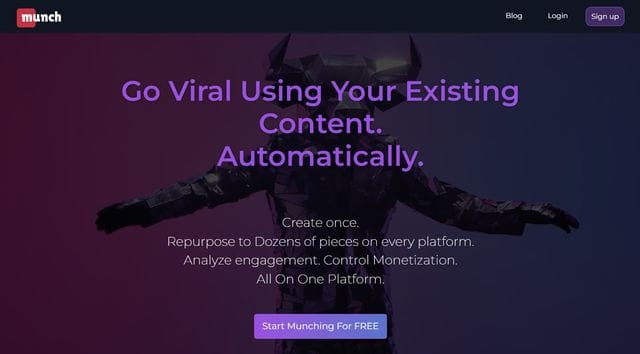
Munch connects to your video library — via YouTube link, direct upload, or platforms like Vimeo — and uses AI to find the moments most likely to perform on TikTok, Instagram Reels, and YouTube Shorts.
Instead of scrubbing through an hour-long recording to find highlights manually, you upload once and Munch generates a ranked list of clip candidates, each scored for engagement potential, in minutes.
Over 500,000 users and enterprise clients including HubSpot and Salesforce now rely on the platform to scale their video marketing output without scaling their editing team.
Munch's AI engine doesn't just cut randomly — it analyzes transcript content, pacing, emotional tone, and real-time social trends to identify which segments will resonate best on each platform.
Auto-crop to 9:16 vertical format, auto-generated captions and subtitles in 15+ languages, and real-time keyword analytics are included on every paid plan.
The platform also matches your clips to current trending topics on social media and aligns them with keyword search volumes, so every clip you publish is backed by actual demand data rather than guesswork.
AI-made descriptions for each clip are generated alongside the video, ready to paste directly into your post scheduler. All plans include unlimited generated clip exports with no watermark, making it practical for high-volume agency workflows.
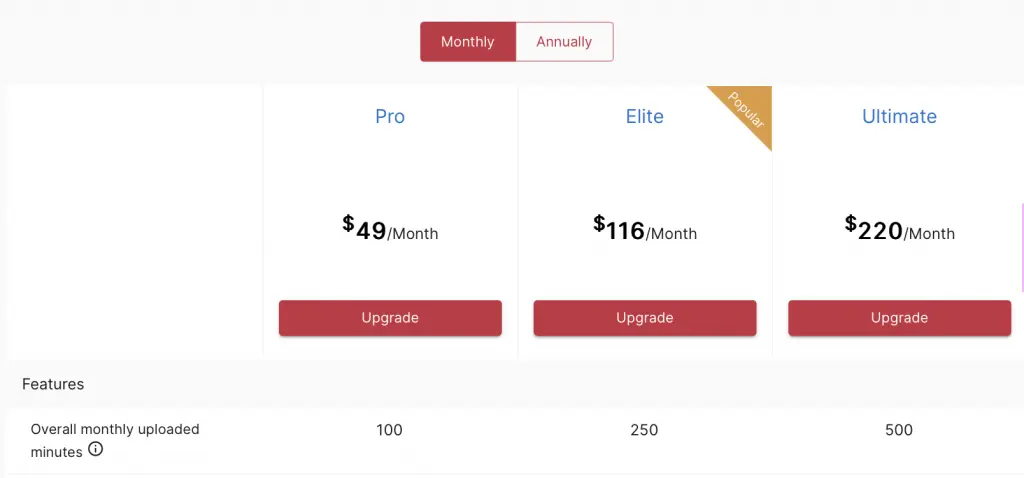
Social media managers who handle video for multiple brand accounts get the clearest ROI — Munch's Ultimate plan supports 1,000 upload minutes per month, which covers heavy content calendars without per-clip fees.
Podcasters and webinar hosts use Munch to extract highlight reels from 60–90 minute recordings and post them across every platform without hiring a video editor.
Marketing agencies benefit from mobile project creation and the “Get It First” early feature access, which keeps client deliverables current with evolving platform trends.
Individual creators on the Pro plan can process up to 200 upload minutes per month, which covers roughly 3–4 long-form videos depending on length.
At $49/mo for the Pro plan, Munch is priced at the higher end for individual creators — especially compared to newer competitors like Opus Clip. However, for social media managers, brands, and agencies who process video at volume, the trend-matching intelligence and unlimited clip exports make it a strong operational investment.
The 7-day free trial lets you test the full clip generation workflow on real content before committing. If your primary need is fast, trend-aware short-form video extraction with minimal manual editing, Munch consistently delivers on that promise.
Munch is an AI-powered video repurposing platform founded in 2021 in Tel Aviv, Israel, by Oren Kandel and Peter Naftaliev. It analyzes long-form videos to automatically extract the most engaging short clips, adds captions and descriptions, and optimizes each clip for TikTok, Instagram Reels, and YouTube Shorts using real-time trend and keyword matching.
• AI Clip Extraction — Analyzes transcript content, emotional tone, and pacing to automatically identify and cut the highest-engagement moments from long-form videos into short clips ranked by performance potential.
• Trend & Keyword Matching — Matches generated clips to current trending topics on TikTok, Instagram, and YouTube in real time, and aligns them with keyword search volumes so every published clip targets active demand.
• Auto-Crop to 9:16 — Automatically reframes and crops horizontal video to vertical 9:16 aspect ratio for TikTok, Instagram Reels, and YouTube Shorts, with AI-driven subject tracking to keep the focal point centered.
• AI-Generated Captions & Subtitles — Produces accurate automated subtitles and on-screen captions in 15+ languages for every clip, with customizable styling to match your brand.
• AI-Made Social Descriptions — Generates platform-optimized post captions and descriptions alongside each clip, ready to copy into your social scheduler without additional copywriting.
• Real-Time Keyword Analytics — Surfaces content-specific marketing data and keyword performance metrics within the dashboard, helping you refine which topics to prioritize in future long-form recordings.
• Mobile Project Creation — Lets you start new repurposing projects and review generated clips directly from a mobile device, available on all paid plans.
• Unlimited Clip Exports (No Watermark) — All paid plans include unlimited exports of generated clips with no watermark, removing per-clip fees that constrain high-volume workflows.
Munch is built for social media professionals, agencies, and brands that produce video at scale and need to maximize distribution across short-form platforms without a dedicated editing team.
• Social media managers — Process multiple client video libraries per month using the Elite or Ultimate plan's upload minute allowances, generating trend-matched clips for every platform in one workflow.
• Marketing agencies — Unlimited watermark-free exports and mobile project creation make Munch practical for managing high-volume deliverables across multiple brand accounts simultaneously.
• Podcasters and webinar hosts — Extract the 10–15 best moments from hour-long recordings and distribute them as platform-optimized shorts without manually scrubbing through the timeline.
• Brands and enterprise content teams — Companies like HubSpot and Salesforce use Munch to repurpose marketing webinars, product demos, and event recordings into social assets that stay aligned with trending topics.
• Course creators and educators — Auto-captioning in 15+ languages and OCR-based text capture make Munch effective for repurposing tutorial content into multilingual short-form clips accessible to global audiences.
Munch stands apart from generic clip generators by combining AI content analysis with live social trend intelligence — most competitors cut clips based on audio energy alone, not platform relevance.
• Real-Time Social Trend Matching — Munch doesn't just clip your video; it cross-references each candidate clip against trending topics and hashtags on TikTok, Instagram, and YouTube at the moment of processing — ensuring every export has a measurable reason to perform.
• Keyword Search Volume Alignment — Clips are scored and ranked partly based on whether the spoken content aligns with keywords people are actively searching, turning your video library into an SEO-aware content asset rather than just raw footage.
• Content-Specific Marketing Analytics — The built-in analytics dashboard provides performance data on published clips — views, engagement, and keyword impact — giving creators an actionable feedback loop for refining future long-form content topics.
• Enterprise-Proven at Scale — Unlike many AI clip tools that focus on solo creators, Munch's infrastructure and pricing are built for agency and enterprise workloads, as demonstrated by its adoption by HubSpot, Salesforce, and other large marketing organizations.
Munch operates as a web app and mobile app and connects to major video hosting and social platforms for import and export.
• YouTube — Import videos directly by pasting a YouTube URL; Munch fetches the video, transcribes it, and begins clip generation without requiring a manual file download and re-upload.
• TikTok & Instagram Reels — Generated clips are formatted and optimized for TikTok and Instagram Reels at 9:16 aspect ratio; direct publishing requires manual download and upload as native API publishing is not currently supported.
• Vimeo — Upload or import long-form video content from Vimeo accounts directly into Munch projects, making it accessible for teams that host master recordings on Vimeo rather than YouTube.
• YouTube Shorts & Facebook — Clips exported from Munch are formatted for YouTube Shorts and Facebook short-form video; users can publish to these platforms via their native dashboards after downloading from Munch.
• Mobile (iOS & Android) — Munch supports mobile project creation on iOS and Android devices, allowing users to initiate new repurposing jobs, review generated clips, and approve exports from a smartphone.
Effortlessly repurpose audio & video into engaging content with AI.
Automate content repurposing: maximize reach, minimize effort.
Record, edit, dub, subtitle, generate AI video, clone your voice, and publish — one AI platform where video, sound, and voice connect, starting free.
Munch is a reliable, enterprise-proven AI video repurposing platform that earns its place for social media managers, agencies, and brands producing video at volume — particularly thanks to its real-time trend matching and keyword alignment features that most clip tools simply don't offer.
At $49/mo entry pricing with no free tier, it's not the most accessible option for individual creators on a budget, and newer competitors are closing the gap on interface polish.
For teams serious about maximizing the reach of every long-form video across short-form platforms, Munch remains a strong, battle-tested choice in 2026.
Check complete Munch features
Best Munch alternatives in 2026
Compare Munch vs competitors
Best AI tools in AI Podcast
Top AI Podcast AI tools ranked
Watch Munch Step-by-Step Tutorial
Discover 331 AI tools list
Add your AI tool here for free
Unlock exclusive deals & discounts
Did you find this content helpful?
Help others discover this tool by sharing this page.
No reviews yet. Be the first to share your thoughts!
Record, edit, dub, subtitle, generate AI video, clone your voice, and publish — one AI platform where video, sound, and voice connect, starting free.
Edit talking-head videos 10x faster by letting AI cut silences, filler words, and bad takes automatically.
Translate, dub, and lip-sync your videos into 110+ languages with studio-quality AI.
Edit, enhance, and clip your videos using AI — with a chat-based interface, virality scoring, and professional tools that replace hours of manual work.
Bulk-generate viral faceless shorts from scripts or long videos — AI story, Reddit, fake texts, dialogue, superhero, and auto-clip from $19/month with a free plan.
Turn talking-head videos into polished, B-roll-enhanced social clips in minutes — with 13.8M+ Getty iStock assets, AI subtitles, and auto music. Free plan available.
Turn any long video into viral shorts in minutes — AI captions, B-roll, faceless video, auto-translation in 48 languages, and social scheduling from $15/month.
Record, edit, transcribe, clone your voice, and publish studio-quality podcasts and videos — all in one AI-powered platform, now rebranded as Async.
AI video editor: long to viral shorts, automated & efficient.
AI agents that create winning video ads, UGC content, and faceless videos — from product link to published post, fully automated.
Automate content repurposing: maximize reach, minimize effort.
AI-powered video editor: viral content, avatars, 1-click creation.
Transform videos into diverse content formats instantly with Video Tap AI.
Scale Your Video Marketing with AI-Powered Creation.
Effortlessly create engaging, stylized subtitles for viral video content.
Generate engaging marketing videos from text - no experience needed.
Turn long videos into viral short clips, schedule across 7 platforms, and grow on social media — all in one AI-powered dashboard.
Turn any long-form video into a month of viral TikToks, Shorts, and Reels — automatically, in minutes.
Go from idea to exported TikTok, YouTube Short, or Instagram Reel in under three minutes — no editing skills needed.
Turn any long video into multiple viral TikToks, Reels, and Shorts in one click — with AI Reframe 2, captions in 52 languages, AI dubbing in 29 languages, and direct social scheduling.
Turn any script or text prompt into a professional animated AI movie in under 2 minutes — with 50+ video styles, character creation, camera controls, and commercial rights included.
Create professional AI avatar training videos in 75+ languages — no camera, no studio, no production team required.
Turn structured enterprise data into governed, on-brand video — automatically, at scale, embedded inside your product.
Create hyper-realistic AI avatar videos, translate into 175+ languages, and scale your content — no camera, no crew, no editing skills needed.
Turn scripts, blog posts, URLs, PPTs, and images into polished, publish-ready videos in minutes — no camera, no editing skills needed.
Turn any text prompt into a full cinematic video — with Sora 2, Veo 3.1, Kling 3.0, ElevenLabs, and 200+ AI models in one platform.
Turn one YouTube video into SEO-optimized titles, shorts, blogs, and social posts — automatically.
Edit video and audio the same way you edit a document — with AI handling the hard parts.