Home Categories Deals Sign Up
Updated: April 28, 2026

How Trupeer AI Works

Trupeer AI is built around a single insight that every software team understands: recording a product walkthrough takes 5 minutes, but turning it into something you'd actually share with a customer takes hours.

Founded in January 2024 by Shivali Goyal (ex-BCG, UT Austin, IIT Delhi) and Pritish Gupta, Trupeer is headquartered in San Francisco with its main operating office in Bangalore.

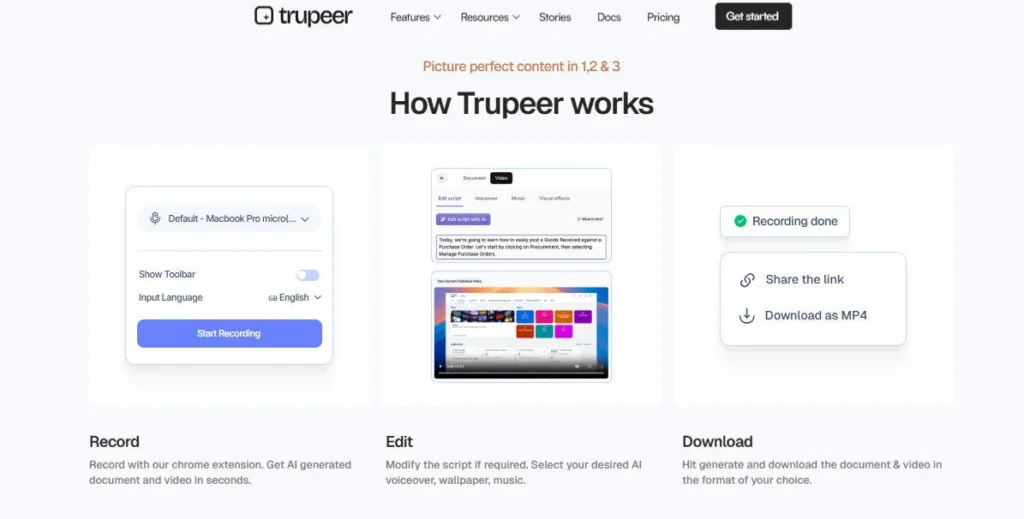
The workflow is three steps: record your screen via the Chrome extension or upload an existing recording, click generate, and receive a studio-quality edited video with AI voiceover, smart zooms, captions, and a fully formatted step-by-step documentation guide — simultaneously — in under ten minutes.

Trusted by Fortune 500 companies and ISO 27001, SOC 2, and GDPR certified from day one, Trupeer is built for enterprise teams that cannot compromise on security.

Key Capabilities

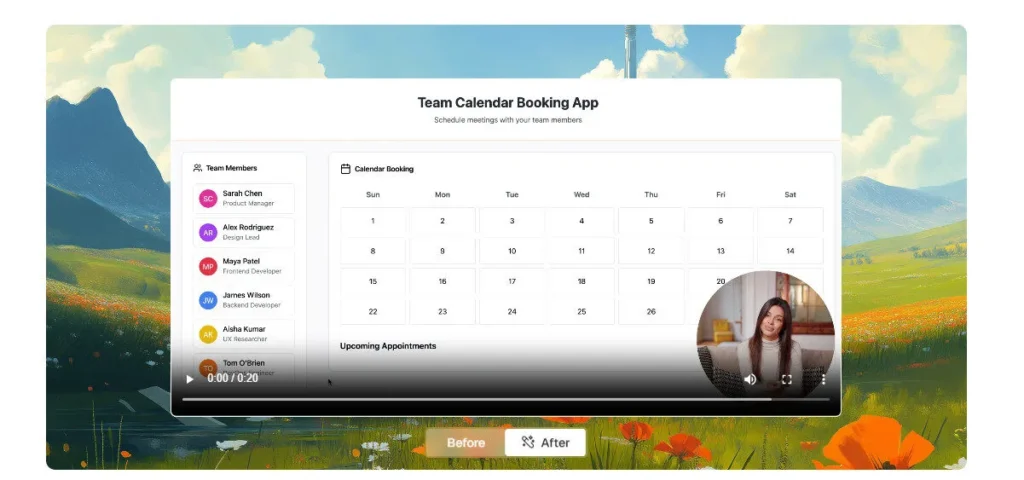
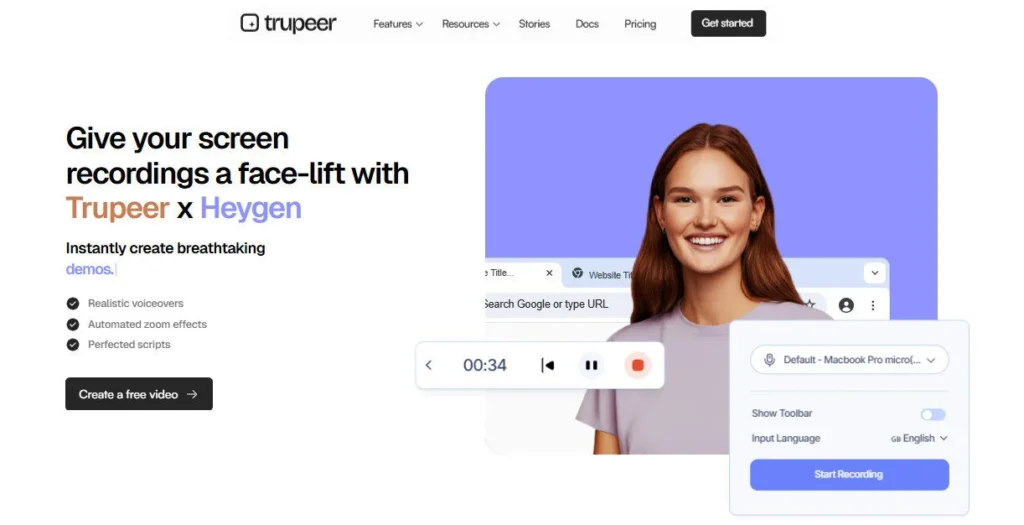
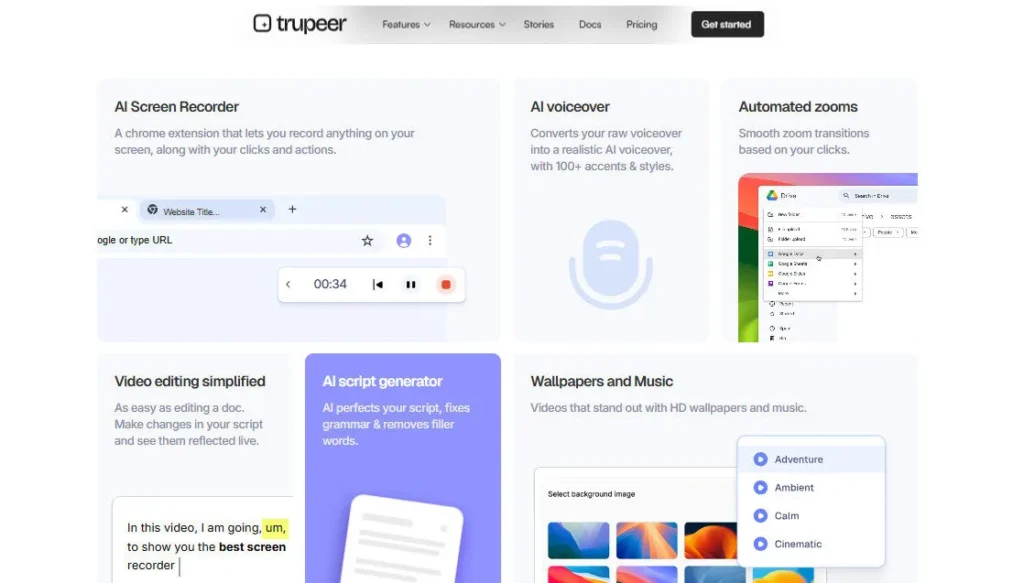
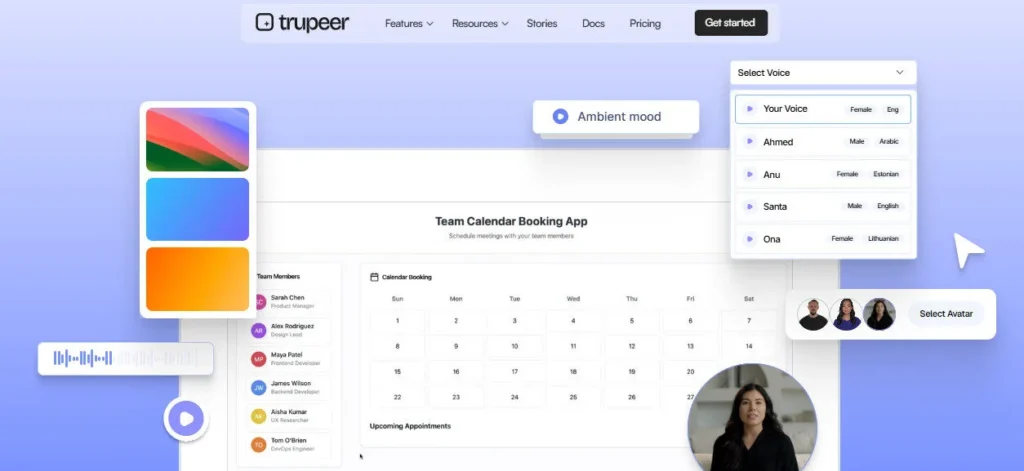
Trupeer operates across two product pillars — Video and Documentation — that run in parallel from every recording. On the video side: AI Auto-Editing adds smart zooms to every key action, removes filler words and awkward pauses from the transcript, generates a clean broadcast-ready script, adds studio-quality AI voiceover in multiple languages, inserts background music, applies brand logo, colors, and fonts, adds lifelike AI avatars for presenter-style videos without camera footage, splits long recordings into navigable chapters, and exports in MP4 or embeds via shared pages with real engagement tracking.

On the documentation side: Vision-Led Action Detection identifies every click and action in the recording, Smart Screenshots and Annotations capture and label each step precisely, and Fully Formatted Structured Documents with headings, steps, and layout are generated automatically — downloadable in Markdown, PDF, or Word.

The Knowledge Base feature centralizes all video and documentation assets into a searchable, embeddable knowledge hub powered by AI video search — searchable by humans and callable by AI agents for automated support.

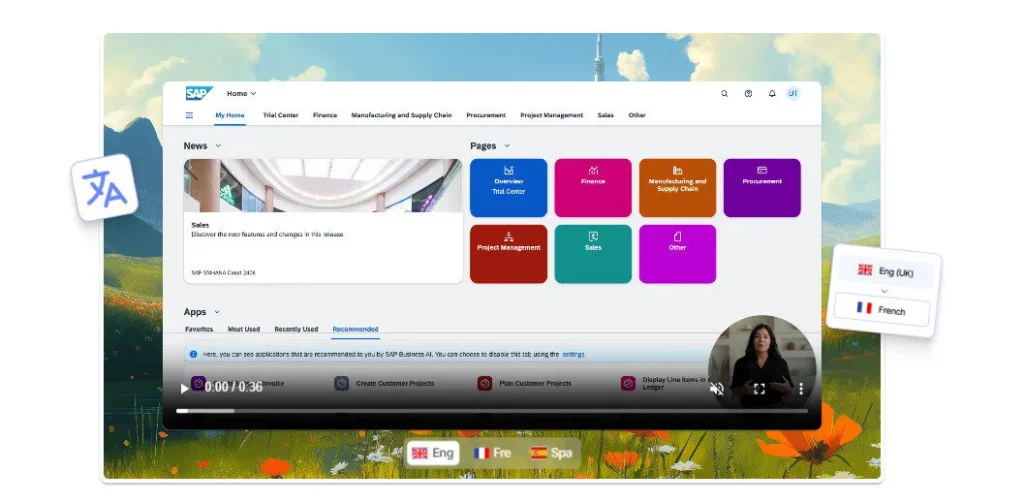
Translation across 65+ languages converts the entire video and documentation output from one recording into a full multilingual content library. Shared Pages give each piece of content a branded, trackable URL that logs who watched, how long they watched, and what sections they replayed.

Who Gets the Most Out of It

Product marketing teams that ship product updates but always lag two weeks behind the engineering release cycle use Trupeer to publish demo videos and release notes immediately after shipping — not a week later after video editing is scheduled.

Customer success and support teams build a library of video answers to common questions once and let the Knowledge Base AI search surface them automatically for every subsequent customer query.

Sales teams send follow-up personalized product demos using existing recordings rather than scheduling live calls for every prospect. L&D and change management teams roll out new software training across thousands of global employees in 65+ languages without scheduling recording sessions for each language or market.

Is It Worth It?

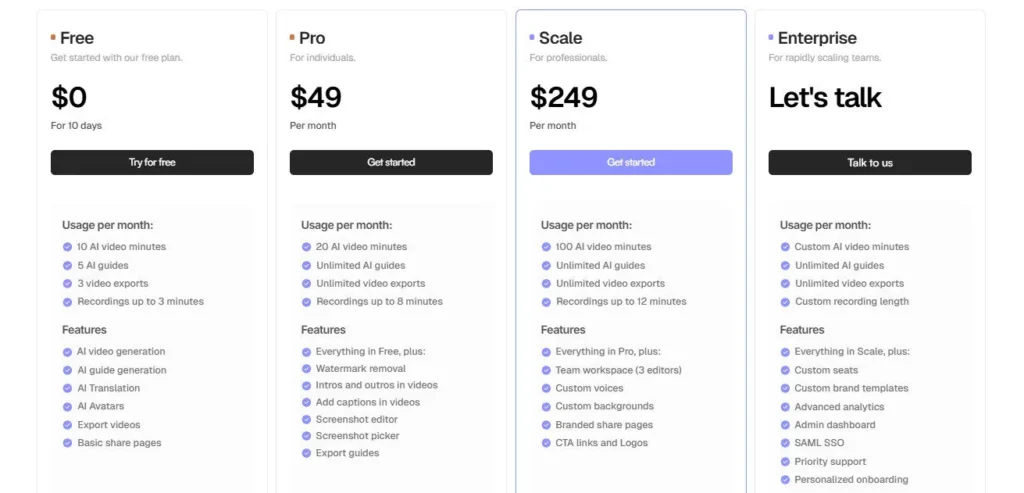
The free plan provides 10 AI video minutes and 5 AI guides per month — enough for two to three real recordings per month to evaluate output quality.

The Pro plan at $40/month annual ($49/month monthly) gives individual creators and small teams 20 AI video minutes, unlimited guide creation, up to 8-minute recording sessions, watermark removal, and all video and documentation features — a complete production tool for regular content producers.

The Scale plan at $199/month annual ($249/month monthly) adds 100 AI video minutes, 3 editor seats, priority processing, custom voice creation, custom backgrounds, and branded share pages with CTA links — the right tier for teams producing content across multiple products or customer segments.

Enterprise plan pricing is custom and unlocks SSO, SCIM, workspace-level permissions, dedicated engineering support from deployment through scale, and unlimited users.

The honest caveat: the 20-minute monthly AI video allocation on Pro feels restrictive for teams with frequent product updates — heavy users will exhaust Pro in under two weeks at one recording per day, making the Scale plan the practical minimum for consistent team use.


Trupeer AI is a San Francisco-based AI screen recording and documentation platform founded in January 2024 by Shivali Goyal and Pritish Gupta that transforms raw screen recordings into studio-quality edited videos, step-by-step guides, and multilingual documentation in 65+ languages.

The platform combines AI auto-editing (smart zooms, AI voiceover, avatars, captions, brand kit), Vision-Led Action Documentation (auto screenshots, annotations, structured guides), and a Knowledge Base with AI video search — all from one Chrome extension recording.

Trusted by Fortune 500 companies, Trupeer holds ISO 27001, SOC 2, and GDPR certification, and supports enterprise deployment with SSO, SCIM, and workspace-level permissions.

• AI Auto-Editing from Screen Recordings — Upload any screen recording and Trupeer automatically applies smart zooms to every key action, removes filler words, generates a clean script, adds studio-quality AI voiceover, inserts background music, and exports a polished video — no timeline editing or manual cuts required.

• AI Documentation Generation (Vision-Led) — While your video is being polished, Trupeer's Vision-Led Action Detection identifies every click and action in the recording and simultaneously generates a fully formatted step-by-step guide with annotated screenshots — downloadable in Markdown, PDF, or Word format.

• Translation in 65+ Languages — Translate any video and its accompanying documentation into 65+ languages with a single click — producing a complete multilingual content library from one original recording without re-recording or localization workflows.

• AI Avatars (No Camera Required) — Add a lifelike AI presenter avatar to any screen recording video without recording any footage — enabling professional on-screen presenter videos for demos, tutorials, and training content without camera setup.

• Knowledge Base with AI Video Search — Centralize all video and documentation assets into an embeddable, searchable Knowledge Base powered by AI video search — searchable by human users and callable by AI support agents for automated customer query resolution.

• Brand Customization (Always On-Brand) — Apply your logo, colors, and fonts to every video automatically via a brand kit — ensuring every recording output, from internal training to customer-facing demos, maintains brand consistency without manual styling.

• Shared Pages with Engagement Analytics — Every piece of content gets a branded, trackable URL that logs viewer identity, watch time, completion rate, and replayed sections — providing real engagement data for sales follow-ups, CS handoffs, and L&D tracking.

• Chrome Extension (One-Click Recording) — Capture full screen, browser tab, or specific app window directly from Chrome with one click — compatible with any web-based software and designed for teams who need to record product workflows without desktop software installation.

Pros
  • ISO 27001, SOC 2, and GDPR certified from day one — the most complete enterprise security compliance stack in its product category
  • Video and documentation are generated simultaneously from one recording — eliminating two separate production workflows in a single step
  • Knowledge Base with AI video search is callable by AI agents for automated support — a genuinely enterprise-grade use case uncommon at this price point
  • Translation in 65+ languages converts one recording into a full multilingual video and documentation library without re-recording
  • Chrome Extension + file upload flexibility means the tool works for both live recordings and existing video libraries without new recording requirements
  • Free plan provides 10 AI video minutes and 5 AI guides per month — enough for genuine workflow evaluation without a payment commitment
Cons
  • ×Pro plan's 20 AI video minutes per month depletes quickly for teams producing daily content — active teams face early pressure to upgrade to Scale at $199/month annual
  • ×Unused credits do not roll over to the next month on any plan — restrictive for teams with variable monthly recording volume
  • ×API access is not publicly confirmed on any standard paid plan — programmatic integration for custom workflows requires Enterprise plan negotiation
  • ×Brand customization (custom backgrounds, branded share pages, CTA links) is gated behind the Scale plan — Pro plan users cannot fully white-label their output
  • ×No mobile app or desktop recording client — the tool is Chrome Extension and web upload only, limiting compatibility with non-browser workflows
  • ×Small early-stage team (13 members as of 2025) — product roadmap and enterprise support depth carry more uncertainty than established documentation platforms like Loom or Scribe

Trupeer AI is best suited for product marketing teams, customer success managers, sales teams, L&D professionals, and enterprise knowledge managers who need to convert software screen recordings into polished video and documentation at scale.

• Product marketing teams — They record a feature walkthrough once immediately after engineering ships it and receive a publish-ready demo video plus release notes documentation in the same workflow — eliminating the production lag between shipping and announcing.

• Customer success and support teams — The Knowledge Base with AI video search turns recorded answers to common questions into self-serve resources that any customer or AI support agent can find instantly, replacing repetitive 1:1 screen-sharing calls.

• Sales teams — Pre-sales demo videos recorded once are shared as personalized follow-up assets with engagement tracking via Shared Pages, letting reps know exactly which sections a prospect watched and replayed before a follow-up call.

• L&D and change management teams — They train global workforces in 65+ languages using translated video and guide outputs from a single English recording, without scheduling localized recording sessions for each market.

• Enterprise knowledge managers — The combination of ISO 27001/SOC 2/GDPR certification, SSO, SCIM, and workspace-level permissions makes Trupeer the compliant platform for enterprise content that must stay within organizational access controls.

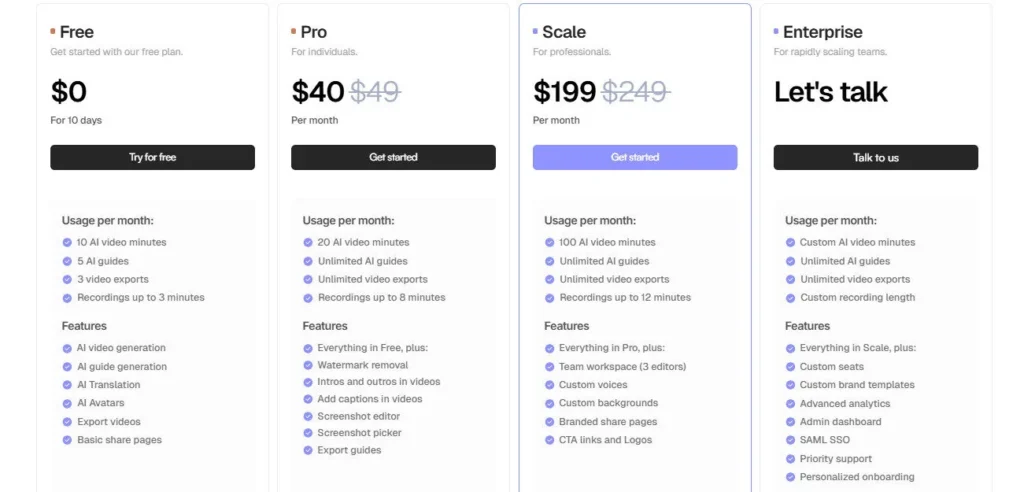
Free ($0/mo)10 AI video minutes per month, 5 AI guides per month, AI auto-editing, AI voiceover, documentation generation, Chrome Extension, watermark on exported videos, basic hosting and sharing.
Pro ($49/mo billed monthly — $40/mo billed annually)20 AI video minutes per month, unlimited guide creation, unlimited video exports, up to 8-minute recording sessions per video, watermark removal, video intros and outros, caption generation, screenshot editing tools, screenshot picker, guide export (Markdown, PDF, Word), AI avatars, translation (65+ languages), hosted sharing pages, all Free features.
Scale ($249/mo billed monthly — $199/mo billed annually)100 AI video minutes per month, 3 editor seats, team workspace with collaboration, priority processing, custom voice creation, custom backgrounds, branded share pages with CTA links and logos, enhanced brand controls, all Pro features.
Enterprise (Custom pricing — billed annually)Custom AI video minutes, unlimited users, SSO & SCIM integration, workspace-level permissions and brand rules, ISO 27001 / SOC 2 / GDPR compliance documentation, dedicated engineers from deployment through scale, private account management, custom onboarding, all Scale features.

Trupeer's core differentiator is simultaneous video and documentation generation from one recording — no other tool in its category produces a polished video AND a fully formatted step-by-step guide at the same time from a single Chrome extension recording session.

• Video and documentation from one recording, simultaneously — The majority of competing tools (Loom, Scribe, Synthesia) are either video tools or documentation tools. Trupeer eliminates the choice: every recording produces both outputs at once, cutting total content production time from two workflows into one for the first time.

• Vision-Led Action Detection for documentation — Rather than relying on cursor position or audio cues, Trupeer's Vision-Led system uses computer vision to identify what is actually happening on screen — every click, every form field, every UI state — and documents each action with precision. This produces documentation accuracy that audio-only transcription tools cannot match.

• Knowledge Base callable by AI agents — The AI video search Knowledge Base is not just for human search — it is explicitly designed for AI agent integration, meaning customer support bots, onboarding agents, and internal assistants can query the video library and surface specific timestamp-level answers. This positions Trupeer as infrastructure for agentic support workflows, not just a content creation tool.

• ISO 27001, SOC 2, and GDPR certified for an early-stage 2024 platform — Achieving all three enterprise security certifications within the first year of operation is an unusually fast compliance track that signals deliberate enterprise-first design rather than security added as an afterthought, making Trupeer procurable in regulated industries from day one.

• Shared Pages with per-viewer engagement analytics — Branded trackable URLs that log individual viewer identity, watch time, completion rate, and replay behavior go beyond standard video hosting metrics — giving sales and CS teams buyer intent data from content engagement that generic video links cannot provide.

Trupeer operates as a Chrome Extension and web application with enterprise identity and documentation format integrations.

• Chrome Extension (Any Browser-Based Software) — The Trupeer Chrome Extension records any full screen, browser tab, or app window directly from Chrome, making it compatible with any web-based SaaS product — CRMs, ERPs, project management tools, customer portals, and internal dashboards — without requiring separate screen capture software.

• File Upload (Existing Video Libraries) — Any pre-recorded MP4 or video file can be uploaded directly to Trupeer for AI processing — enabling teams to polish and document existing recording libraries without re-recording from scratch.

• Markdown, PDF, and Word Export — All auto-generated documentation is exportable in Markdown (for developer documentation platforms like Notion, Confluence, and GitHub), PDF (for distribution), and Word (for editing and company template compliance) — compatible with any documentation workflow.

• SSO & SCIM (Enterprise Plan) — Single Sign-On and SCIM automated provisioning integrate with enterprise identity providers (Okta, Azure AD, Google Workspace) for zero-touch user management and access control — eliminating manual seat provisioning.

• AI Agent Integration (Knowledge Base API) — The Knowledge Base's AI video search is callable by AI agents, enabling integration with support platforms, onboarding bots, and internal assistant workflows for automated video-sourced answer delivery.

• Embeddable Knowledge Base — The Knowledge Base can be embedded directly into product documentation sites, customer portals, and help centers as a searchable video and guide library — compatible with standard website embed code across all major CMS and portal platforms.

CategoryScoreWhy It Matters
Accuracy & Reliability4.3/5Trupeer's Vision-Led Action Detection consistently identifies clicks and UI transitions across standard web-based SaaS interfaces — the primary use case — with high screenshot and annotation accuracy reported by enterprise users including David Greene (RVP Solutions Consulting). AI voiceover and script cleaning reliably remove filler words and produce broadcast-ready narration from rough recordings. Output quality drops on highly dense UI workflows (multiple rapid click sequences) where action detection occasionally misidentifies the primary action of a step.
Ease of Use4.7/5Chrome Extension one-click recording with single-click generation is the most friction-free path from idea to polished video and guide in the product documentation category. YouTube reviewers from 2025–2026 consistently describe completing first videos in under 10 minutes with no prior experience. The script editor — designed to feel like editing a document, not a video timeline — is universally cited as the key UX differentiator that makes video editing accessible to non-editors. The Knowledge Base and Shared Pages features require slightly more setup but are well-documented.
Functionality & Features4.2/5Trupeer covers the complete software content production workflow for product demos and training: recording, AI editing, voiceover, avatars, translation (65+ languages), documentation, Knowledge Base, Shared Pages with analytics, brand kit, chapter generation, and multi-format export. The simultaneous video and documentation generation from one recording is a functional capability no direct competitor offers. The main functional gaps are the absence of a confirmed public API on standard plans, custom voice creation locked to Scale, and brand customization (custom backgrounds, CTA links) also locked to Scale.
Performance & Speed4.2/5YouTube reviewers from 2025–2026 consistently report processing a 4-minute rough recording into polished video and documentation in under 10 minutes end-to-end. Scale plan users receive priority processing. The Chrome Extension records with no installation overhead. Translation processing time scales with video length — short product demos translate in 2–3 minutes, longer walkthroughs in 5–8 minutes based on community reports. Performance on high-volume Scale plan batch processing is positive in independent reviews.
Customization & Flexibility3.8/5Pro plan customization includes brand kit (logo, colors, fonts), intros and outros, captions, and AI voice selection. Scale plan adds custom voice creation, custom backgrounds, and branded share pages — meaningfully expanding brand control for professional teams. The script editor allows full manual override of the AI-generated script at any point. The main flexibility gaps are: custom voice creation limited to Scale, custom backgrounds limited to Scale, and no template library for structuring different video formats (product demo, walkthrough, training module) outside of the template replication feature.
Data Privacy & Security4.8/5Achieving ISO 27001, SOC 2, and GDPR certification within the first year of operation is an unusually strong compliance posture for a 2024-founded startup. Enterprise plan adds SSO, SCIM, and workspace-level access controls. The privacy policy is clearly structured with explicit Data Controller identification and data handling documentation at trupeer.ai/privacy-policy. Enterprise clients receive dedicated engineering support ensuring compliance requirements are met from deployment through scale — not just certified at sign-up.
Support & Resources3.9/5In-app chat support is available across all plans with a [email protected] email contact. Enterprise plan users receive dedicated engineers embedded from deployment through scale — a support model that goes beyond standard ticketing. A growing YouTube tutorial ecosystem (2025–2026) covers the complete workflow. As a 13-person early-stage company, enterprise SLA response times and named support coverage are not formally documented outside the Enterprise plan. The active founder-led community engagement on LinkedIn compensates for limited formal documentation.
Cost-Efficiency4.0/5Pro at $40/month annual with unlimited guides, 20 AI video minutes, 65+ language translation, avatars, and watermark-free export delivers strong value for individual creators. The cost-efficiency challenge is the 20-minute allocation — teams that record daily content hit the ceiling in under two weeks, creating early pressure to the Scale plan at $199/month annual. At $199/month for 100 minutes, 3 seats, and priority processing, Scale is fairly priced against the production volume it supports. Trupeer's own pricing comparison documents a 52% cost advantage over Loom Business with AI at comparable team sizes.
Overall Score4.2/5Trupeer AI is the most capable and security-compliant platform in 2026 for software teams that turn screen recordings into product demos, training content, and customer documentation. Simultaneous video and documentation generation, Vision-Led Action Detection, AI agent-callable Knowledge Base, 65+ language translation, and ISO 27001/SOC 2/GDPR certification from a 2024-founded startup are genuinely differentiated capabilities at any price. The Pro plan's 20-minute monthly ceiling is the most consistent limitation reported by active users, making Scale the practical starting tier for consistent team workflows.

Trupeer AI is the most efficient tool in 2026 for software teams that produce product demos, training content, and customer documentation from screen recordings — the simultaneous video and guide output, Vision-Led Action Detection, Knowledge Base with AI agent integration, and ISO 27001/SOC 2/GDPR certification from an early-stage platform are differentiators no direct competitor matches at any price tier.

The Pro plan's 20-minute monthly allocation is the key constraint for active teams, pushing most consistent users toward Scale at $199/month annual. For enterprise L&D, product marketing, and CS teams, the compliance stack and knowledge infrastructure justify the investment.

Q1.Is Trupeer AI free to use?
Ans:-Yes — Trupeer AI has a permanent free plan that includes 10 AI video minutes and 5 AI guide creations per month. Free plan exports include a watermark. No credit card is required to start. The Pro plan at $40/month (annual) removes watermarks, increases to 20 AI video minutes and unlimited guides, and unlocks all AI video editing features including translation, avatars, and intros and outros.
Q2.What does Trupeer AI generate from a screen recording?
Ans:-From a single screen recording, Trupeer generates two outputs simultaneously: a studio-quality edited video (with smart zooms, filler word removal, AI voiceover, captions, brand kit, avatars, background music, and chapter markers) and a fully formatted step-by-step documentation guide (with annotated screenshots, structured headings, and steps). Both outputs can be translated into 65+ languages and exported in MP4, Markdown, PDF, or Word format.
Q3.How does Trupeer AI's documentation generation work?
Ans:-Trupeer's Vision-Led Action Detection uses computer vision to watch every click and UI state change in your screen recording and automatically captures the relevant screenshot for each step, annotates it precisely, and formats everything into a structured document with headings, numbered steps, and descriptions. The result is a complete procedural guide generated at the same time as the video — no manual screenshot taking, annotation, or formatting required.
Q4.What languages does Trupeer AI support for translation?
Ans:-Trupeer supports translation into 65+ languages including Russian, German, Estonian, Japanese, Chinese, Hindi, Spanish, French, Portuguese, Korean, and more. Translation converts both the video voiceover and the accompanying documentation guide into the target language simultaneously. Each translation consumes credits at the same rate as the original video length. Scale and Enterprise plan users have priority processing for high-volume translation workflows.
Q5.Does Trupeer AI have enterprise security certifications?
Ans:-Yes — Trupeer is ISO 27001, SOC 2, and GDPR certified. The platform also supports SSO and SCIM integration with enterprise identity providers (Okta, Azure AD, Google Workspace) on the Enterprise plan, along with workspace-level permissions, brand controls, and content access rules. For regulated industries including financial services, healthcare, and government, Trupeer's compliance documentation is available upon request.
Q6.What is the Trupeer Knowledge Base?
Ans:-The Trupeer Knowledge Base is a centralized searchable repository of all your video and documentation assets, powered by AI video search. Customers and team members can search by topic and receive answers with exact timestamps and guide sections. Uniquely, the Knowledge Base is callable by AI agents — allowing automated support bots and onboarding assistants to query your video library and surface specific answers to customer questions without human intervention.
Q7.How does Trupeer AI compare to Loom?
Ans:-Trupeer and Loom both handle screen recording, but they serve different outcomes. Loom is primarily a sharing and communication tool — you record and send. Trupeer is a production tool — you record and it transforms the output into edited video and formatted documentation. Trupeer's AI auto-editing, simultaneous doc generation, 65-language translation, AI avatars, and Knowledge Base with AI agent support go significantly beyond Loom's capabilities. Trupeer Pro ($40/month annual) also costs roughly 52% less than Loom Business with AI at comparable team sizes, according to Trupeer's own pricing comparison published in 2026.
Q8.What is the maximum recording length on each Trupeer AI plan?
Ans:-Recording length per session is 8 minutes on the Pro plan and 12 minutes on the Scale plan. The free plan recording length is not specified but is limited to 10 total AI video minutes per month for processing. Long recordings exceeding the session limit must be split into segments before uploading. Enterprise plan users receive customized recording length limits based on their team's workflow requirements.
Q9.Do unused credits roll over on Trupeer AI?
Ans:-No — unused AI video minutes do not roll over to the next month on any plan. Credits reset monthly on all active subscriptions. If you cancel mid-month, you can continue using your remaining credits until the end of the current billing period. For teams with variable monthly recording volume, the non-rollover policy is an important consideration — Scale plan's 100-minute allocation provides more buffer for months with lower usage.
Q10.Can I use Trupeer AI without recording from scratch?
Ans:-Yes — Trupeer accepts file uploads of existing video recordings in addition to live recording via the Chrome Extension. Any pre-recorded MP4 or video file can be uploaded directly for AI processing — allowing teams to reprocess existing Loom recordings, meeting recordings, or legacy product demo videos without re-recording them.

Promote This Tool

Help others discover this tool by sharing this page.

✓ Link copied to clipboard!

Trupeer AI Reviews

0.0
Based on 0 reviews
5 star
0%
4 star
0%
3 star
0%
2 star
0%
1 star
0%

Write a Review

Your Rating:

No reviews yet. Be the first to share your thoughts!

40 Similar Trupeer AI Tools