Home Categories Deals Sign Up
Updated: April 25, 2026

PDF AI in Action: Turn Any Document Into a Conversation

PDF AI (pdf.ai) is a solo-founder AI startup built and scaled by Damon Chen, a former Cisco engineer based in San Jose, California. In May 2023, Damon acquired the original tool for $20,000 with zero revenue, rebuilt it around GPT-4-powered document chat, and scaled it to $60,000 monthly recurring revenue within six months — reaching 350,000+ users with no external funding.

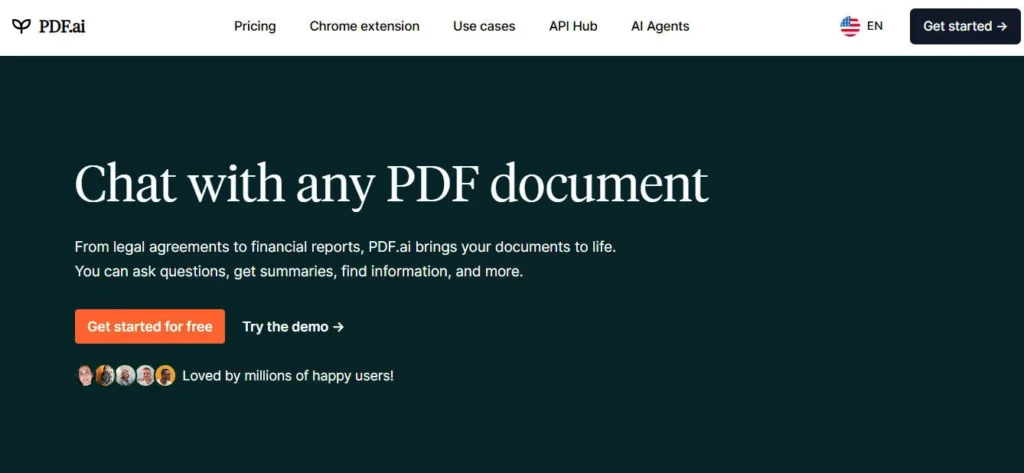
The product solves a universal pain point: instead of manually scanning a 100-page legal contract, insurance policy, or research paper to find one answer, you upload the file and ask it directly. The AI returns a precise, cited response in seconds with the page reference included so you can verify the source.

Key Capabilities

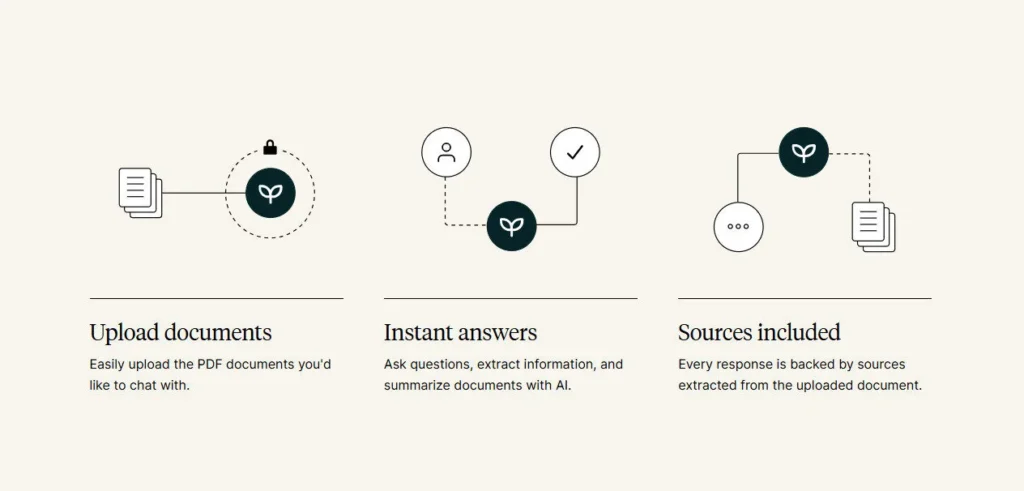
The core workflow is intentionally simple: upload a PDF, type a question, get an answer. Every response includes a citation pointing back to the exact page in the document, so you're never guessing whether the AI made something up.

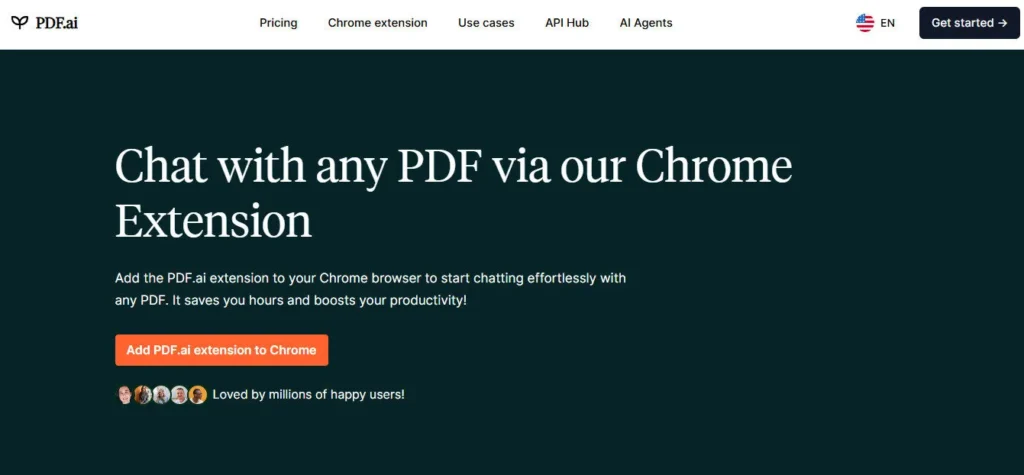
The OCR feature extends this to scanned documents and image-based PDFs — not just machine-readable text files — though page limits per file apply based on your plan. The Chrome extension brings PDF chat directly into your browser, so you can chat with PDFs you find online without downloading them first.

A tagging system lets you organize your document library with custom labels — useful if you're managing multiple files across different projects or subjects. The private document mode is a meaningful privacy feature: documents uploaded as private are never stored on PDF AI's servers, with processing happening client-side.

An embeddable PDF chatbot lets developers and businesses embed a document Q&A interface directly into their own website or product using a simple code snippet. Multilingual support means the AI responds in the language you type, regardless of the document's original language.

Who Gets the Most Out of It

Students and academics get the clearest time savings — upload a 200-page dissertation or journal article and ask targeted questions instead of reading cover to cover.

Legal and compliance professionals use it to locate specific clauses in contracts and regulatory documents without manual keyword searching. Researchers use the tagging and multi-document library to organize sources and ask cross-document questions.

Developers and businesses wanting to add document Q&A to their own products use the embeddable chatbot feature without building the AI infrastructure themselves. PDF AI is intentionally not the most feature-heavy tool in its category — it's built for users who want one thing done well: fast, reliable, cited answers from their documents.

Is It Worth It?

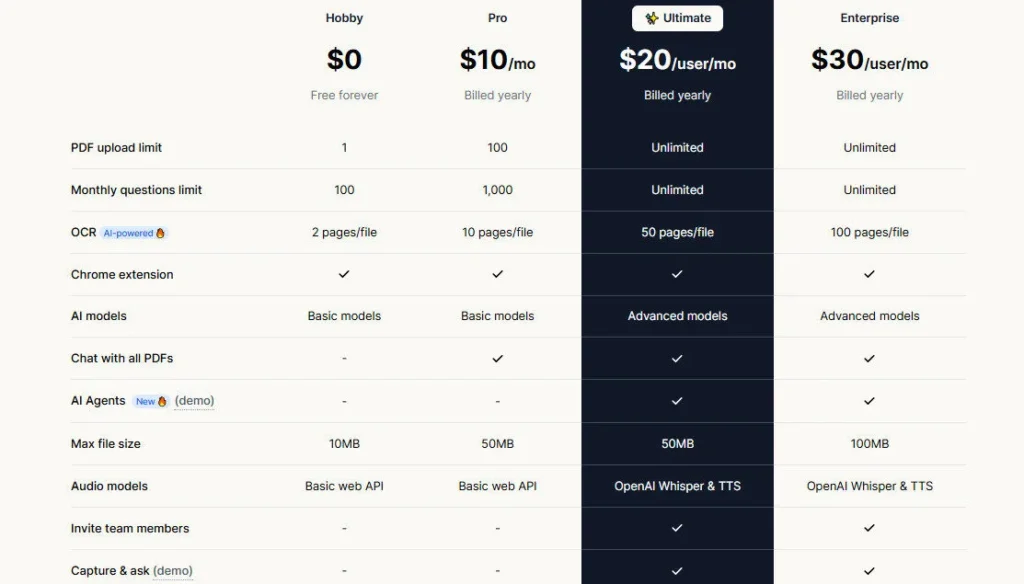
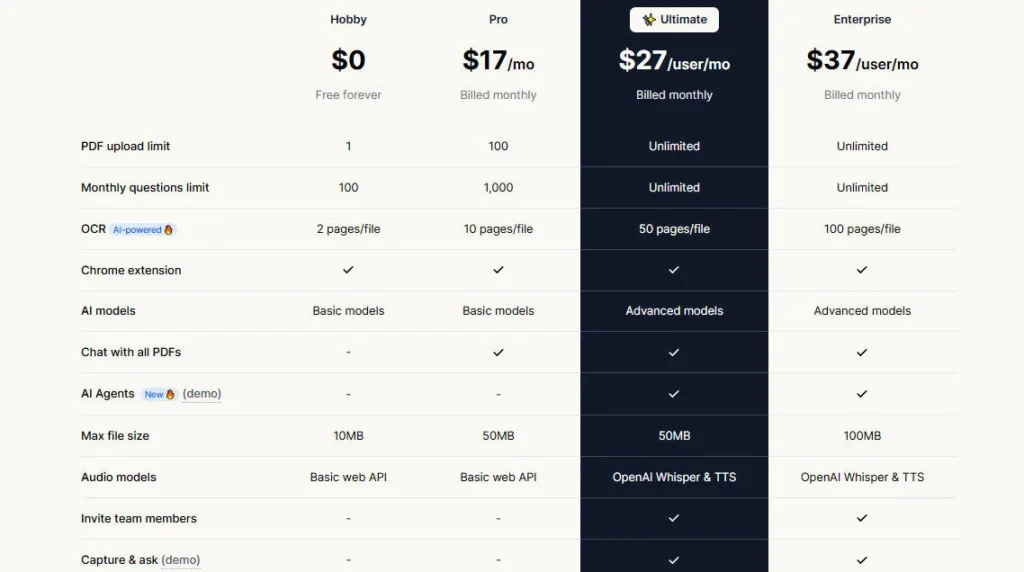
The free plan gives you 1 PDF upload and 100 questions per month — enough to test the core experience on a real document. The Pro plan at $17/month includes 100 PDF uploads, 5,000 questions per month, OCR support, the Chrome extension, and a 50 MB file size limit.

For individual professionals, students, and researchers who regularly deal with documents, $17/month is a fair price for the time saved.

The tool doesn't try to be an all-in-one writing platform — if you need knowledge bases across dozens of documents, automated research pipelines, or multi-model AI switching, tools like AskYourPDF or TextCortex are better fits. For straightforward, fast, single-document AI chat with a privacy-first design, PDF AI delivers clean, focused value.

PDF AI (pdf.ai) is an AI-powered document chat tool built and scaled by solo founder Damon Chen, a former Cisco engineer, after acquiring the original product in May 2023 for $20,000. It lets users upload any PDF document and ask natural-language questions, receiving precise, cited answers in seconds. Trusted by 350,000+ users and generating $60K+ MRR, it's one of the most successful solo-built AI products in the document intelligence space.

• Chat with Any PDF — Upload a PDF and ask it questions in plain English; the AI returns precise, cited answers with the page number from your document — no manual scrolling or keyword searching required.

• Cited Responses with Page References — Every answer includes a reference to the exact page in your document, allowing you to verify accuracy and click through to the source instantly.

• OCR for Scanned Documents — AI-powered Optical Character Recognition converts scanned PDFs and image-based documents into queryable text, extending chat functionality beyond machine-readable files.

• Chrome Extension — Chat with PDFs you find on any website directly in the browser without downloading the file first — activate the extension, and any PDF URL becomes instantly queryable.

• Private Document Mode — Documents uploaded as private are never stored on PDF AI's servers; processing happens locally, making it suitable for confidential contracts, medical records, or sensitive business documents.

• Embeddable PDF Chatbot — Embed a fully functional PDF Q&A chatbot into any website or application using a simple code snippet — no AI infrastructure required, making it practical for businesses and developers.

• Tag-Based Document Organization — Assign custom tags like ‘Legal', ‘Research', or ‘Finance' to your uploaded PDFs for faster retrieval across large document libraries.

• Multilingual Responses — The AI responds in the language you type, regardless of the original document's language — making it useful for researchers working with foreign-language sources.

Pros
  • Cited responses with exact page references — every answer is verifiable, not just plausible
  • Private document mode ensures sensitive files are never stored on PDF AI's servers
  • Chrome extension lets you chat with any PDF found online without downloading it first
  • OCR support extends document chat to scanned and image-based PDFs — not just text-layer files
  • Embeddable PDF chatbot allows developers and businesses to deploy document Q&A in their own products without building AI infrastructure
  • Multilingual response support makes it practical for researchers working with foreign-language documents
  • Solo-founder story and $60K+ MRR demonstrates product-market fit and lean operational reliability
Cons
  • ×Free tier is very restrictive — only 1 PDF upload and 100 questions per month before hitting limits
  • ×No multi-document Knowledge Base feature for querying across multiple files simultaneously — a gap versus competitors like AskYourPDF
  • ×OCR page limits per file apply even on the Pro plan — heavily scanned documents with many pages require careful planning
  • ×No mobile app for iOS or Android — access is limited to the web app and Chrome extension
  • ×No support for non-PDF file types (Word, Excel, PowerPoint) — document format support is narrower than competing tools
  • ×Solo-founder operation means support capacity and update velocity may be limited during high-demand periods

PDF AI is best suited for users who need fast, reliable, cited document answers without the complexity of a full-stack research or knowledge management platform.

Students & Academic Researchers — Upload lecture notes, research papers, and textbooks to extract specific answers and cited passages in seconds — dramatically faster than manual scanning for key arguments or data points.

• Legal & Compliance Professionals — Use Private Document Mode to safely process confidential contracts and regulatory filings, locating specific clauses and definitions without uploading sensitive material to third-party cloud servers.

Business Professionals & Executives — Process RFP documents, financial reports, technical manuals, and meeting transcripts — extracting the exact figures and decisions you need without reading the full document.

• Developers & SaaS Builders — Use the embeddable PDF chatbot snippet to add document Q&A to a client-facing product, internal tool, or customer support portal without building AI infrastructure from scratch.

• Casual Power Users on a Budget — At $17/month for 100 uploads and 5,000 questions, PDF AI delivers solid document intelligence value for individuals who regularly deal with PDFs but don't need the complexity or cost of enterprise knowledge base tools.

Free ($0/mo)1 PDF upload per month, 100 questions per month, OCR support (2 pages per file), basic document chat, no credit card required.
Pro ($17/mo)100 PDF uploads per month, 5,000 questions per month, OCR support (10 pages per file), Chrome extension, chat with all PDFs simultaneously, 50 MB file size limit, embeddable PDF chatbot, private document mode, tag-based organization, multilingual responses, customer support.
Enterprise (Custom)N/A — This tool does not offer a publicly listed enterprise plan; contact the developer for custom API or volume requirements.

PDF AI stands apart through deliberate simplicity, a privacy-first architecture, and the only embeddable chatbot feature in its price range for developers.

• Private Document Mode (No Server Storage) — Unlike most PDF chat tools that store every uploaded file on their servers, PDF AI's private document mode processes documents without saving them — a structural privacy advantage that matters enormously for legal, medical, and financial documents where confidentiality is non-negotiable.

• Embeddable PDF Chatbot for Developers — PDF AI is one of the few tools in the document chat category that lets developers embed a fully functional PDF Q&A interface into their own product via a code snippet — without managing AI APIs, model hosting, or retrieval infrastructure themselves.

• Chrome Extension with URL-Based PDF Chat — Most PDF chat tools require you to download a file before processing it. PDF AI's Chrome extension activates on any PDF URL in your browser, letting you chat with documents hosted on external websites — useful for reading research papers, legal filings, and technical documentation found online.

• Solo-Founder Profitability as a Trust Signal — Built by a single founder with no external funding to $60K+ MRR and 350,000+ users, PDF AI's economics prove genuine product-market fit — not VC-funded growth masking low retention. This lean, self-sustaining operation means the product is built for users who pay, not for investors who demand features.

• Cited Answers as a Core Design Principle — Rather than generating fluent-sounding summaries that may be partially fabricated, PDF AI anchors every response to a specific page reference in the source document — making verification the default, not an afterthought.

PDF AI operates primarily as a web-based platform and Chrome extension, covering the main environments where professionals interact with PDF documents.

• Google Chrome (Browser Extension) — The official PDF AI Chrome extension activates on any PDF URL, enabling document chat directly in the browser without downloading files or switching to the web app.

• Any Modern Web Browser (Web App) — The full PDF AI platform runs in any modern browser without a desktop install — accessible on Chrome, Firefox, Edge, Safari, and Brave on both macOS and Windows.

• Embeddable Environments (Websites & Web Apps) — The embeddable PDF chatbot can be integrated into any website or web application via a simple HTML/JavaScript snippet, covering custom portals, documentation sites, legal platforms, and internal business tools.

• GPT-4 (OpenAI) — PDF AI is powered by OpenAI's GPT-4 model for document understanding, question answering, and citation extraction — giving it the same underlying language intelligence as ChatGPT with document-specific retrieval on top.

• Any PDF Source (URL or File Upload) — PDF AI accepts both local file uploads and direct PDF URLs from external websites via the Chrome extension, making it compatible with documents hosted on academic databases, government portals, legal repositories, and corporate intranets.

CategoryScoreWhy It Matters
Accuracy & Reliability4.4/5PDF AI's GPT-4-powered document retrieval consistently produces accurate, page-cited responses for well-structured PDFs across standard use cases including research papers, legal contracts, and technical documents. The citation-first design means every answer points to a verifiable source in your document — significantly reducing hallucination risk compared to AI tools that generate responses without source attribution. OCR accuracy on heavily degraded or low-resolution scans can vary, which introduces occasional extraction errors on poor-quality source material.
Ease of Use4.9/5The upload-and-chat workflow requires zero configuration — sign up, upload a file, and ask a question in under 60 seconds. Multiple user reviews and the StartupStory feature on Damon Chen's growth story emphasize that new users reach their first successful query immediately, with no onboarding required. The Chrome extension removes even the upload step for PDFs found online. The intentionally minimal feature set means there's nothing confusing to navigate.
Functionality & Features3.9/5PDF AI delivers its core feature set cleanly — document chat, cited responses, OCR, Chrome extension, private mode, embeddable chatbot, multilingual support, and tag organization. However, it lacks multi-document Knowledge Base queries, non-PDF file format support (Word, Excel, PowerPoint), mobile apps, and multi-model AI selection that competing tools at similar price points offer. It's intentionally a focused tool, not a comprehensive platform — and the rating reflects that honest scope boundary.
Performance & Speed4.6/5PDF AI is consistently fast — documents process and initial responses appear typically within 2–3 seconds for standard PDF lengths. The minimal architecture of a solo-founder product without enterprise feature bloat contributes to reliable response times. Multiple community reviews and the Starter Story feature on the product specifically praise low latency and uptime reliability. Heavy OCR processing on large scanned documents introduces minor additional latency.
Customization & Flexibility3.7/5Customization options are intentionally limited — you can organize documents with custom tags, toggle private mode per document, and choose question phrasing freely in any language. Developers get meaningful flexibility via the embeddable chatbot snippet. There is no tone selection, custom AI persona configuration, or model switching capability. For users who need deeper output control or multi-document workflow configuration, competing platforms offer significantly more flexibility.
Data Privacy & Security4.8/5PDF AI's Private Document Mode — which processes files without storing them server-side — is a structurally superior privacy architecture compared to most PDF chat tools that retain all uploaded documents. The platform explicitly states a no-training-on-user-data policy and allows users to delete documents from their account at any time. The solo-founder operational model means fewer employees with access to user data, reducing organizational privacy risk compared to larger teams.
Support & Resources3.6/5PDF AI is built and operated by a single founder, which inherently limits support infrastructure compared to team-operated platforms. The website includes a resources blog with tutorials and how-to guides. Customer support is available on paid plans but response times and capacity are constrained by the solo-operator model. The simplicity of the product reduces the frequency of support needs — most users can resolve questions through the resource articles without contacting support.
Cost-Efficiency4.7/5At $17/month for the Pro plan — including 100 PDF uploads, 5,000 questions, OCR, Chrome extension, embeddable chatbot, and private document mode — PDF AI delivers a strong value-to-price ratio for individual users and small teams. The free tier allows meaningful first-time testing. Scaling costs are predictable with a single flat monthly plan rather than confusing credit systems or per-model charges. Compared to enterprise-class competitors charging $30–$50/month for similar document chat functionality, PDF AI is competitively priced.
Overall Score4.3/5PDF AI earns a 4.3 for delivering a focused, fast, privacy-first PDF chat experience that its 350,000+ users clearly value — built and operated profitably by a single founder without external funding. Its cited-answer design, private document mode, and embeddable chatbot are genuine differentiators at $17/month. The intentionally narrow feature scope — no multi-document queries, no mobile app, no non-PDF file support — keeps it from scoring higher, but for its core use case of fast, reliable, cited document chat, PDF AI is honest, well-priced, and dependable.

PDF AI is a focused, well-executed AI document chat tool that earns its 350,000+ user base by doing one thing better than most competitors: returning fast, cited, verifiable answers from any PDF — with a privacy-first private document mode that prevents sensitive files from being stored server-side. At $17/month for the Pro plan, it's one of the most affordable document intelligence tools available, built and run profitably by a single founder with no external funding.

It's not the right tool for multi-document knowledge bases or enterprise-grade collaboration — but for individuals, students, legal professionals, and developers who need clean, reliable PDF chat with a privacy-conscious design, PDF AI is a strong and honest choice.

Q1.What is PDF AI and how does it work?
Ans:-PDF AI (pdf.ai) is an AI-powered document chat tool that lets you upload any PDF and ask questions in plain English. The AI reads the document and returns precise answers with citations pointing to the exact page number so you can verify every response. It's powered by GPT-4 and available via web app and Chrome extension.
Q2.Is PDF AI free to use?
Ans:-Yes. PDF AI offers a permanent free plan with 1 PDF upload per month, 100 questions per month, and limited OCR support — no credit card required. The Pro plan at $17/month unlocks 100 PDF uploads, 5,000 questions per month, full OCR, Chrome extension access, and the embeddable chatbot feature.
Q3.Who built PDF AI?
Ans:-PDF AI was built and scaled by Damon Chen, a former Cisco engineer based in San Jose, California. In May 2023, Damon acquired the original product for $20,000 with zero revenue, rebuilt it around GPT-4 document chat, and grew it to over $60,000 MRR and 350,000+ users within months — entirely bootstrapped with no external funding.
Q4.What is the Private Document Mode in PDF AI?
Ans:-Private Document Mode is a privacy feature where documents you flag as private are processed without being stored on PDF AI's servers. This makes it safe to chat with confidential contracts, medical records, financial filings, and other sensitive materials — the document analysis happens without leaving a server-side copy. This is a key differentiator from most PDF chat tools that store all uploaded files.
Q5.Can PDF AI read scanned PDFs?
Ans:-Yes. PDF AI includes OCR (Optical Character Recognition) support that converts scanned and image-based PDFs into queryable text. On the free plan, OCR is limited to 2 pages per file; on the Pro plan, it covers 10 pages per file. Heavily scanned documents exceeding the page limit will have OCR applied only up to the plan's cap.
Q6.Does PDF AI have a Chrome extension?
Ans:-Yes. The PDF AI Chrome extension is available on the Pro plan and allows you to chat with PDFs you find anywhere on the web without downloading them. When you navigate to any PDF URL in Chrome, the extension activates and gives you instant access to document chat directly in the browser.
Q7.Can I embed PDF AI on my own website?
Ans:-Yes. PDF AI includes an embeddable PDF chatbot feature on the Pro plan that lets developers add a fully functional document Q&A interface to any website or web application using a simple code snippet. This allows businesses to offer AI-powered document chat in their own products without building GPT-4 retrieval infrastructure from scratch.
Q8.What languages does PDF AI support?
Ans:-PDF AI supports multilingual responses — you ask a question in your preferred language and the AI responds in that language, even if the original document is written in a different language. This makes it practical for researchers and professionals working with foreign-language source documents.
Q9.How is PDF AI different from AskYourPDF?
Ans:-PDF AI is more focused and privacy-first — it offers Private Document Mode, an embeddable chatbot for developers, and a Chrome extension for chatting with online PDFs, but it lacks multi-document Knowledge Base queries and mobile apps. AskYourPDF supports simultaneous querying across multiple documents, 5M+ users, a ChatGPT plugin, a Zotero integration, and both iOS and Android apps — making it more feature-rich for power researchers and larger teams. PDF AI is simpler, more affordable at $17/month, and better suited for users who prioritize data privacy.
Q10.What are the main limitations of PDF AI?
Ans:-PDF AI's free tier allows only 1 PDF upload and 100 questions per month — very limited for regular use without upgrading. There is no multi-document Knowledge Base feature for cross-file queries, no mobile app for iOS or Android, and no support for non-PDF file types like Word or Excel. OCR page limits per file apply even on the Pro plan. Users who need enterprise-grade knowledge management across many documents will find AskYourPDF or TextCortex more capable.

Promote This Tool

Help others discover this tool by sharing this page.

✓ Link copied to clipboard!

PDF AI Reviews

0.0
Based on 0 reviews
5 star
0%
4 star
0%
3 star
0%
2 star
0%
1 star
0%

Write a Review

Your Rating:

No reviews yet. Be the first to share your thoughts!

40 Similar PDF AI Tools