Home Categories Deals Sign Up
Updated: April 25, 2026

How Komo AI Works: From SOPs to Autonomous Execution

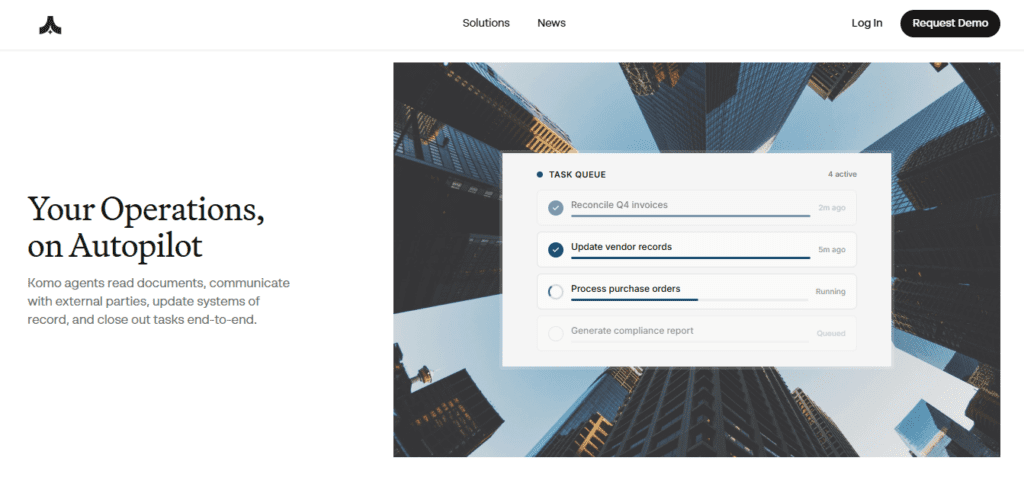
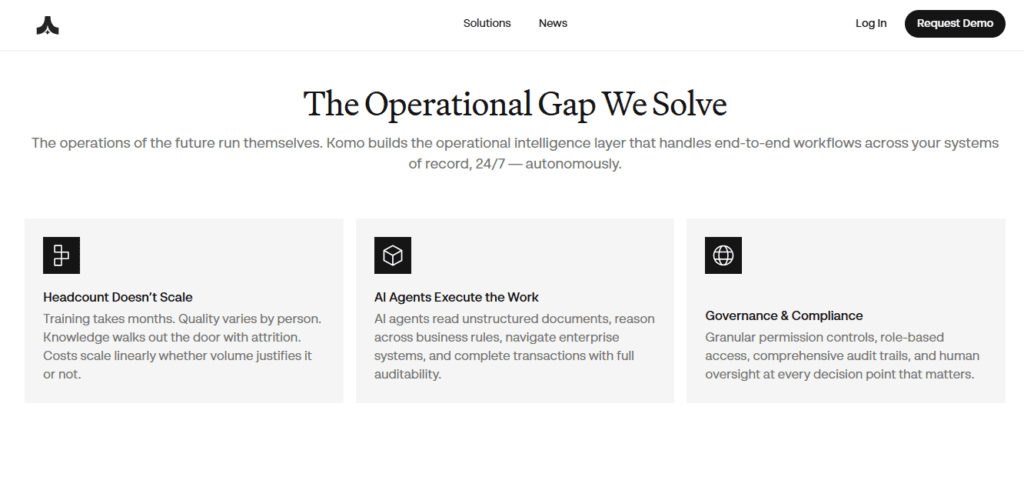
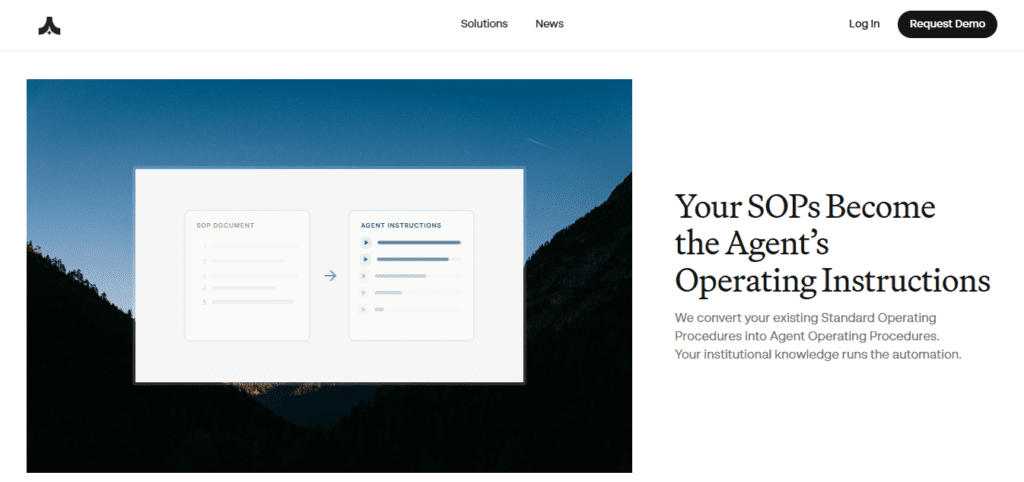
Komo AI AI tool – Komo AI isn't a chatbot you nudge step by step — it's a full AI operations platform that understands your workflows and runs them end-to-end. You upload a Standard Operating Procedure, describe your process in plain language, or record your screen, and Komo converts it into a repeatable automated playbook.

From that point, your AI agents execute the entire workflow across every connected tool without you lifting a finger. This is the core distinction: most AI tools answer questions; Komo completes work.

Key Capabilities

The platform operates on a credit-based system tied to actual operations executed. On the Essential plan at $20/month, you get 20,000 credits, 5 agent playbooks, and 100+ integrations covering Google Drive, SharePoint, email, and calendar.

The Plus plan at $50/month adds remote computer use for background agents — Komo can navigate browsers and applications autonomously on your behalf. The Advanced plan at $200/month unlocks GPT-5, 100 advanced playbooks, and video-based playbook recording.

You can run thousands of agents in parallel, operate persistent email and calendar assistants around the clock, and run Structured Research including batch document analysis through the Data Room. Every action Komo takes produces a full report and source citations so you always know what it did and why.

Who Gets the Most Out of It

Solo professionals handling high-volume research, outreach, or data enrichment tasks get immediate ROI on the $20–$100/month tiers. Small business teams on the Premium plan at $500/month can automate entire operational workflows without adding headcount.

Enterprise organizations get custom deployments with dedicated account managers, SLA guarantees, and custom security configurations. If your team runs the same multi-step processes repeatedly across multiple platforms, Komo directly eliminates that manual overhead — at scale.

Is It Worth It?

The free plan is functional for testing basic AI search but offers no agent playbooks, making it more of a demo than a working tier. The 7-day free trial on any paid plan is a smarter entry point — it lets you run real workflows before committing. At $20/month, Essential is a solid entry tier for individuals.

The jump to $100/month for Pro is significant, but at that level you get unlimited credits, 20 advanced playbooks, and remote computer use agents, replacing tools that cost far more when purchased separately. The steepest learning curve is building good playbooks — Komo rewards process-oriented teams who invest in setup.

If you need simple answers, a general-purpose chatbot is faster to start. But for operations-heavy workflows, Komo's autonomous execution model stands clearly apart from every AI assistant on the market.

Komo AI is an autonomous AI operations platform that transforms Standard Operating Procedures into automated end-to-end workflows executed by AI agents 24/7 across connected tools. Originally launched in 2023 as a private AI-powered search engine, the platform has evolved into a comprehensive agentic workspace supporting individuals, solo professionals, and enterprise teams.

It integrates with 100+ platforms including Google Drive, SharePoint, email, Slack, and web browsers to execute operations — including structured research, data enrichment, and document analysis — without manual intervention.

• SOP-to-Playbook Automation — Upload an SOP document, describe your process in plain language, or record your screen; Komo converts it into a reusable automated playbook that agents execute end-to-end without manual input.

• Parallel Agent Execution — Run thousands of AI agents simultaneously across connected tools, scaling operations in volume without scaling your team's headcount.

• Background Agents (Email & Calendar) — Persistent agents manage your inbox and calendar 24/7, drafting replies, scheduling meetings, and flagging priority items autonomously on Essential plans and above.

• Remote Computer Use — Plus plan and above allows Komo agents to control browsers and desktop applications on your behalf, executing tasks that require real interface navigation.

• Structured Research & Data Enrichment — The @Research function performs batch document analysis and data enrichment across uploaded files and external sources simultaneously, with full source citations on every output.

• Data Room & Document Research — Pro plan and above includes a dedicated Data Room where agents analyze large sets of uploaded documents, extract key data points, and synthesize findings across an entire corpus.

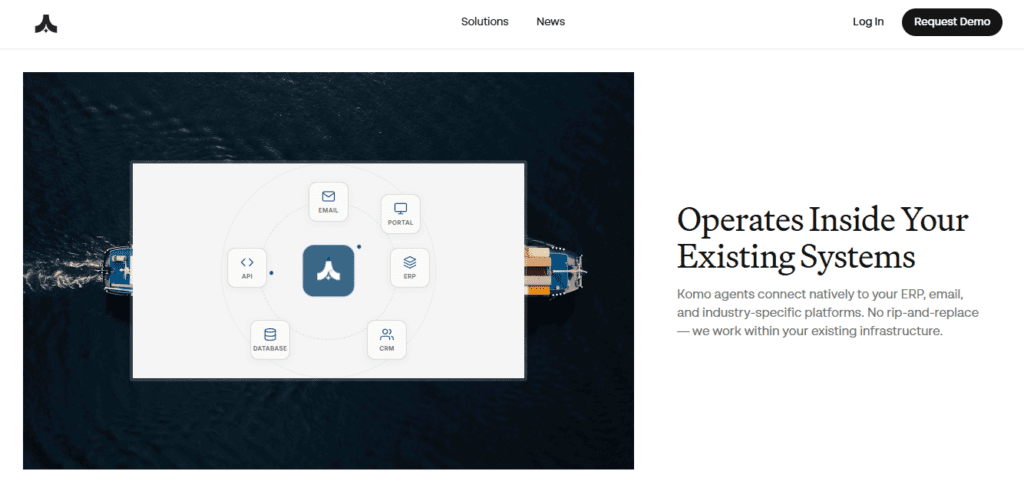
• 100+ Integrations — Native connectors to Google Drive, Microsoft SharePoint, OneDrive, email clients, calendar tools, Slack, and browser environments ensure agents can operate across your full existing stack.

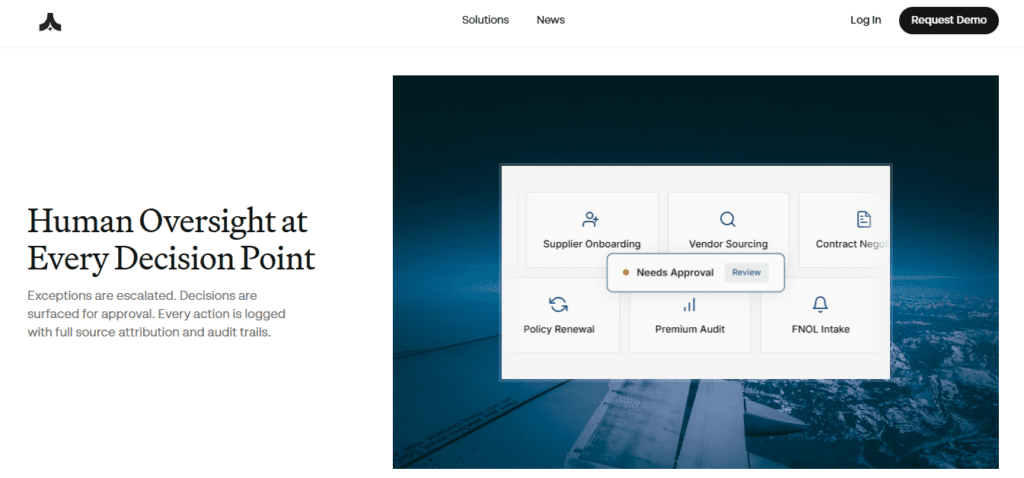
• Full Transparency Reports — Every action taken by an agent produces a detailed activity report with source citations, giving you complete visibility into what was executed, how, and based on what information.

Pros
  • Free tier plus 7-day trial on all paid plans lets you test real workflows before paying
  • SOP-to-playbook conversion works via text, document upload, or screen recording — no coding required
  • Remote computer use agents can navigate real browser interfaces, not just API connections
  • Parallel agent execution scales operations without additional headcount or tool subscriptions
  • Credit-based pricing means you only consume resources on actual operations, not idle time
  • Detailed activity reports with source citations on every agent action ensure full auditability
  • Access to GPT-5 and Claude 4.5 on Advanced and above plans, without separate API subscriptions
Cons
  • ×Free plan offers no agent playbooks — you need a paid plan to access the core automation value
  • ×Jump from Essential ($20/mo) to Pro ($100/mo) is steep with no mid-tier for moderate professional use
  • ×Building effective playbooks requires upfront time investment; casual or one-off users will not see full ROI
  • ×Credit limits on lower tiers can be depleted quickly by heavy research or parallel agent workloads
  • ×No published SOC 2 certification or detailed security documentation visible on the public-facing site
  • ×Platform is primarily web-based with no dedicated mobile app for monitoring or managing active agents

Komo AI is best suited for operations-heavy teams and professionals who run the same multi-step processes repeatedly and want AI to execute them — not just assist with them.

• Solo professionals and freelancers — Researchers, consultants, and analysts on the Pro plan ($100/month) can automate lead enrichment, competitor research, and document review workflows that previously consumed hours of manual work daily.

• Small business operations teams — Teams with defined repeatable processes — onboarding, outreach, data processing — use Komo on the Premium plan ($500/month) to execute workflows without hiring additional staff.

• Enterprise organizations — Companies with complex SOPs and high-volume operations benefit from custom deployments, dedicated support, and unlimited custom agents, with SLA guarantees and custom security requirements.

Productivity-focused individuals — Users on the Essential plan ($20/month) can automate email management, calendar scheduling, and structured research tasks using background agents without writing a single line of code.

• Research-heavy knowledge workers — Analysts and researchers on Plus and above plans leverage Structured Research and Data Room to perform batch document analysis and data enrichment across large corpora with cited outputs.

Free ($0/mo)Limited AI Search access, limited Research queries, basic AI models only, no agent playbooks.
Essential ($20/mo)20,000 credits/month, unlimited Search, 5 basic agent playbooks, 100+ integrations (Drive, SharePoint, Email, Calendar), Advanced AI models (GPT-3, Claude 4.5), basic background agents (Email/Calendar assistants), Structured Research with data enrichment and batch document analysis.
Plus ($50/mo)50,000 credits/month, unlimited Research, 20 basic agent playbooks, 100+ integrations, Advanced AI models (GPT-4, Claude 4.5), advanced background agents with remote computer use, Data Room and Document Research.
Pro ($100/mo)100,000 credits/month, unlimited Search and Research, 20 advanced agent playbooks, 100+ integrations, Advanced AI models (GPT-3, Claude 4.5), advanced background agents with remote computer use, Structured Research, Data Room and Document Research.
Advanced ($200/mo)200,000 credits/month, unlimited Search and Research, 100 advanced agent playbooks including video playbooks, GPT-5 and Claude 4.5 access, advanced background agents with remote computer use, Structured Research, Data Room and Document Research.
Premium ($500/mo)500,000 credits/month, unlimited Search and Research, 100 advanced agent playbooks with video playbooks, GPT-5 and Claude 4.5, advanced background agents with remote computer use, Advanced Data Room and Document Research, Priority Support.
Max ($1,000/mo)1,000,000 credits/month, unlimited Search and Research, 100 advanced agent playbooks with video playbooks, GPT-5 and Claude 4.5, advanced background agents with remote computer use, Advanced Data Room and Document Research, Priority Support.
Enterprise (Custom)Custom credits, unlimited custom agents, custom AI model configuration, custom integrations, custom agent playbooks, dedicated account manager, custom deployment options, SLA guarantees, custom security requirements, dedicated support team.

Komo AI's core differentiator is autonomous end-to-end workflow execution — not AI-assisted drafting or Q&A, but complete operations run without human intervention step-by-step.

• SOP-to-Playbook in Three Input Modes — You can feed Komo your workflow via uploaded document, plain-language description, or screen recording. No other mainstream AI operations platform accepts all three input types for playbook creation without requiring technical configuration.

• Remote Computer Use Agents — From the Plus plan upward, Komo's background agents can control real browser interfaces and desktop applications to complete tasks that require actual navigation — not just API calls — making it useful for tools without native integrations.

• Credit-Based Transparent Pricing — Every operation consumes a defined number of credits, so you only pay for real work completed. Unlike seat-based or token-based pricing, this model is directly tied to operational output, not model usage.

• Full Auditability on Every Action — Every agent action produces a detailed report with source citations and step-by-step logs. This level of transparency is essential for regulated industries and teams that need to verify or audit what AI executed on their behalf.

Komo AI runs entirely in the browser and connects to a wide range of productivity, cloud storage, communication, and automation platforms via its 100+ native integrations.

• Cloud Storage and Productivity Suites — Google Drive, Microsoft SharePoint, and OneDrive integrate natively on Essential plans and above, allowing agents to read, write, and organize documents without manual uploads.

• Email and Calendar Platforms — Background agents connect to email clients and calendar tools to manage scheduling, draft replies, and flag priority items autonomously around the clock from the Essential plan.

• Browser and Desktop Environments — Remote computer use (Plus plan and above) lets agents navigate real web browsers and desktop applications, enabling automation of any tool — even those without an API.

• Communication Tools — Slack and other messaging platforms are supported in the 100+ integrations library, allowing agents to post updates, read threads, and trigger actions based on real-time messages.

• Web Browsers — Komo runs fully in-browser on Chrome, Firefox, Safari, and Edge without any software installation required, and the 7-day free trial is accessible immediately upon signup at komo.ai.

CategoryScoreWhy It Matters
Accuracy & Reliability4.4/5Komo AI generates full activity reports and source citations on every agent action, providing strong transparency and auditability compared to black-box automation tools. Playbook execution across 100+ integrations is robust for structured, well-defined workflows. Reliability drops slightly for tasks requiring dynamic judgment calls outside the original playbook scope, which is typical of agentic platforms at this stage of development.
Ease of Use4.1/5Creating playbooks via plain-language description or screen recording removes the coding barrier entirely, making setup accessible to non-technical users. The web interface is clean and modern. However, building effective playbooks for complex workflows requires meaningful upfront effort — users who invest less time in setup will see limited results, which is a steeper onboarding curve than standard AI chatbots.
Functionality & Features4.6/5The combination of SOP automation, parallel agent execution, remote computer use, Structured Research, Data Room document analysis, and persistent background email/calendar agents puts Komo well ahead of most AI productivity platforms in raw functional scope. The inclusion of GPT-5 and Claude 4.5 on Advanced plans, plus support for video-based playbook recording, adds capabilities that competitors have not yet matched.
Performance & Speed4.3/5Background agents run 24/7 and parallel execution allows thousands of agents to operate simultaneously, which is a genuine performance advantage for high-volume operations. Individual research queries return cited responses quickly. Playbook execution speed varies with the complexity of connected tool interactions, particularly when remote computer use is involved in multi-step browser navigation.
Customization & Flexibility4.5/5Komo supports three playbook creation methods (document, language, screen recording), a credit-based pricing model that scales by actual usage, and a range of AI models from GPT-3 through GPT-5 depending on plan. Enterprise customers get fully custom agent playbooks, custom integrations, and custom AI model configurations. The modular architecture makes it adaptable to significantly different operational contexts.
Data Privacy & Security3.9/5Enterprise plans include custom security requirements and custom deployment options, suggesting the infrastructure can support data-sensitive environments. However, Komo AI does not prominently publish SOC 2 certification, GDPR compliance documentation, or data retention policies on its public-facing website. For teams handling regulated or confidential data, this lack of visible compliance documentation requires direct clarification with the sales team before committing.
Support & Resources4.2/5All users can contact support at [email protected], and the Komo AI documentation at docs.komo.ai is detailed and up-to-date with plan-by-plan feature breakdowns. Premium and Max plan users receive Priority Support, and Enterprise customers get a dedicated account manager. Support SLA response times are not publicly specified for standard plans, which is a minor transparency gap.
Cost-Efficiency4.3/5At $20/month for Essential, Komo delivers genuine automation value — 5 agent playbooks, 100+ integrations, and background email/calendar agents — that would cost significantly more across individual automation tools. The Pro plan at $100/month is steep for solo users but replaces multiple automation, research, and AI assistant subscriptions simultaneously. The Max plan at $1,000/month for 1 million credits is competitive for teams replacing human operational roles.
Overall Score4.3/5Komo AI is the most functionally advanced autonomous operations platform available at accessible pricing in 2026, offering SOP-to-agent automation, parallel execution, remote computer use, and GPT-5 access in a single workspace. The primary friction points — upfront playbook setup time and limited public security documentation — are worth acknowledging, but for operations-heavy teams and professionals, the platform delivers category-leading value.
Get the newest updates on the official website now!
Visit Website

Komo AI is the most capable autonomous operations platform available in 2026 for teams that run process-heavy workflows and need AI to execute — not just advise. At $20/month, Essential is a credible entry point; the Pro tier at $100/month unlocks the full agentic toolkit for serious individual users. The main commitment required is upfront playbook setup — teams that invest that time will find Komo eliminates entire categories of manual, repetitive operational work.

Q1.What is Komo AI and what does it actually do?
Ans:-Komo AI is an autonomous AI operations platform that transforms your Standard Operating Procedures into automated workflows executed by AI agents. Unlike standard AI chatbots, it doesn't just answer questions — it performs complete multi-step operations across your connected tools (email, Google Drive, SharePoint, browsers) without manual intervention. It was originally launched in 2023 as an AI search engine and has since evolved into a full agentic platform.
Q2.Is Komo AI free to use?
Ans:-Yes, Komo AI has a permanently free plan with limited Search access and basic AI models, but it does not include agent playbooks — which are the core value of the platform. For meaningful automation, paid plans start at $20/month (Essential). All paid plans come with a 7-day free trial so you can test real workflows before committing.
Q3.How does the credit system in Komo AI work?
Ans:-Credits are consumed every time Komo executes an operation — search queries, research tasks, agent playbook executions, document analysis, and background agent activities each use a defined number of credits. The Essential plan includes 20,000 credits/month, Pro gives 100,000, and the Max plan provides 1,000,000. Unused credits do not roll over to the next billing cycle.
Q4.What is a Komo AI playbook and how do I create one?
Ans:-A playbook is a reusable automated workflow that an AI agent follows to complete a multi-step task. You create one by uploading an existing SOP document, describing your process in plain language, or recording your screen while you complete the task. Komo translates your input into a structured playbook that agents can execute repeatedly, 24/7, across your connected tools.
Q5.What does remote computer use mean in Komo AI?
Ans:-Remote computer use allows Komo's background agents to control a real web browser or desktop application interface — clicking buttons, filling forms, navigating menus — just as a human user would. This means Komo can automate tasks in tools that don't have APIs or native integrations. Remote computer use is available from the Plus plan ($50/month) and above.
Q6.Which AI models does Komo AI use?
Ans:-Lower tiers (Essential, Pro) use GPT-3 and Claude 4.5. The Plus and Pro plans include GPT-4 alongside Claude 4.5. The Advanced, Premium, and Max plans unlock GPT-5 and Claude 4.5, giving access to the most capable models available. Enterprise customers can request custom AI model configurations beyond the standard stack.
Q7.How does Komo AI differ from tools like Zapier or Make?
Ans:-Zapier and Make are trigger-based automation tools that execute predefined rules when specific events occur. Komo AI is an agentic platform: it understands the goal and context of a workflow, not just the steps, and can adapt to exceptions and edge cases during execution. It can also use remote computer use to operate tools that Zapier and Make cannot connect to via API.
Q8.Is Komo AI suitable for individual users or only for teams?
Ans:-Komo AI serves both. Personal plans (Free, Essential at $20/mo, Plus at $50/mo) are designed for individuals getting started or solo professionals managing their own workflows. Professional plans (Pro at $100/mo, Advanced at $200/mo) target freelancers and heavy individual users. Business and Enterprise tiers are built for teams needing collaboration, shared playbooks, and priority support.
Q9.What integrations does Komo AI support?
Ans:-Komo AI connects to 100+ tools including Google Drive, Microsoft SharePoint, OneDrive, email clients, calendar platforms, Slack, and real web browsers via remote computer use. These integrations are available on Essential plans and above. Enterprise customers can request custom integrations beyond the standard library.
Q10.Can I cancel my Komo AI subscription at any time?
Ans:-Yes. You can cancel your subscription at any time through your account's Billing & Subscription settings. Your access continues until the end of your current billing period, and no refunds are issued for partial months. If you cancel during a free trial before it ends, you will not be charged. Annual billing saves 15% compared to monthly pricing.

Promote This Tool

Help others discover this tool by sharing this page.

✓ Link copied to clipboard!

Komo AI Reviews

0.0
Based on 0 reviews
5 star
0%
4 star
0%
3 star
0%
2 star
0%
1 star
0%

Write a Review

Your Rating:

No reviews yet. Be the first to share your thoughts!

48 Similar Komo AI Tools