Home Categories Deals Sign Up
Updated: April 25, 2026

Plus AI in Action: Slides Built Where You Already Work

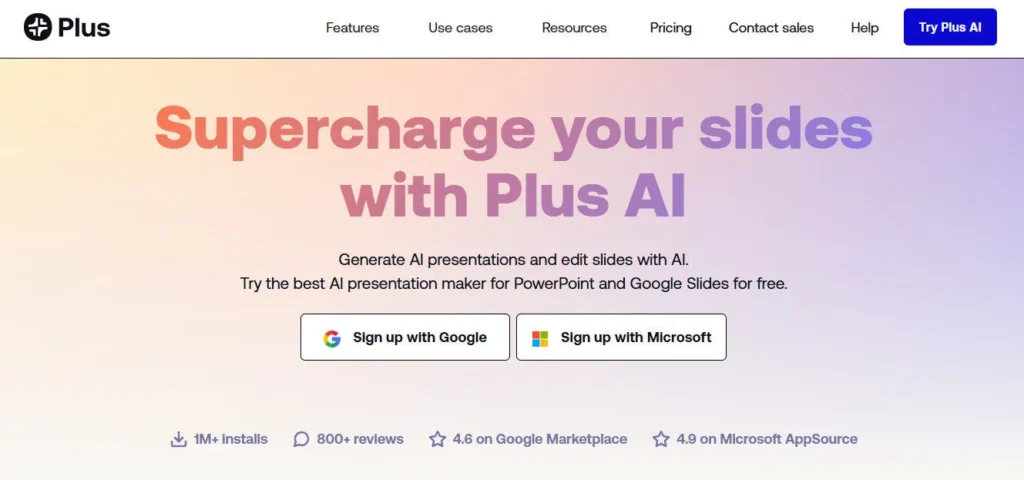
Plus AI doesn't ask you to learn a new platform. You install it as an add-in inside Google Slides or PowerPoint, then generate, reformat, and rewrite entire presentations without ever switching tabs. With over 2 million installs, a 4.6 rating on Google Marketplace, and a 4.8 on Microsoft AppSource, it's the top-rated AI presentation tool for professionals who live inside their existing slide apps.

Key Capabilities

You can generate a full deck from a text prompt, or feed Plus AI a source document — PDF, Word (.docx), or PowerPoint (.pptx) — and watch it extract and structure the content into clean slides automatically. The Remix feature is a standout: it reformats any existing slide into a completely new layout with a single click, making it ideal for refreshing legacy decks.

AI writing tools let you elaborate, summarize, rewrite, or translate slide text directly in the editor. The built-in chart generator turns raw numbers into fully editable visuals, and the AI image and icon generator adds professional visuals without leaving your presentation.

On paid plans, you can save custom instructions and reusable prompts so Plus AI always generates content in your preferred style and tone.

Who Gets the Most Out of It

Sales teams building recurring pitch decks gain the most immediate value — the saved prompts feature means a client proposal template can be regenerated with new data in under two minutes.

Consultants and analysts benefit from the document-to-slides conversion, which handles dense PDFs and Word reports without manual reformatting. Educators and trainers use it to convert course materials into structured slide decks quickly.

Enterprise teams on the custom plan get white-glove template conversion, shared asset libraries, and SOC 2 Type II compliance reporting — critical for organizations with strict brand governance and data security requirements.

Is It Worth It?

At $10/month (billed annually), the Basic plan is genuinely affordable for individuals who regularly create presentations. The Pro plan at $20/month unlocks custom branding and 100K+ character prompts — essential for teams that need branded output without manual formatting. The main friction is that custom templates require the Enterprise plan, which is custom-priced and not self-serve.

For anyone already working in Google Slides or PowerPoint daily, Plus AI pays for itself quickly: users report saving several hours per week on formatting and content structuring alone.

Plus AI is an AI-powered presentation add-in developed by Plus Docs, Inc., launched in 2021 and based in Seattle, WA. It works natively inside Google Slides and Microsoft PowerPoint, letting you generate full presentations from text prompts or source documents, and reformat existing slides using AI. With 2M+ installs and SOC 2 Type II compliance, it's built for both individual professionals and enterprise teams.

• AI Presentation Generation — Describe your topic in a sentence or upload a PDF, Word, or PowerPoint file, and Plus AI generates a complete, structured slide deck inside your existing Google Slides or PowerPoint environment.

• Remix Feature — Reformat any slide into a new layout in one click; ideal for updating legacy decks or applying fresh designs without rebuilding slides from scratch.

• AI Writing Tools — Elaborate, summarize, improve phrasing, rewrite in a different tone, or translate slide text into nearly any language — all without leaving the slide editor.

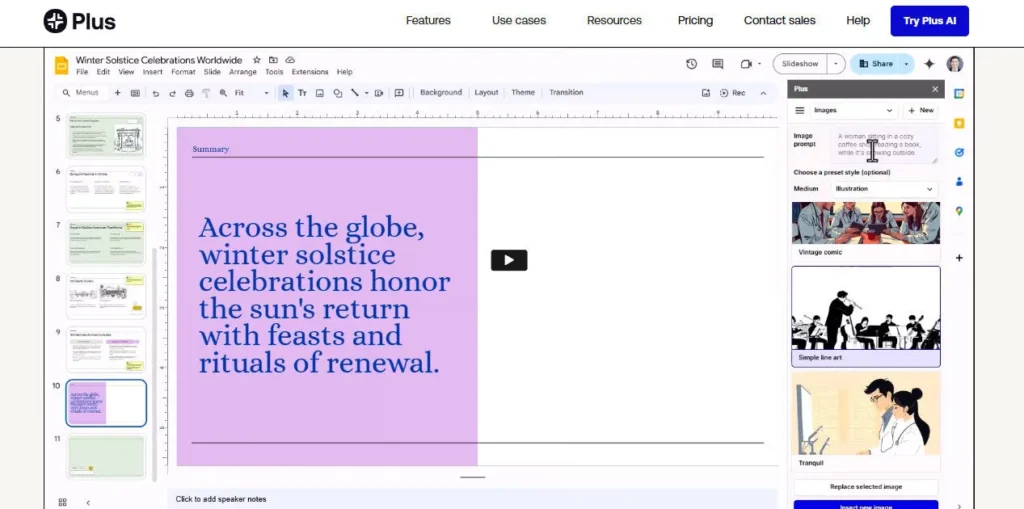
• AI Image & Icon Generator — Generate slide-specific images from text prompts using style presets, and automatically insert professional icons matched to your slide content.

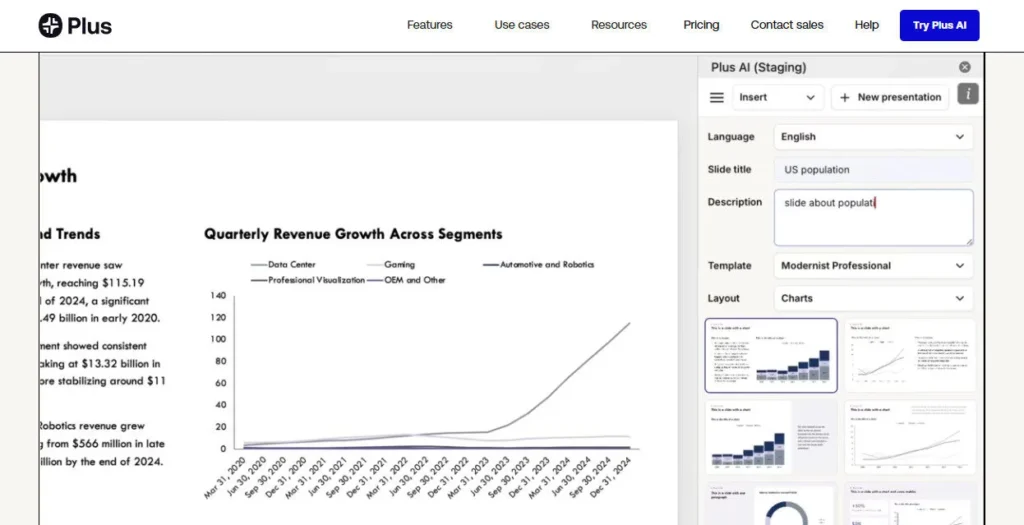
• Chart Generator — Paste in data and Plus AI builds a fully editable chart directly in Google Slides or PowerPoint, turning raw numbers into visual insights instantly.

• Custom Memory & Saved Prompts — Save frequently used instructions, brand voice guidelines, and prompt templates so every generated deck reflects your style without re-entering context.

• Custom Branding (Pro & Enterprise) — Upload your logo, fonts, and brand colors once; Plus AI applies them automatically to every new presentation generated on your account.

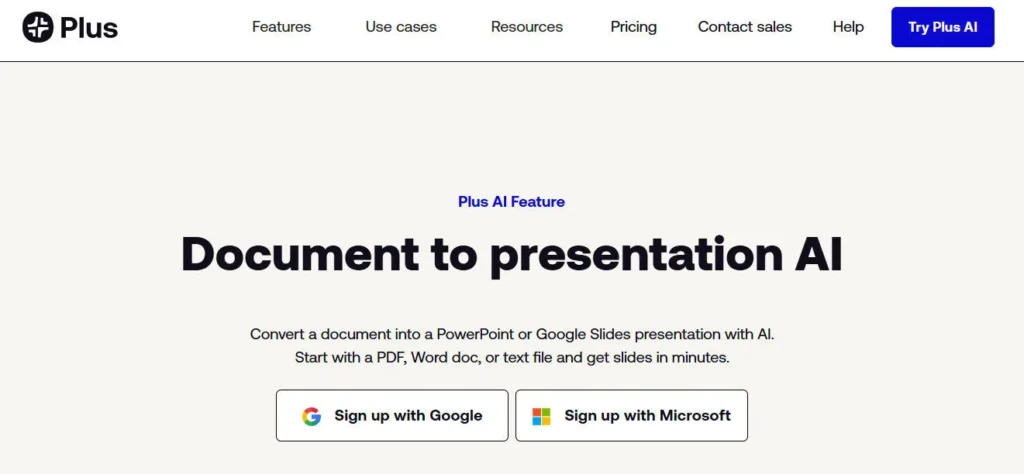
• Document-to-Slides Conversion — Feed Plus AI a PDF, Word document, or PowerPoint file and it extracts key content, structures it into an outline, and generates a new slide deck in minutes.

Pros
  • Works natively inside Google Slides and PowerPoint — no new app, no migration, no learning curve
  • 2M+ installs with a 4.6 on Google Marketplace and 4.8 on Microsoft AppSource, the highest ratings in the AI presentation category
  • Remix reformats any existing slide into a fresh layout in one click, saving hours on deck redesigns
  • SOC 2 Type II certified — one of the few AI presentation tools with verified enterprise-grade data security
  • Accepts PDF, Word, and PowerPoint files as source documents for generating new presentations
  • 7-day free trial gives full access to paid plan features before any charge
  • Built-in multilingual support reads, writes, and translates presentations into nearly any language
Cons
  • ×No permanent free plan — the 7-day trial requires a credit card upfront, which creates friction for casual users evaluating the tool
  • ×Custom templates and branded slide libraries are locked behind the Enterprise plan with no public pricing, forcing a sales call before you can access them
  • ×Pro plan at $20/month (annual) or $25/month (monthly) adds up to $240–$300/year per user, making it expensive for larger teams
  • ×Functions as an add-on or add-in requiring installation in Google Slides or PowerPoint — it is not a fully standalone web creation tool
  • ×AI-generated slides on complex or data-heavy topics often require significant manual editing to reach publication quality

Plus AI is designed for working professionals who create presentations regularly and want AI to handle the heavy lifting inside tools they already use.

Sales professionals — generate client pitch decks and proposals from a saved prompt template in under two minutes, with auto-applied branding on every new deck.

• Consultants and analysts — convert dense PDF reports and Word documents into clean, structured slide decks without manual copy-pasting or reformatting.

• Educators and corporate trainers — transform course materials, training guides, and outlines into polished presentation decks using AI-generated layouts and speaker-ready content.

• Enterprise teams — use custom templates, shared asset libraries, and SOC 2 Type II compliance to govern branded presentation creation at scale across large organizations.

Marketing teams — use saved prompts and custom branding to produce consistent, on-brand campaign decks and internal reports rapidly across multiple team members.

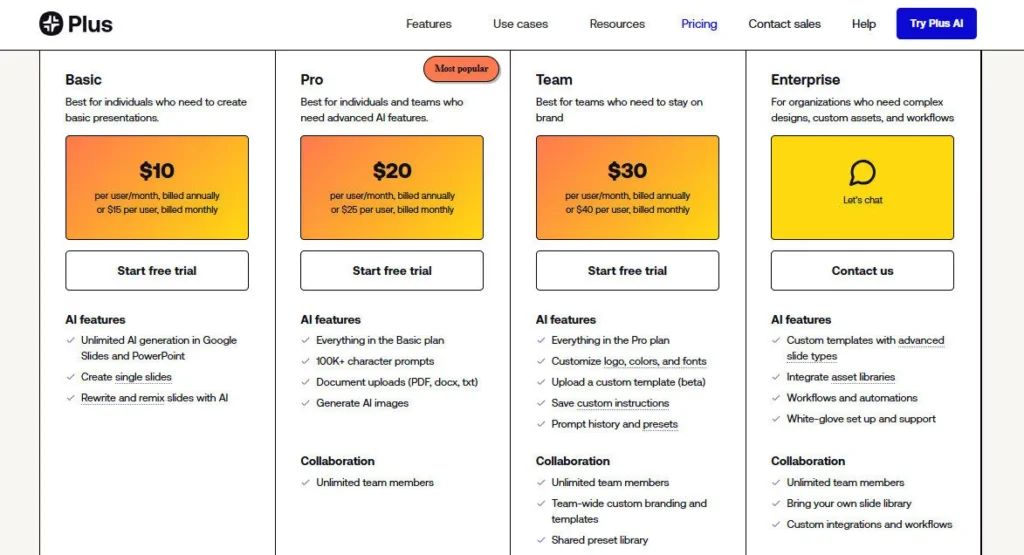
Basic ($10/mo, billed annually — or $15/mo, billed monthly)AI presentation generation from text prompts, document-to-slides conversion (PDF, Word, PPT), Remix slide reformatting, AI writing tools (rewrite, summarize, elaborate, translate), AI image and icon generation, standard professional templates, works in Google Slides and PowerPoint.
Pro ($20/mo, billed annually — or $25/mo, billed monthly)Everything in Basic, plus custom branding (upload logo, fonts, and brand colors), 100K+ character prompt support, advanced AI editing features, saved custom instructions and shared presets, team organization management, priority access to new features.
Enterprise (Custom pricing — demo required)Everything in Pro, plus custom slide templates using your organization's actual slide masters, shared asset libraries (pre-approved images, icons, slides), white-glove template conversion service, advanced specialized slides (ad mockups, case studies, diagram slides), SOC 2 Type II compliance reporting, dedicated implementation support.

Plus AI stands out because it enhances the tools professionals already use rather than replacing them with a new platform.

• Native Google Slides & PowerPoint Integration — Plus AI runs directly inside your existing slide editor as an add-in, meaning you never leave your workflow to generate, reformat, or rewrite a deck; competitors like Gamma require you to build presentations on a separate platform.

• Remix Feature — one-click slide reformatting converts any existing slide into a completely different layout without re-entering content, making it uniquely powerful for refreshing old decks or adapting templates on the fly.

• Document-to-Presentation Pipeline — accepting PDF, Word (.docx), and PowerPoint (.pptx) as source inputs means Plus AI can absorb real working documents and structure them into presentation-ready slides — a capability most AI presentation tools don't support natively.

• SOC 2 Type II Certification — one of the very few AI slide tools with independently audited security compliance, making it viable for enterprise buyers in regulated industries without a lengthy security review process.

• Zapier & MCP Server Access — beyond the API, Plus AI connects to Zapier for no-code automation and supports MCP server integration, enabling programmatic deck generation inside larger AI agent workflows.

Plus AI integrates directly into existing productivity platforms rather than requiring users to adopt a standalone tool.

• Google Slides (Google Workspace Add-on) — install Plus AI from the Google Workspace Marketplace and access it through the Extensions menu in any Google Slides file; rated 4.6 stars across 1,000+ reviews.

• Microsoft PowerPoint (Add-in via Microsoft AppSource) — install the Plus AI add-in from Microsoft AppSource and access the full AI panel inside any PowerPoint file on desktop or browser; rated 4.8 on AppSource.

• Zapier — connects Plus AI to 5,000+ apps including HubSpot, Notion, Slack, and Google Sheets for automated presentation creation triggered by external events.

• Plus AI API — developers can generate native PowerPoint slides programmatically using the Plus AI REST API, enabling custom integrations and bulk deck generation in internal tools.

• MCP Server — supports Model Context Protocol server integration, allowing Plus AI to participate in broader AI agent workflows and LLM-powered pipelines.

CategoryScoreWhy It Matters
Accuracy & Reliability4.3/5Plus AI generates well-structured, contextually accurate slide content from prompts and uploaded documents, with users consistently rating its output quality highly across 1,000+ Google Marketplace and AppSource reviews. The Remix feature reliably applies new layouts without breaking slide content. Output quality on highly technical or data-dense topics occasionally requires manual editing to reach publication standard.
Ease of Use4.6/5Because Plus AI runs inside Google Slides and PowerPoint, there is virtually no learning curve for existing users of those apps — you install the add-in and start generating immediately. Multiple verified user reviews describe the integration as feeling 'like something that should have been there all along.' The 7-day trial setup (requiring a credit card) is the only friction point for first-time users.
Functionality & Features4.4/5Plus AI covers the full presentation workflow: generation from prompts and documents, slide reformatting via Remix, AI writing, chart generation, image and icon insertion, multilingual translation, and saved prompt templates. The API and Zapier integrations extend functionality into automation use cases most competitors don't support. Custom templates require an enterprise contract, which is a meaningful gap for self-serve Pro users.
Performance & Speed4.4/5Full presentations are generated in under 60 seconds from a text prompt, and single-slide Remix operations take only a few seconds. Performance is consistent across Google Slides (browser-based) and PowerPoint (desktop and browser). As a cloud-dependent add-in, speed is subject to internet connectivity, and occasional latency has been noted in user reports during peak periods.
Customization & Flexibility4.0/5The Pro plan's custom branding (logo, fonts, colors) and saved prompt memory give individual users meaningful control over output style. However, full custom template import — the most-requested flexibility feature — is locked behind the Enterprise plan and requires a white-glove setup process rather than self-serve upload. This creates a notable capability gap between Pro and Enterprise users.
Data Privacy & Security4.7/5Plus AI is one of the few AI presentation tools to hold SOC 2 Type II certification, which involves independent auditing of security controls, not just a self-declared policy. All data is encrypted on-device before transmission and encrypted in transit and at rest on Plus AI's servers. Enterprise customers can request the full SOC 2 report, which is a strong signal of genuine compliance maturity.
Support & Resources4.2/5Plus AI provides a detailed Help Center covering setup, features, billing, and troubleshooting for both Google Slides and PowerPoint. Enterprise clients receive dedicated onboarding and template conversion support. General customer support response times and live chat availability are not prominently documented, which limits the score compared to tools that advertise sub-1-minute response times.
Cost-Efficiency4.2/5The Basic plan at $10/month (annual) is highly competitive for individuals generating multiple presentations per week. The Pro plan at $20/month (annual) delivers strong ROI for power users and small teams. The jump to Enterprise custom pricing for custom templates is a significant cost escalation with no transparent self-serve middle ground, which reduces value perception for growing teams.
Overall Score4.3/5Plus AI earns a strong 4.3 by delivering the most seamless AI presentation experience for Google Slides and PowerPoint users — its native integration, Remix feature, and SOC 2 compliance are genuine differentiators. The absence of a permanent free tier and the Enterprise-only custom template access keep it from a higher score for budget-conscious or self-serve users.

Plus AI is the strongest AI presentation tool for professionals who want to stay inside Google Slides or PowerPoint — its native integration, Remix feature, and document-to-slides pipeline eliminate hours of manual formatting without forcing a platform change. The Basic plan at $10/month is fair for individuals, but teams needing branded templates will hit the Enterprise paywall quickly, which is the tool's most significant limitation.

Q1.Is there a free version of Plus AI?
Ans:-Plus AI does not offer a permanent free plan. Instead, it provides a 7-day free trial of its paid plans, which requires a credit card to activate. During the trial, you get full access to all paid plan features including unlimited AI-generated presentations. If you don't cancel within 7 days, your card is charged automatically.
Q2.Does Plus AI work inside PowerPoint and Google Slides?
Ans:-Yes — Plus AI is purpose-built to run natively inside both Google Slides (as a Google Workspace Add-on, rated 4.6 on Google Marketplace) and Microsoft PowerPoint (as an Add-in, rated 4.8 on Microsoft AppSource). You access it through the Extensions or Add-ins menu and work in your existing file without switching apps.
Q3.What is the Remix feature in Plus AI?
Ans:-Remix is a one-click feature that reformats any existing slide into a completely new layout using AI. You select a slide, open Plus AI, and choose a new layout style — the tool restructures the content visually without you needing to re-enter text or rebuild the slide from scratch. It's particularly useful for refreshing old decks or adapting a slide to a different design context.
Q4.How much does Plus AI cost in 2026?
Ans:-Plus AI's Basic plan costs $10/month billed annually (or $15/month billed monthly). The Pro plan is $20/month billed annually (or $25/month billed monthly) and adds custom branding, 100K+ character prompts, and team features. Enterprise pricing is custom and requires booking a demo.
Q5.Can Plus AI convert a PDF or Word document into a presentation?
Ans:-Yes. Plus AI accepts PDF, Word (.docx), and PowerPoint (.pptx) files as source inputs. You upload the document, and Plus AI extracts the key content, structures it into an outline, and generates a complete slide deck inside Google Slides or PowerPoint. This eliminates manual copy-pasting from reports and documents into slides.
Q6.Is Plus AI secure enough for enterprise use?
Ans:-Yes. Plus AI has achieved SOC 2 Type II compliance, with independently audited controls covering data security, availability, and confidentiality. All sensitive data is encrypted on your device before being sent to Plus AI's servers, and data is encrypted in transit and at rest. Enterprise customers can request a copy of the SOC 2 report directly from the Plus AI security page.
Q7.Can I use my own company template with Plus AI?
Ans:-Custom templates that use your organization's actual slide masters require the Enterprise plan, which includes white-glove template conversion and a shared slide library. On the Pro plan, you can apply custom branding (logo, fonts, brand colors), but true template import is an Enterprise-only feature. You'll need to contact Plus AI's sales team to set this up.
Q8.Does Plus AI support multiple languages?
Ans:-Yes. Plus AI can read, write, and translate presentations into nearly any language directly inside the slide editor. You can use the AI writing tools to translate an entire deck or individual slides from English into another language while preserving the existing slide formatting and layout.
Q9.How does Plus AI compare to Decktopus AI?
Ans:-Plus AI is unique in that it works natively inside Google Slides and PowerPoint — you never leave your existing tool. Decktopus is a standalone web-based platform with its own editor. Plus AI is better for users who want to enhance existing decks and work within familiar apps, while Decktopus offers more interactive features like embedded forms, voice recording, and built-in slide analytics. Decktopus also has a more visible free tier and lower entry pricing.
Q10.Can I use Plus AI through an API or automation tools?
Ans:-Yes. Plus AI offers a REST API for programmatic PowerPoint slide generation, a Zapier integration connecting it to 5,000+ apps, and MCP server support for AI agent workflows. These options make it suitable for developers, agencies, and teams who need to automate presentation creation at scale without manual intervention.

Promote This Tool

Help others discover this tool by sharing this page.

✓ Link copied to clipboard!

Plus AI Reviews

0.0
Based on 0 reviews
5 star
0%
4 star
0%
3 star
0%
2 star
0%
1 star
0%

Write a Review

Your Rating:

No reviews yet. Be the first to share your thoughts!

5 Similar Plus AI Tools