Home Categories Deals Sign Up
Updated: April 25, 2026

How Artspace AI Works: From Prompt to Polished Visual in One Click

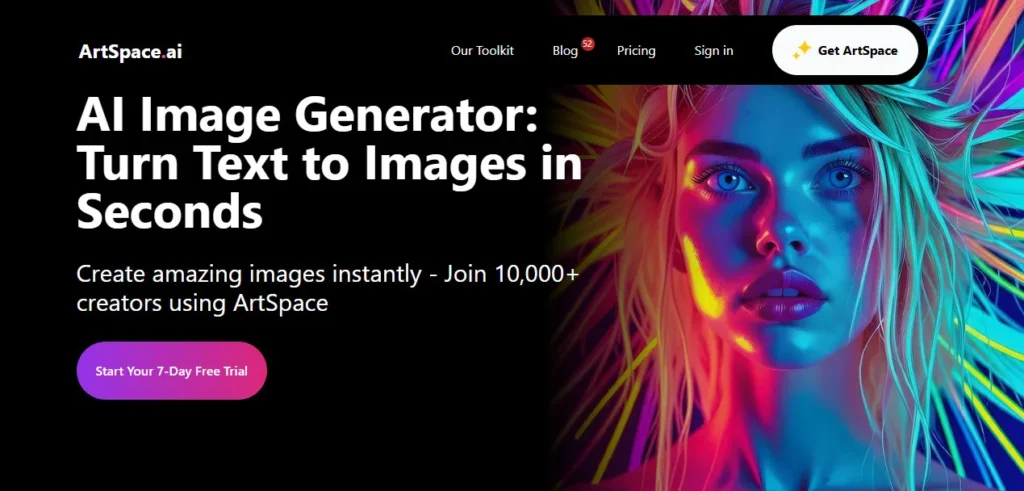
Artspace AI AI tool – Artspace AI is an all-in-one AI image generation and editing platform that lets you create, edit, upscale, and transform visuals entirely in your browser — no design skills required.

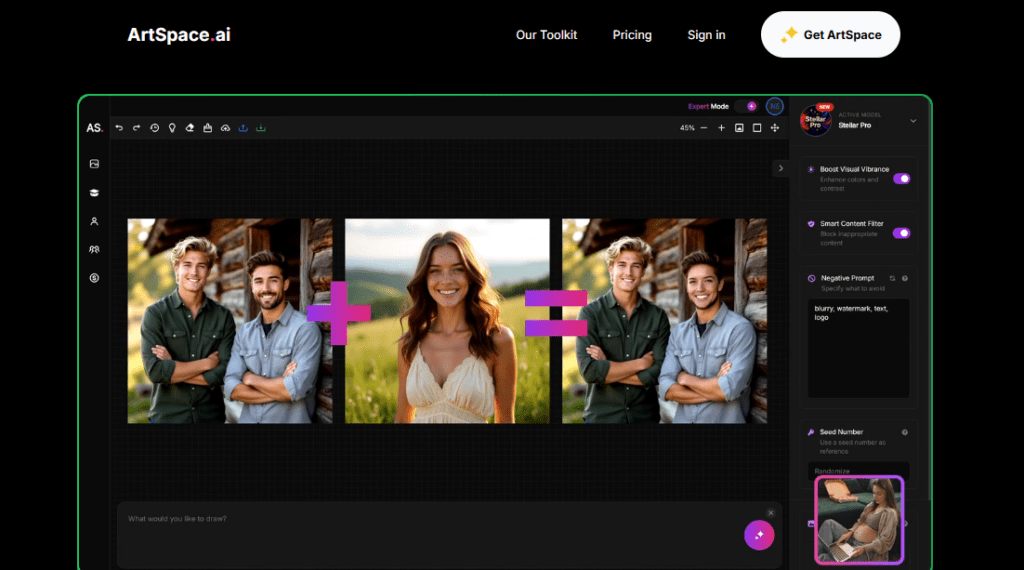
What sets it apart immediately is its ever-growing library of 204+ One-Click Tools, powered by Flux Kontext, Seedream, and Nano Banana models, that automate complex editing tasks like face swaps, background removal, pose changes, clothing swaps, and 4K upscaling in a single click.

And unlike most AI image platforms, Artspace offers a genuine lifetime deal starting at just $59 — meaning you pay once and own your access permanently with no monthly fees.

Key Capabilities

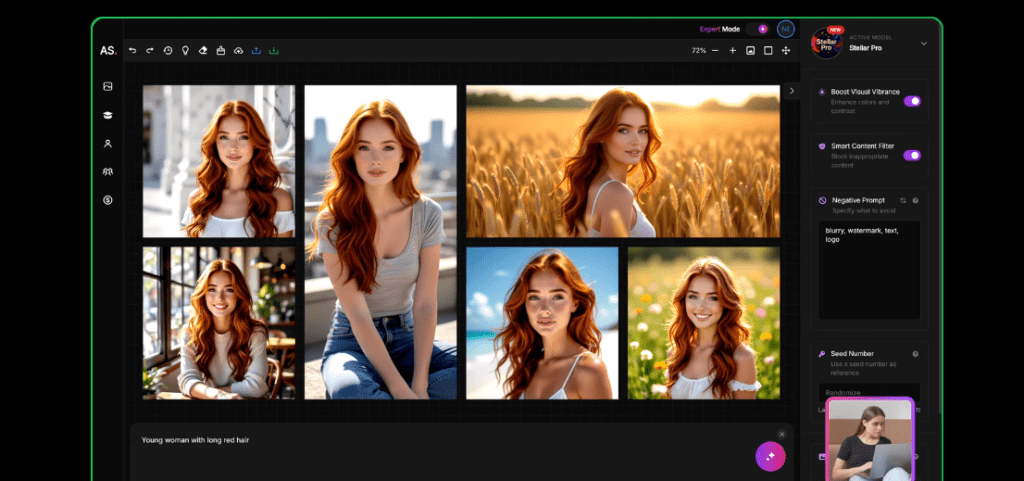
The platform is built around three core workflows. The first is standard text-to-image generation, where you type a prompt and choose from multiple AI models to produce images in styles ranging from photorealistic to fantasy illustration — most results are ready in under 15 seconds.

The second is the 204+ One-Click Tools suite, which covers face swaps, face restoration, Smart Upscale to 4K, background removal and replacement, object addition and removal, hair and clothing changes, 3D avatar animation, pose changes, and expression edits — each replacing a manual step that would normally require Photoshop or After Effects.

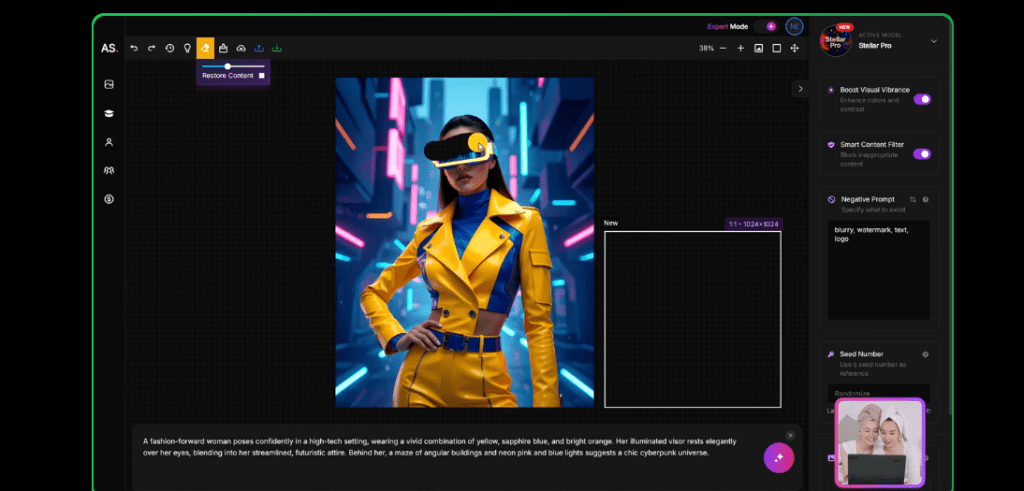
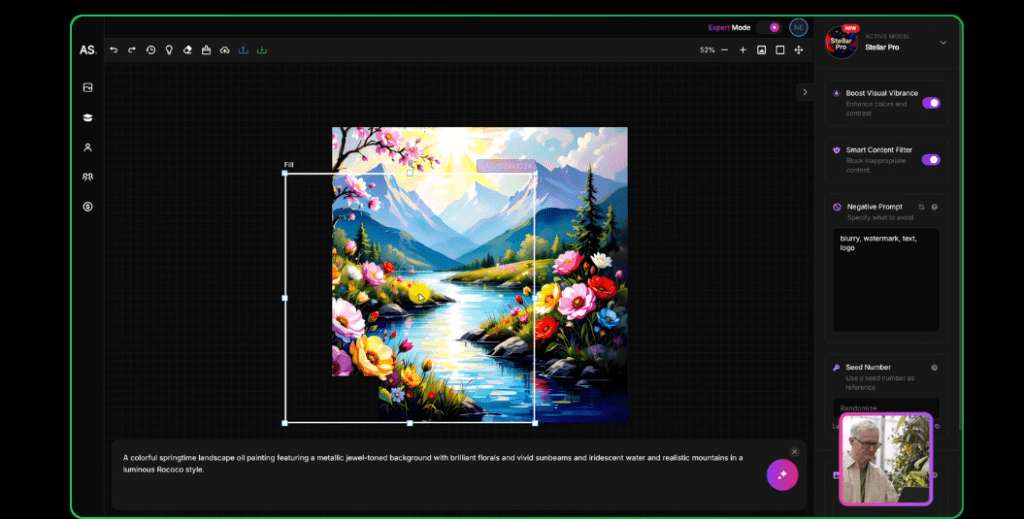
The third workflow is Canvas Mode, available on Pro and Unlimited plans, which provides an infinite canvas with inpainting and outpainting, a prompt-to-extend canvas tool, and a personal image library for organizing your creative output.

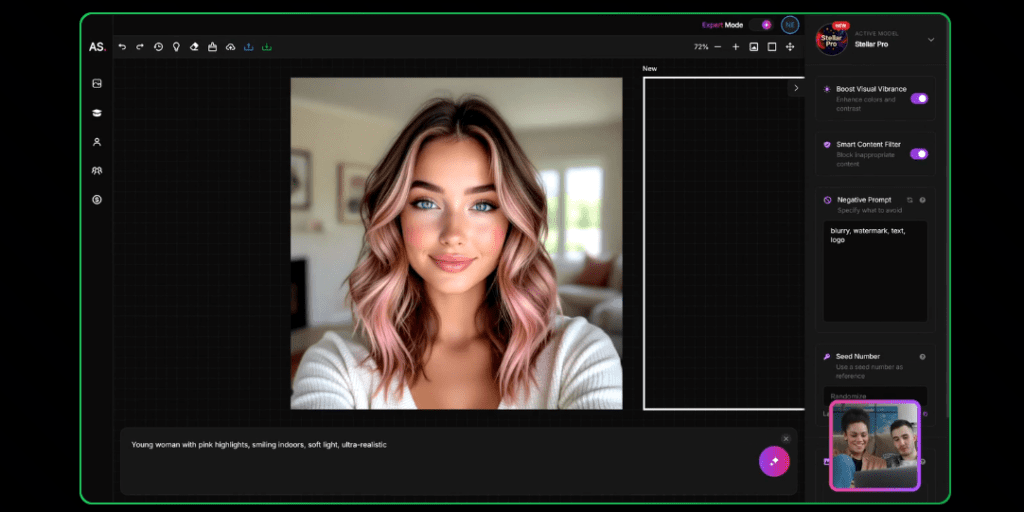
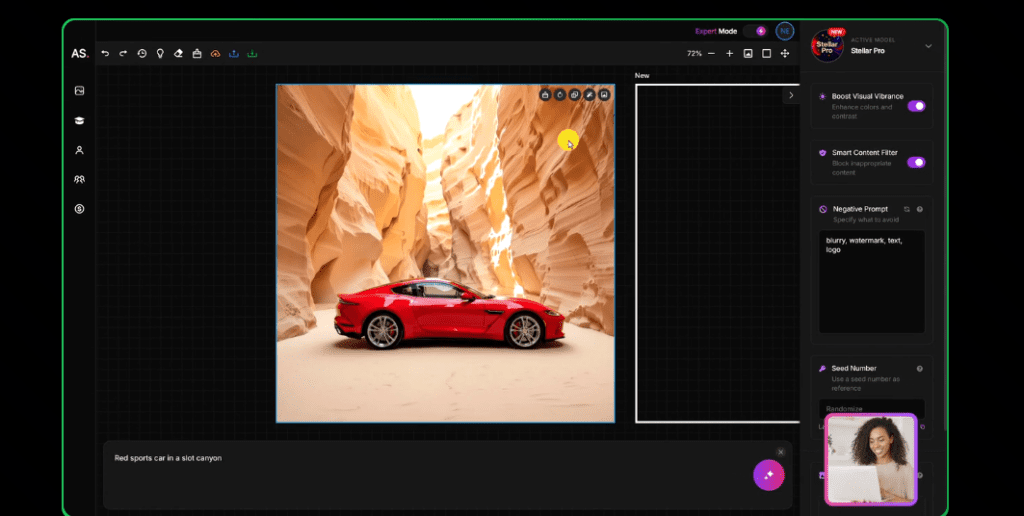
Expert Mode gives advanced users fine-grained control over generation settings including model selection, aspect ratio, image dimensions, sampling steps, and negative prompts.

The platform also includes community features — public galleries, voting, and a marketplace integration for listing and selling generated artwork — creating a creative ecosystem around the tool rather than just a standalone generator.

Who Gets the Most Out of It

YouTubers, bloggers, social media creators, marketers, and print-on-demand sellers find Artspace AI particularly practical. The One-Click Tools eliminate the need to switch between five different apps to produce a finished visual — you can generate, upscale, remove the background, swap the face, and change the outfit all within the same dashboard.

For freelancers and agencies considering a cost-effective long-term setup, the Lifetime Standard Pro plan at $129 and Unlimited at $199 — down from regular prices of $899 and $1,799 respectively — represent exceptional one-time investments compared to $19–$39/month recurring subscriptions.

Is It Worth It?

If you generate images regularly and want to eliminate subscription fatigue, the lifetime deal is Artspace AI's strongest argument. At $59 for Starter Lifetime Standard and $129 for Pro Lifetime Standard — both with Priority Generation and 204+ One-Click Tools — you recover the cost in three to seven months versus the monthly plan.

The 7-day free trial on all subscription plans lets you test the full Pro or Unlimited experience before committing. For power users who want truly unlimited output with Priority+ support, the Unlimited Lifetime Standard at $199 (regularly $1,799) is the best-value permanent AI image plan available in 2026.

Artspace AI is an AI-powered image generation and editing platform launched in 2022 that combines text-to-image generation with an ever-growing suite of 204+ One-Click Tools powered by Flux Kontext, Seedream, and Nano Banana models.

It gives creators the ability to generate, edit, upscale, face swap, remove backgrounds, and transform images entirely in-browser — all with full commercial rights.

The platform offers monthly, yearly, and lifetime subscription options, making it unique among AI image tools for its one-time payment lifetime deal starting at $59.

• Text-to-Image Generator — Generate high-quality AI images from text prompts across multiple styles including photorealistic, fantasy, abstract, and illustrative — most outputs render in under 15 seconds using the latest Flux Kontext, Seedream, and Nano Banana models.

• 204+ One-Click Tools (Ever-Growing) — An expanding library of single-click AI editing tools covering face swap, face restoration, background removal and replacement, object addition and removal, Smart Upscale to 4K, pose changes, hair and clothing swaps, expression edits, and 3D avatar animation — all without leaving the platform.

• Canvas Mode (Pro & Unlimited) — An infinite canvas workspace with inpainting, outpainting, prompt-to-extend canvas, and a personal image library — available with NSFW generation allowed on Pro and Unlimited plans.

• Expert Mode — Advanced generation controls including model selection, aspect ratio, image dimensions, sampling steps, CFG scale, seed, and negative prompts for users who want precise composition and style control.

• AI Image Upscaler (4K) — Upscale any generated or uploaded image to 4K resolution using AI-powered smart upscaling that recovers detail and sharpness without introducing artifacts.

• Face Swap & Face Restoration — Swap faces between images with a single click, and restore old or blurry photos to sharp, high-resolution portraits using AI reconstruction tools built directly into the dashboard.

• Community Gallery & Marketplace — Browse a public community feed of AI-generated artwork, vote on featured pieces, and list your own generated images for sale through integrated marketplace tools.

• Lifetime Deal Access — A unique one-time payment option offering permanent access to Artspace AI in Standard (Priority Generation) or Relaxed (Off-Peak Generation) tiers, starting at $49 Relaxed or $59 Standard — eliminating monthly subscription fees entirely.

Pros
  • Lifetime deal starting at $59 (Standard) or $49 (Relaxed) eliminates monthly subscription fees — recover your cost in 3–7 months vs the monthly plan
  • 204+ One-Click Tools replace Photoshop, background remover, face swap, and upscaler apps in a single dashboard
  • 7-Day Free Trial available on all subscription plans — test the full Pro or Unlimited experience before paying
  • Commercial Use rights included on every paid plan — safe for client work, print-on-demand, and resale
  • Ever-growing One-Click Tools library continuously expands with new capabilities added without price increases
  • Infinite Canvas Mode with inpainting and outpainting gives professional-level image editing without external tools
  • Fast rendering — most image generations complete in under 15 seconds with Priority Generation on Standard lifetime plans
Cons
  • ×Canvas Mode is not available on the Starter plan (monthly, yearly, or lifetime) — upgrading to Pro is required to access it
  • ×Relaxed Lifetime tier uses off-peak processing queues — during busy hours you may experience generation delays
  • ×Model library is not as broad as platforms like Getimg.ai (60+ named external models) — Artspace uses its own curated model set
  • ×No dedicated mobile app — the platform is web-only with no native iOS or Android experience
  • ×High-volume professional users may find 300 images/month on the Starter Lifetime plan limiting compared to unlimited output on the top tier
  • ×NSFW content generation requires Pro or Unlimited plan — not available on the Starter tier at any billing cycle

Artspace AI is best suited for individual creators, content producers, and small businesses who want a full-featured AI image suite without paying recurring monthly fees.

• YouTubers and social media creators — the One-Click Tools suite covers thumbnail creation, background removal, face swaps, and 4K upscaling in one dashboard, cutting video asset production time from hours to minutes.

• Bloggers and content marketers — generate unique, commercially licensed featured images and in-article visuals from text prompts without stock photo subscriptions or design software licensing costs.

• Print-on-demand sellers and artists — produce unlimited AI-generated artwork with full commercial rights on the Unlimited plans, and list work directly through Artspace's marketplace integration.

• Freelancers and agencies seeking lifetime value — the Pro Lifetime Standard plan at $129 (one-time) replaces what would cost $19/month, paying for itself in under 7 months and delivering Priority Generation access permanently.

• Power users and AI enthusiasts — the Unlimited Lifetime Standard at $199 (regularly $1,799) delivers truly unlimited image generation, all 204+ tools, Canvas Mode with NSFW, Priority+ support, and lifetime access in a single purchase.

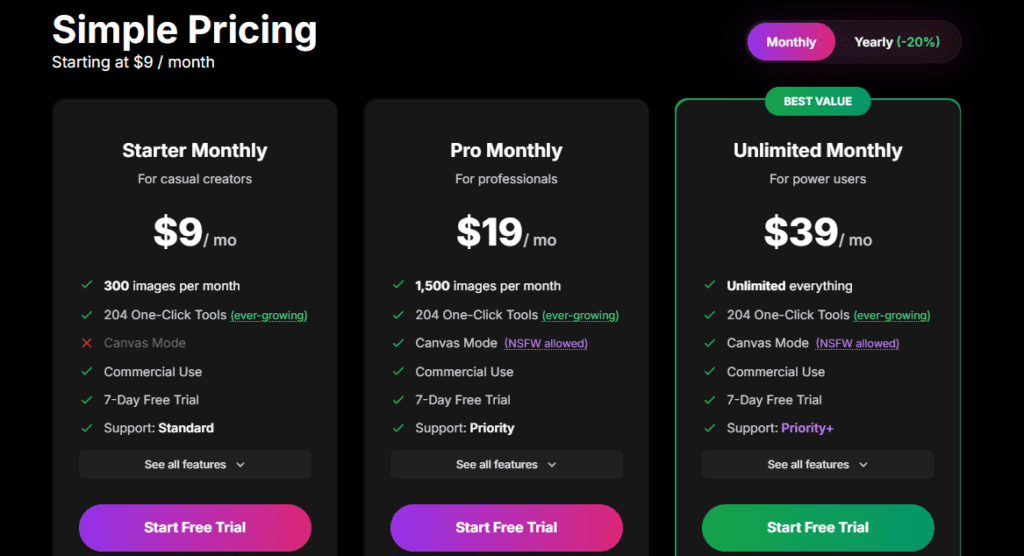
Starter Monthly ($9/mo)300 images/month, 204 One-Click Tools (ever-growing), No Canvas Mode, Commercial Use, 7-Day Free Trial, Support: Standard.
Pro Monthly ($19/mo)1,500 images/month, 204 One-Click Tools (ever-growing), Canvas Mode (NSFW allowed), Commercial Use, 7-Day Free Trial, Support: Priority.
Unlimited Monthly ($39/mo)Unlimited everything, 204 One-Click Tools (ever-growing), Canvas Mode (NSFW allowed), Commercial Use, 7-Day Free Trial, Support: Priority+.
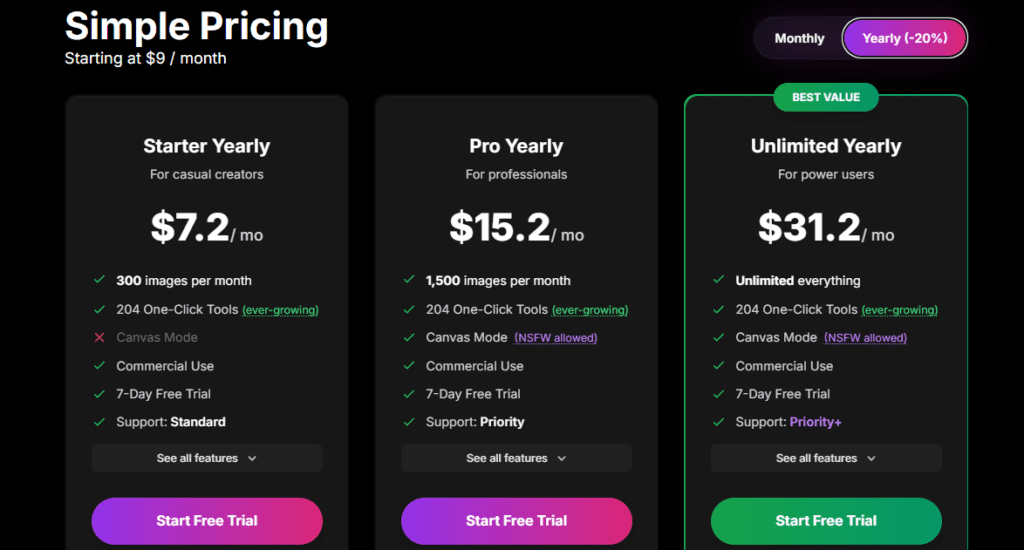
Starter Yearly ($7.2/mo — save 20%)300 images/month, 204 One-Click Tools, No Canvas Mode, Commercial Use, 7-Day Free Trial, Support: Standard.
Pro Yearly ($15.2/mo — save 20%)1,500 images/month, 204 One-Click Tools, Canvas Mode (NSFW allowed), Commercial Use, 7-Day Free Trial, Support: Priority.
Unlimited Yearly ($31.2/mo — save 20%)Unlimited everything, 204 One-Click Tools, Canvas Mode (NSFW allowed), Commercial Use, 7-Day Free Trial, Support: Priority+.
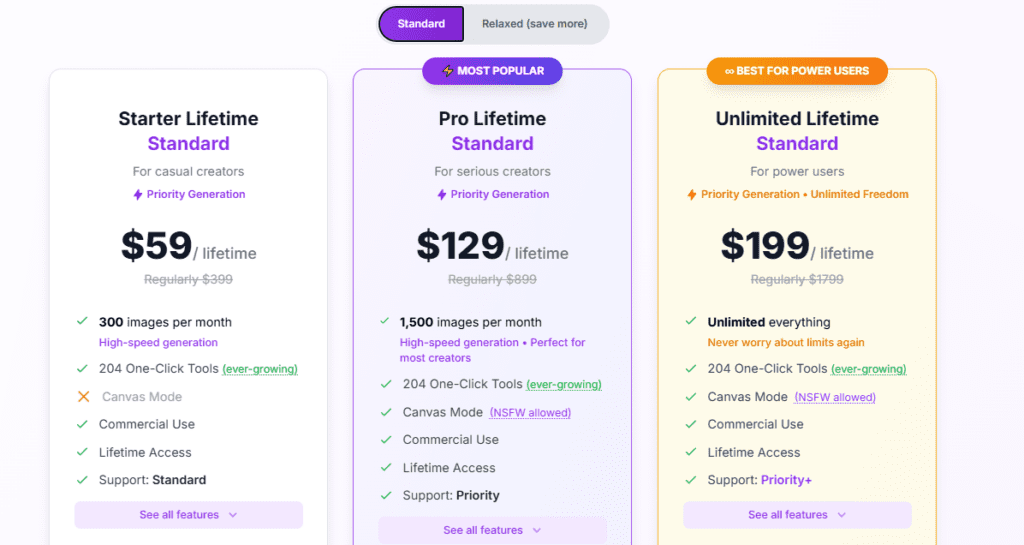
Starter Lifetime Standard ($59 one-time | regularly $399)300 images/month, Priority Generation (high-speed), 204 One-Click Tools, No Canvas Mode, Commercial Use, Lifetime Access, Support: Standard.
Pro Lifetime Standard ($129 one-time | regularly $899)1,500 images/month, Priority Generation (high-speed), 204 One-Click Tools, Canvas Mode (NSFW allowed), Commercial Use, Lifetime Access, Support: Priority.
Unlimited Lifetime Standard ($199 one-time | regularly $1,799)Unlimited everything, Priority Generation (high-speed), 204 One-Click Tools, Canvas Mode (NSFW allowed), Commercial Use, Lifetime Access, Support: Priority+.
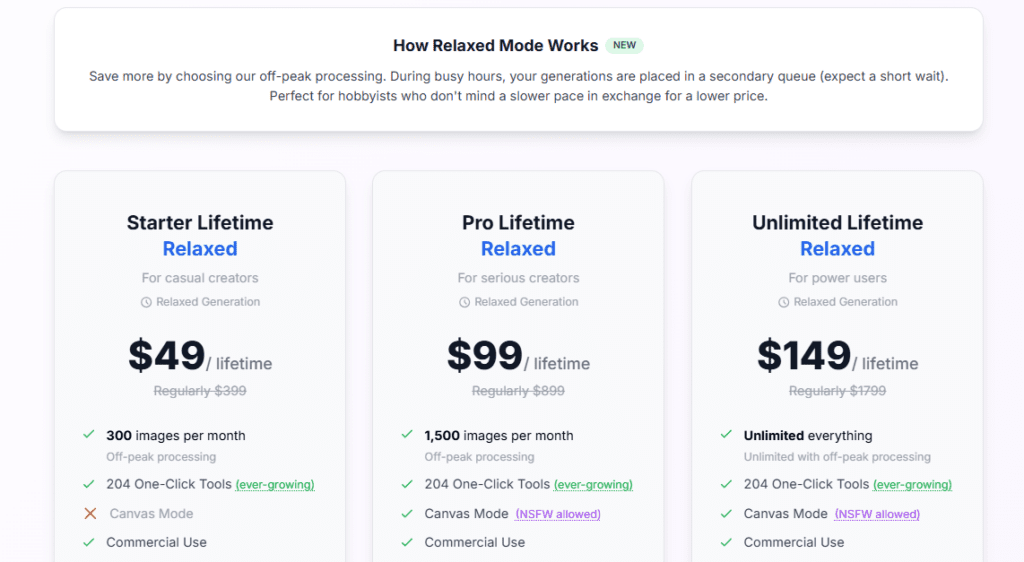
Starter Lifetime Relaxed ($49 one-time | regularly $399)300 images/month, Off-Peak Processing (secondary queue during busy hours), 204 One-Click Tools, No Canvas Mode, Commercial Use, Lifetime Access.
Pro Lifetime Relaxed ($99 one-time | regularly $899)1,500 images/month, Off-Peak Processing, 204 One-Click Tools, Canvas Mode (NSFW allowed), Commercial Use, Lifetime Access.
Unlimited Lifetime Relaxed ($149 one-time | regularly $1,799)Unlimited everything, Off-Peak Processing, 204 One-Click Tools, Canvas Mode (NSFW allowed), Commercial Use, Lifetime Access.

Artspace AI stands out through its rare lifetime deal pricing, an ever-expanding One-Click Tools library, and an all-in-one dashboard that replaces multiple standalone editing apps.

• Genuine Lifetime Deal Pricing — a one-time payment of $59 (Standard) or $49 (Relaxed) grants permanent access with no recurring fees — a pricing model almost nonexistent among active AI image platforms in 2026, making it one of the best long-term value options available.

• 204+ Ever-Growing One-Click Tools — unlike platforms that charge separately for editing features, Artspace bundles an expanding library of single-click AI tools — including pose changes, clothing swaps, 3D avatar animation, face restoration, and object removal — at no additional cost, with new tools continuously added for all existing plan holders.

• Standard vs. Relaxed Lifetime Tiers — the split between Priority Generation (Standard, from $59) and Off-Peak Relaxed Generation (Relaxed, from $49) gives hobbyists a lower-cost entry into lifetime access while professionals get guaranteed fast-queue generation — a flexible cost structure unique to Artspace.

• Infinite Canvas Mode with Prompt-to-Extend — the Canvas Mode's prompt-based canvas extension lets you describe what should appear beyond the original image borders and the AI fills it in, enabling seamless scene expansion without manual Photoshop masking.

• Integrated Community Gallery and Marketplace — beyond generating images, Artspace users can publish work to a public gallery, receive community votes, and list images for sale through a built-in marketplace — creating a creator economy layer that pure generation tools like Midjourney and Getimg.ai do not offer.

Artspace AI operates entirely in the browser with export formats compatible with all major design, publishing, and e-commerce platforms.

• Web Browser — fully accessible on Chrome, Firefox, Edge, and Safari with no installation required; all tools including text-to-image generation, 204+ One-Click Tools, Canvas Mode, Expert Mode, and the community gallery run entirely in-browser.

• Export Compatibility — generated and edited images export as PNG and JPG files, making them directly usable in Adobe Photoshop, Illustrator, Canva, Figma, WordPress, Shopify, and any social media publishing workflow.

• Marketplace Integration — Artspace includes built-in tools to list, tag, and sell AI-generated artwork through its integrated marketplace, making it compatible with digital product and art sales workflows without requiring a third-party storefront.

• Community Gallery Integration — the public community feed supports sharing, liking, and commenting on AI-generated images, making it function like a visual social platform compatible with creator discovery and portfolio-building workflows.

• Lifetime Deal via Affiliate Link — Artspace AI's lifetime plans are accessible through the official affiliate deal page at artspace.ai/lifetime, enabling one-time purchases that are fully compatible with long-term solo creator and agency toolkits without subscription management overhead.

CategoryScoreWhy It Matters
Accuracy & Reliability4.2/5Artspace AI's text-to-image generation using Flux Kontext, Seedream, and Nano Banana models consistently produces clean, detailed outputs for abstract, fantasy, and photorealistic styles — most renderings complete in under 15 seconds. Beithoven.com and Fritz.ai reviewers note that abstract and concept art outputs are particularly strong, while human faces and hands — a known challenge across all Stable Diffusion-based platforms — remain occasionally inconsistent. The 204+ One-Click Tools perform reliably for single-subject editing tasks like face swaps and background removal.
Ease of Use4.5/5The interface is purpose-built for non-designers — you type a prompt, pick a mode, and your image appears in seconds with no configuration required. The One-Click Tools reduce complex multi-step editing to a single button press, and the 7-Day Free Trial allows hands-on learning before any payment. Trustpilot reviewers consistently highlight ease of use and fast onboarding as top strengths, with one reviewer noting it 'revitalised old photos to high quality very quickly.'
Functionality & Features4.6/5Artspace AI covers text-to-image generation, 204+ One-Click editing tools, Canvas Mode with inpainting and outpainting, Expert Mode with full generation controls, 4K upscaling, face swap, face restoration, background removal and replacement, object editing, 3D avatar animation, community gallery, and marketplace integration — an exceptional breadth for a platform at this price tier. The only notable gap compared to platforms like ImagineArt or 1min.AI is the absence of video generation, voice tools, or multi-model switching.
Performance & Speed4.3/5Standard and Priority Generation tiers consistently produce images in under 15 seconds, which is competitive with other Flux-based image platforms. The Relaxed Off-Peak tier introduces variable queue delays during busy hours — acceptable for hobbyists but unsuitable for deadline-driven work. Multiple YouTube reviewers including LoverFighterWriter and FreelanceHustle confirm fast rendering speeds as a standout strength on the Standard and Priority plans.
Customization & Flexibility4.4/5Expert Mode provides detailed control over model selection, aspect ratio, dimensions, sampling steps, CFG scale, seed, and negative prompts — matching the customization depth of more technical platforms. The 204+ One-Click Tools offer stylistic flexibility that typically requires multiple apps elsewhere. The dual Relaxed and Standard lifetime pricing also gives users genuine financial flexibility — a customization of access model that most competitors do not offer.
Data Privacy & Security3.9/5Artspace AI processes payments through standard secure infrastructure and stores user-generated images for library access. The platform does not publicly publish a detailed AI training data opt-out policy or a third-party security audit, which limits enterprise-level trust assessment. Community gallery features publish user images publicly by default in the shared feed, which users should consider when generating commercially sensitive content on the platform.
Support & Resources4.1/5Support tiers are clearly differentiated — Standard for Starter plans, Priority for Pro plans, and Priority+ for Unlimited plans across all billing types. Trustpilot reviewers describe customer support as 'second to none' with quick response times. The platform has an active YouTube presence with tutorial channels covering One-Click Tools, Expert Mode, Canvas Mode, and general walkthroughs. There is no published live chat or SLA documentation for response time guarantees on lower support tiers.
Cost-Efficiency4.9/5Artspace AI offers the strongest cost-efficiency of any AI image platform reviewed in this category, specifically due to its lifetime deal. At $129 one-time for Pro Lifetime Standard — covering 1,500 images/month, 204+ tools, Canvas Mode, and Priority Generation permanently — the platform pays for itself in under 7 months versus the $19/month Pro plan. The Unlimited Lifetime Standard at $199 (regularly $1,799) is the single best-value permanent AI image deal available in 2026 for power users who generate images daily.
Overall Score4.4/5Artspace AI is the top choice in 2026 for creators, bloggers, and freelancers who want a complete AI image generation and editing suite at the lowest possible long-term cost — the lifetime deal is genuinely exceptional. Its 204+ One-Click Tools, Canvas Mode, Expert Mode, and marketplace integration give it a feature breadth that rivals far more expensive monthly platforms. The absence of a mobile app and video generation tools are the primary limitations, but for image-focused workflows, Artspace AI delivers outstanding value and reliability.

Artspace AI is one of the most compelling AI image platforms in 2026 specifically because of its rare lifetime deal — at $129 one-time for Pro Lifetime Standard (regularly $899), it pays for itself in under 7 months compared to the monthly plan and delivers permanent access to 1,500 images/month, 204+ One-Click Tools, Canvas Mode, and Priority Generation.

For individual creators, bloggers, and small agencies who want a complete image generation and editing suite without ongoing subscription fees, Artspace AI offers exceptional long-term value.

The main trade-offs are the absence of a mobile app and the starter tier's Canvas Mode restriction, but for anyone willing to commit to the Pro or Unlimited tier, the lifetime deal is difficult to beat in this category.

Q1.Does Artspace AI have a free trial?
Ans:-Yes. Artspace AI offers a 7-Day Free Trial on all three subscription plans — Starter, Pro, and Unlimited — for both monthly and yearly billing. This lets you test the full feature set of your chosen plan, including Canvas Mode on Pro and Unlimited, before any payment is charged. The lifetime deal plans do not include a trial but come with a money-back guarantee window.
Q2.What is the Artspace AI lifetime deal?
Ans:-Artspace AI offers permanent one-time payment plans in two processing tiers — Standard (Priority Generation) and Relaxed (Off-Peak Generation). Standard Lifetime plans cost $59 for Starter (regularly $399), $129 for Pro (regularly $899), and $199 for Unlimited (regularly $1,799). Relaxed Lifetime plans cost $49 for Starter, $99 for Pro, and $149 for Unlimited. All lifetime plans include 204+ One-Click Tools, Commercial Use rights, and lifetime access with no monthly fees.
Q3.What is the difference between Relaxed and Standard lifetime plans?
Ans:-Standard Lifetime plans include Priority Generation — your image requests are processed in the fast queue, typically completing in under 15 seconds. Relaxed Lifetime plans use Off-Peak Processing — during busy hours your generations are placed in a secondary queue, which may add a short wait. Relaxed plans cost $10–50 less than Standard equivalents and are ideal for hobbyists who don't mind occasional delays in exchange for a lower one-time price.
Q4.How many One-Click Tools does Artspace AI have?
Ans:-As of 2026, Artspace AI includes 204 One-Click Tools, with the library continuously growing. These tools cover face swap, face restoration, background removal and replacement, object addition and removal, Smart Upscale to 4K, pose changes, hair and clothing swaps, expression edits, 3D avatar animation, and dozens more — all powered by Flux Kontext, Seedream, and Nano Banana AI models. New tools are added regularly at no additional cost to existing plan holders.
Q5.What is Canvas Mode in Artspace AI?
Ans:-Canvas Mode is an infinite canvas workspace available on Pro and Unlimited plans (monthly, yearly, and lifetime) that enables inpainting, outpainting, and prompt-to-extend canvas generation. You can extend an image beyond its original borders by describing what should appear in the new area, use brush-based inpainting to edit specific regions, and organize your outputs in a personal image library. Canvas Mode also allows NSFW image generation on Pro and Unlimited tiers.
Q6.Does Artspace AI include commercial use rights?
Ans:-Yes. All paid Artspace AI plans — including all subscription tiers (Starter, Pro, Unlimited) and all lifetime plans (Standard and Relaxed) — include full Commercial Use rights. You can use, publish, sell, and license any generated images for client work, marketing, print-on-demand merchandise, and other commercial purposes without additional licensing fees or restrictions.
Q7.Is Artspace AI available as a mobile app?
Ans:-No. Artspace AI is currently a web-only platform, accessible via browser on desktop and mobile devices. There is no dedicated native iOS or Android app. The browser-based platform is mobile-responsive, allowing basic use on smartphones, but the full Canvas Mode and One-Click Tools experience is best on a desktop or laptop for optimal interface and generation control.
Q8.How does Artspace AI compare to Midjourney?
Ans:-Midjourney produces highly stylized, artistically impressive outputs but runs exclusively through Discord, has no web editor, no face swap, no background removal, no One-Click Tools, and no lifetime deal option. Artspace AI runs in a browser with a clean dashboard, 204+ editing tools, Canvas Mode, Expert Mode, marketplace integration, and a lifetime deal from $59 — making it a far more complete production toolkit. Midjourney still edges out Artspace in raw artistic output quality for complex stylized prompts.
Q9.How many images can I generate per month on Artspace AI?
Ans:-The Starter plan (all billing types) generates 300 images per month. The Pro plan generates 1,500 images per month. The Unlimited plan generates unlimited images with no monthly cap. Credit usage varies by generation settings — higher resolution and more sampling steps may count as additional image credits. Lifetime plan holders retain their monthly generation limits permanently with no expiry.
Q10.Where can I get the Artspace AI lifetime deal?
Ans:-The Artspace AI lifetime deal is available directly at artspace.ai/lifetime. The deal offers three tiers — Starter, Pro, and Unlimited — in both Standard (Priority Generation) and Relaxed (Off-Peak) processing modes. Current promotional pricing runs from $49 to $199, down from regular prices of $399 to $1,799. The lifetime deal page is also accessible through affiliate partner links, which offer the same official pricing directly from Artspace.

Promote This Tool

Help others discover this tool by sharing this page.

✓ Link copied to clipboard!

Artspace AI Reviews

0.0
Based on 0 reviews
5 star
0%
4 star
0%
3 star
0%
2 star
0%
1 star
0%

Write a Review

Your Rating:

No reviews yet. Be the first to share your thoughts!

48 Similar Artspace AI Tools