Home Categories Deals Sign Up
Updated: April 25, 2026

HomeVisualizer AI in Action

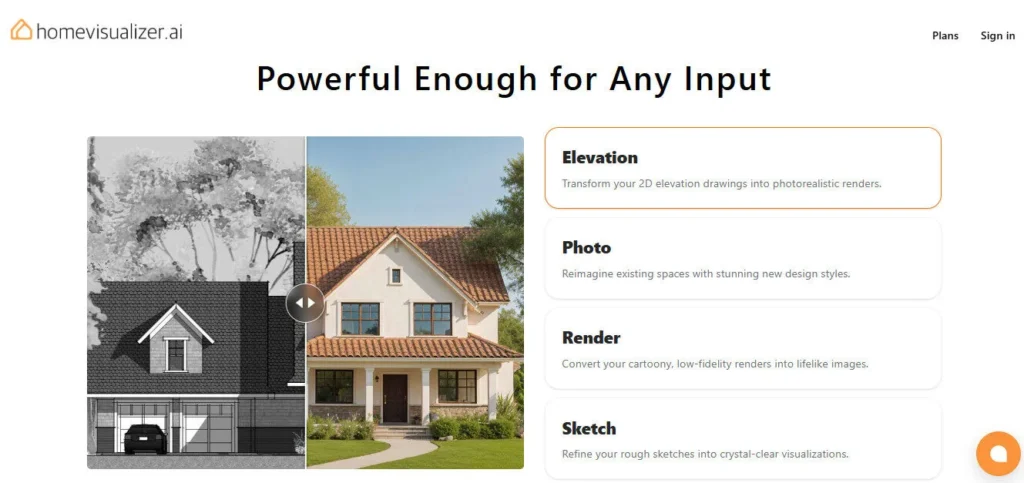
HomeVisualizer AI is an AI-powered interior design rendering tool built specifically with interior designers in mind. Upload a photo, sketch, elevation drawing, or even a rough rendering, and the platform transforms it into a photorealistic visual in seconds.

It's trained by expert interior designers, so the AI understands spatial relationships, lighting, and material details better than most general-purpose image tools.

Key Capabilities

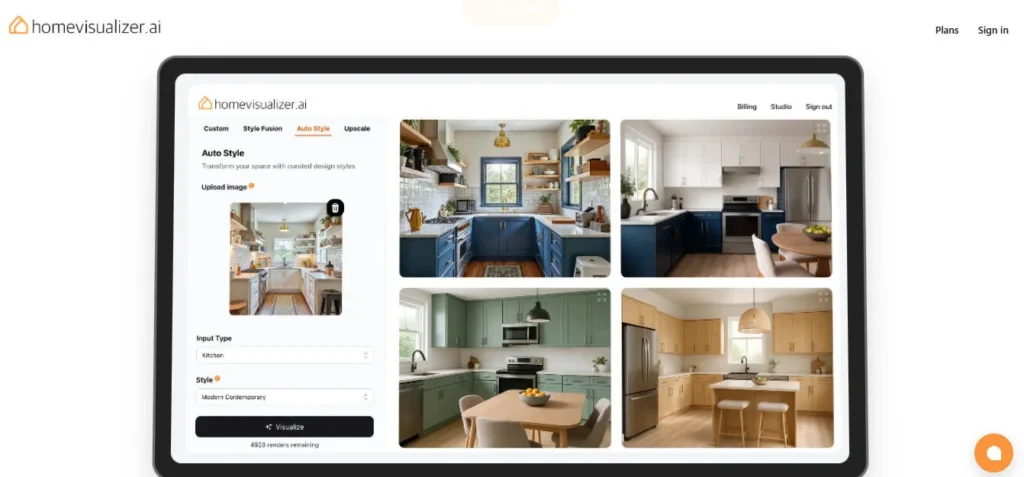
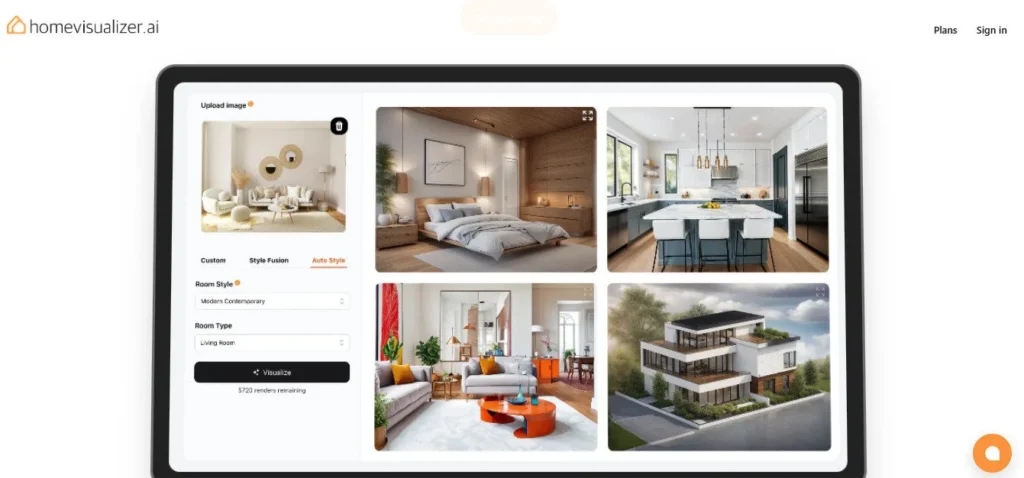
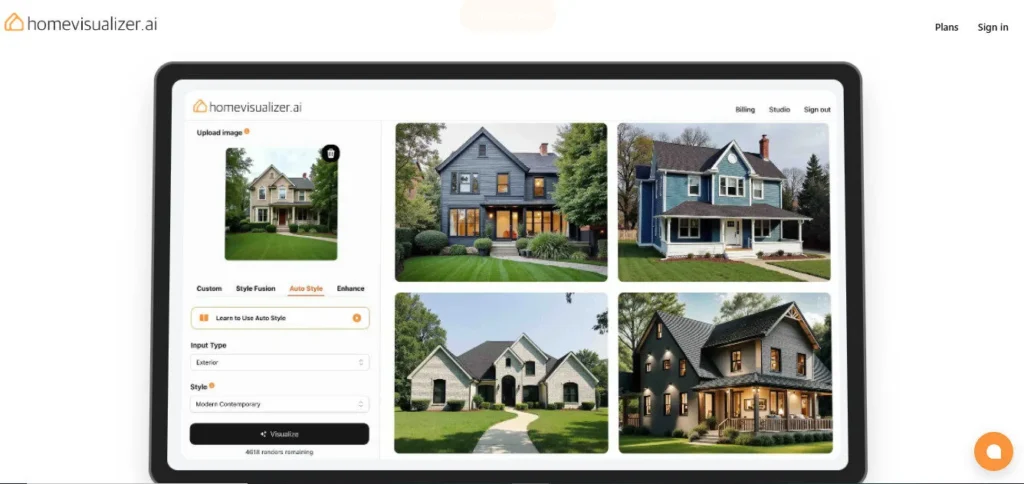
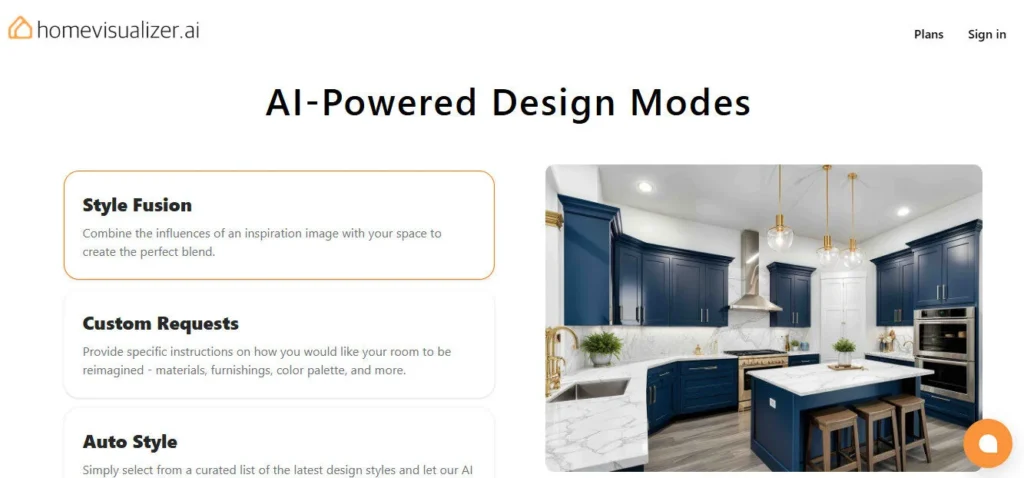
The platform offers three core design modes: Auto Style, Custom Requests, and Style Fusion. Auto Style lets you pick from a library of predefined interior styles — think Scandinavian, Art Deco, or Industrial — and apply them to your uploaded photo instantly.

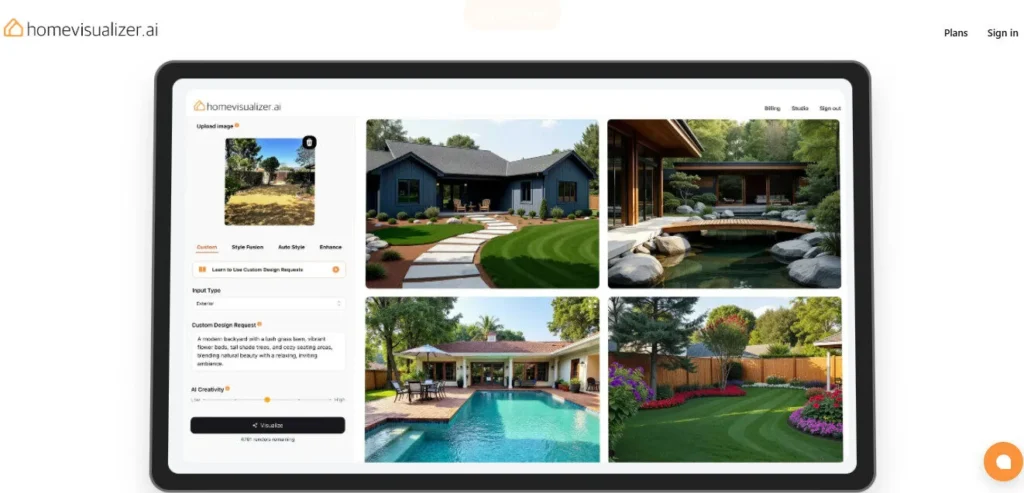
Custom Requests allow you to enter a text prompt to guide the AI toward a specific look or material. Style Fusion is the standout feature: you upload an inspiration image, and the AI adapts those specific design elements to your actual room.

All plans include watermark-free downloads and no-watermark renders. The Pro and Business tiers add Commercial Use licensing and Unlimited Cloud Storage — essential for freelancers and agencies delivering client work.

Who Gets the Most Out of It

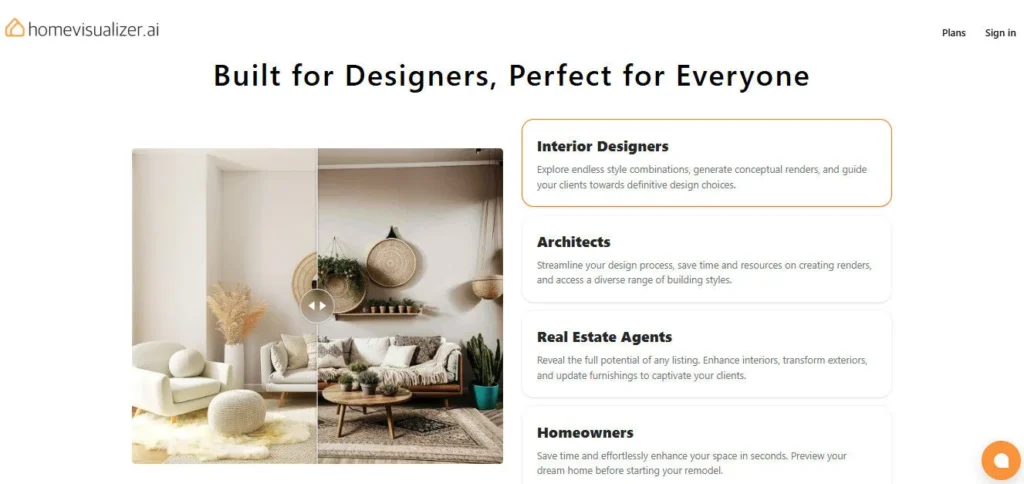
Interior designers use it during live client brainstorming sessions to show real-time visual options without firing up complex 3D software. Real estate agents upload photos of fixer-uppers to help buyers visualize a property's potential before making an offer.

General contractors use it to confirm layout decisions before committing to structural changes. Even homeowners planning a renovation find it accessible — the learning curve is roughly 15 minutes, making it approachable without any design background.

Is It Worth It?

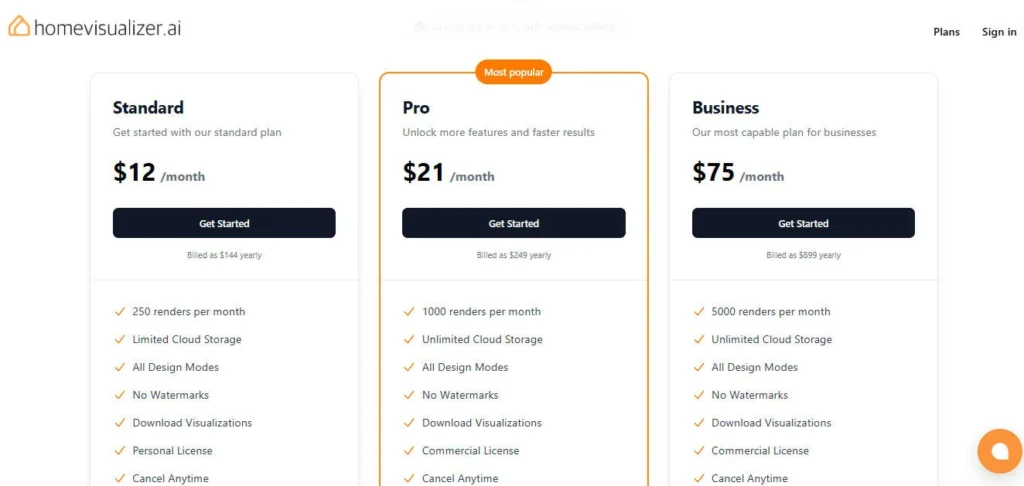
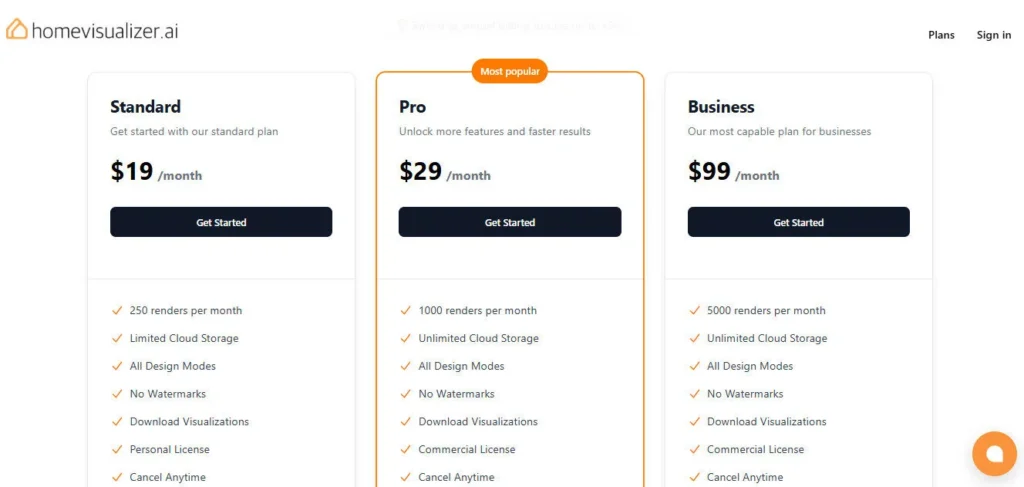
At $19/month (or $12/month billed annually) for 250 renders, the Standard plan covers casual and personal use well. Professionals who need Commercial Use licensing should step up to the Pro plan at $29/month ($21/month annually) for 1,000 renders and Unlimited Cloud Storage.

High-volume studios can justify the Business plan at $99/month ($75/month annually) for 5,000 renders. There is no free tier, but the per-render cost scales down significantly on annual billing — making the annual Pro plan a strong value for any active design practice.

HomeVisualizer AI is an AI-powered interior design rendering platform trained by expert interior designers to transform room photos, sketches, elevations, and rough renders into photorealistic visuals.

Built for interior designers, homeowners, real estate agents, and contractors, it streamlines client presentations and design ideation without requiring complex 3D software. The tool offers three design modes — Auto Style, Custom Requests, and Style Fusion — across three paid plans starting at $19/month.

• Auto Style — Upload any room photo and choose from a library of predefined interior styles (e.g., Scandinavian, Art Deco, Industrial); the AI transforms the space in seconds.

• Style Fusion — Upload an inspiration image from any source, and the AI adapts those specific design elements — furniture, materials, lighting — to your actual room.

• Custom Requests — Enter a text prompt to guide the AI toward specific materials, color palettes, or design details beyond the preset styles.

• Sketch to Render — Upload a hand-drawn floor plan or rough sketch and receive a photorealistic interior visualization, ideal for early-stage client presentations.

• Multi-Format Input Support — Accepts photos, elevations, existing 3D renderings, and hand-drawn sketches as starting inputs, making it flexible across design workflows.

• No Watermarks on All Plans — Every paid plan (Standard, Pro, Business) delivers clean, downloadable renders with no watermarks.

• Commercial Use License — Pro and Business plans include a Commercial Use license, so freelancers and agencies can legally use renders in client deliverables.

• Unlimited Cloud Storage — Pro and Business tiers provide unlimited cloud storage to organize and access your entire render library from any device.

Pros
  • Style Fusion feature lets you pull design elements from real inspiration images — unusually powerful for client direction work
  • Accepts sketches, elevations, photos, and existing renders as inputs — more flexible than most image-only tools
  • No watermarks on all three paid plans, including the entry-level Standard tier
  • Commercial Use licensing included from the Pro plan upward for professional deliverables
  • Annual billing saves up to 35% — Standard drops to $12/mo, Pro to $21/mo, Business to $75/mo
  • Built and trained by interior designers, so spatial relationships and material detail are more accurate than general AI image tools
Cons
  • ×No free plan or free trial — you must pay from day one, starting at $19/month
  • ×Sketch-to-render output quality is noticeably weaker than photo-based inputs — not reliable for precise floor plan visualization
  • ×Standard plan limits you to 250 renders per month and Personal Use only — no commercial licensing at the entry tier
  • ×No desktop app or mobile app — entirely browser-based, which limits offline use
  • ×No direct integration with professional design software like AutoCAD, Revit, or SketchUp — inputs and outputs must be manually transferred

HomeVisualizer AI is best suited for design professionals and property stakeholders who need fast, realistic visuals without complex 3D software.

• Interior designers — Use it during live client sessions to show multiple design directions in real time; the Style Fusion mode is especially useful for translating client inspiration boards into actionable visuals. Commercial Use licensing on the Pro plan makes it suitable for paid client work.

Real estate agents — Upload photos of fixer-uppers or vacant properties to help buyers visualize the finished potential, speeding up purchase decisions.

• General contractors — Confirm layout and décor decisions visually before committing to physical changes, reducing costly miscommunications with clients.

• Homeowners planning renovations — Experiment with styles, materials, and furniture arrangements on the Standard plan ($19/mo) before spending money, with a learning curve of roughly 15 minutes.

Standard ($19/mo, or $12/mo billed annually as $144/yr)250 renders per month, Limited Cloud Storage, All Design Modes (Auto Style, Custom Requests, Style Fusion), No Watermarks, Download Visualizations, Personal Use only, Cancel Anytime.
Pro ($29/mo, or $21/mo billed annually as $249/yr)1,000 renders per month, Unlimited Cloud Storage, All Design Modes, No Watermarks, Download Visualizations, Commercial Use license, Cancel Anytime.
Business ($99/mo, or $75/mo billed annually as $899/yr)5,000 renders per month, Unlimited Cloud Storage, All Design Modes, No Watermarks, Download Visualizations, Commercial Use license, Cancel Anytime.

HomeVisualizer AI stands out from generic AI image tools with features purpose-built for interior design workflows.

• Style Fusion — Unlike tools that only apply preset styles, Style Fusion lets you upload any real-world inspiration image and map its specific design DNA onto your room; this is rare among AI render tools and directly addresses how designers actually work with mood boards.

• Multi-Format Input Flexibility — Most AI room tools only accept photos, but HomeVisualizer AI also processes sketches, hand-drawn layouts, elevations, and existing 3D renders — covering the full design workflow from concept to client presentation.

• Designer-Trained AI — The model was built in collaboration with expert interior designers, resulting in more accurate spatial understanding and material rendering than general-purpose AI image generators.

• No-Data-Resale Privacy Commitment — The platform explicitly states it never sells user data or uses it for model training, which matters to designers sharing confidential client project images.

HomeVisualizer AI runs entirely in the browser with no software installation required, and is accessible across modern platforms.

• Web Browser — Fully functional on Chrome, Safari, Firefox, and Edge; no download or plugin needed, works on any device with a modern browser.

Image File Inputs — Accepts standard image formats (JPEG, PNG) from any source, including smartphone photos, DSLR shots, scanned sketches, and screenshots of 3D renderings.

• Cloud Storage — Built-in unlimited cloud storage on Pro and Business plans means your renders are accessible from any device, any location.

• Payment via Lemon Squeezy — Billing is handled through Lemon Squeezy, a secure payment processor; no sensitive payment data is stored on HomeVisualizer AI's servers.

CategoryScoreWhy It Matters
Accuracy & Reliability4.2/5Photo-to-render and Style Fusion outputs are consistently photorealistic and spatially accurate, with reviewers noting furniture placement and lighting feel natural. The sketch-to-render mode is the exception — results are noticeably less precise and unreliable for detailed floor plan work.
Ease of Use4.4/5Reviewers consistently report a learning curve of around 15 minutes, and the interface is described as user-friendly even for non-designers. The platform requires no software installation — everything runs in the browser, which reduces setup friction significantly.
Functionality & Features4.3/5The three design modes — Auto Style, Custom Requests, and Style Fusion — cover a wide range of real design workflows. Multi-format input support (photos, sketches, elevations, renders) sets it apart from tools that only accept photos. The absence of direct CAD software integration limits its utility for high-end production pipelines.
Performance & Speed4.3/5The tool is fast enough for live client brainstorming sessions, with most renders completing in seconds. No significant reports of slow queue times on Pro or Business plans, though Standard-tier performance may vary.
Customization & Flexibility4.4/5Style Fusion's ability to adapt real-world inspiration images is a genuinely flexible feature not common in competing tools. Users can also specify materials down to wood grain and adjust lighting conditions including natural light simulation by time of day. Customization is deep relative to most consumer-facing AI design tools.
Data Privacy & Security4.5/5HomeVisualizer AI explicitly commits to never selling user data or using uploaded images for model training — a strong stance compared to many AI tools. Payment processing is handled by Lemon Squeezy with no sensitive payment data retained on the platform's servers.
Support & Resources3.8/5The platform offers email support at [email protected] and promises a refund or credit for unsatisfactory renders. However, there is no documented live chat, help center, or community forum publicly visible, which limits self-service troubleshooting options.
Cost-Efficiency3.9/5The absence of any free plan or trial is a real barrier — competitors often offer at least a few free renders to test quality before committing. That said, the annual Pro plan at $21/month for 1,000 renders with Commercial Use is competitive for working designers. Annual billing discounts of up to 35% reward committed users.
Overall Score4.2/5HomeVisualizer AI is a well-focused, professionally capable tool that delivers real value for interior designers, real estate agents, and renovation-planning homeowners. The no-free-plan policy holds it back from a higher score, but the Style Fusion feature and multi-format input support give it a clear edge over generic AI image tools for professional design workflows.

HomeVisualizer AI is a focused, well-executed tool for anyone who needs fast photorealistic interior renders without investing in complex 3D software.

The lack of a free plan is the main barrier to entry, but the annual Pro plan at $21/month offers strong value for active interior designers and real estate professionals who can leverage Style Fusion and multi-format inputs regularly. The sketch-to-render output remains its weakest mode, but photo-to-render and Style Fusion results are consistently impressive.

Q1.Is HomeVisualizer AI free to use?
Ans:-No, HomeVisualizer AI does not offer a free plan or a free trial. The entry-level Standard plan starts at $19/month (or $12/month billed annually). You must subscribe to a paid plan to generate renders.
Q2.What are the pricing plans for HomeVisualizer AI?
Ans:-There are three paid plans. Standard costs $19/month ($12/mo annually) for 250 renders with Personal Use only. Pro costs $29/month ($21/mo annually) for 1,000 renders with Commercial Use and Unlimited Cloud Storage. Business costs $99/month ($75/mo annually) for 5,000 renders with Commercial Use and Unlimited Cloud Storage.
Q3.Can I use HomeVisualizer AI renders for client projects?
Ans:-Yes, but only on the Pro ($29/mo) or Business ($99/mo) plans, which include a Commercial Use license. The Standard plan is for Personal Use only, meaning you cannot legally use its outputs in paid client work or commercial marketing materials.
Q4.What is Style Fusion in HomeVisualizer AI?
Ans:-Style Fusion lets you upload any inspiration image — from a magazine, Pinterest, or a photo — and the AI adapts the specific design elements from that image to your actual room. It's one of the platform's most powerful features for designers working with client mood boards.
Q5.Can HomeVisualizer AI work from a hand-drawn sketch?
Ans:-Yes, the platform accepts hand-drawn sketches as input and attempts to generate a photorealistic interior from them. However, sketch-to-render is the weakest mode — results are less reliable and precise than photo-based or rendering-based inputs.
Q6.How many renders can I generate per month on each plan?
Ans:-Standard gives you 250 renders per month, Pro gives 1,000, and Business gives 5,000. All plans are available on monthly or annual billing, with annual billing saving up to 35%.
Q7.Does HomeVisualizer AI sell my data or use my images for AI training?
Ans:-No. HomeVisualizer AI explicitly states it never sells user data to third parties and does not use your uploaded images for model training. This is an important distinction for designers sharing confidential client project files.
Q8.What is the difference between the Standard and Pro plans?
Ans:-The key differences are render count (250 vs. 1,000 per month), cloud storage (Limited vs. Unlimited), and use rights (Personal Use only vs. Commercial Use). If you're a professional using renders in client work, you need the Pro plan at minimum.
Q9.Does HomeVisualizer AI integrate with design software like SketchUp or AutoCAD?
Ans:-There is no direct integration with professional CAD or 3D design software. You'll need to export screenshots or images from those tools and upload them manually as inputs. Outputs are downloaded as image files.
Q10.How long does it take to generate a render in HomeVisualizer AI?
Ans:-HomeVisualizer AI generates renders quickly — most users report results within seconds for photo-based inputs. The exact speed can vary based on plan tier and server load, but the tool is designed for fast real-time client sessions.

Promote This Tool

Help others discover this tool by sharing this page.

✓ Link copied to clipboard!

HomeVisualizer AI Reviews

0.0
Based on 0 reviews
5 star
0%
4 star
0%
3 star
0%
2 star
0%
1 star
0%

Write a Review

Your Rating:

No reviews yet. Be the first to share your thoughts!

48 Similar HomeVisualizer AI Tools