Home Categories Deals Sign Up
Updated: April 6, 2026

GetProspect in Action: Verified Emails From LinkedIn in One Click

GetProspect is a Ukrainian-built B2B email finder and prospecting platform founded and led by CEO Dmytro Shulha. The platform has grown bootstrapped — built by a small team with a big passion for tech — to serve thousands of businesses worldwide, earning a 4.8/5 rating from 1,000+ Chrome Web Store reviews, 4.5/5 on Capterra, and 4.0/5 on G2.

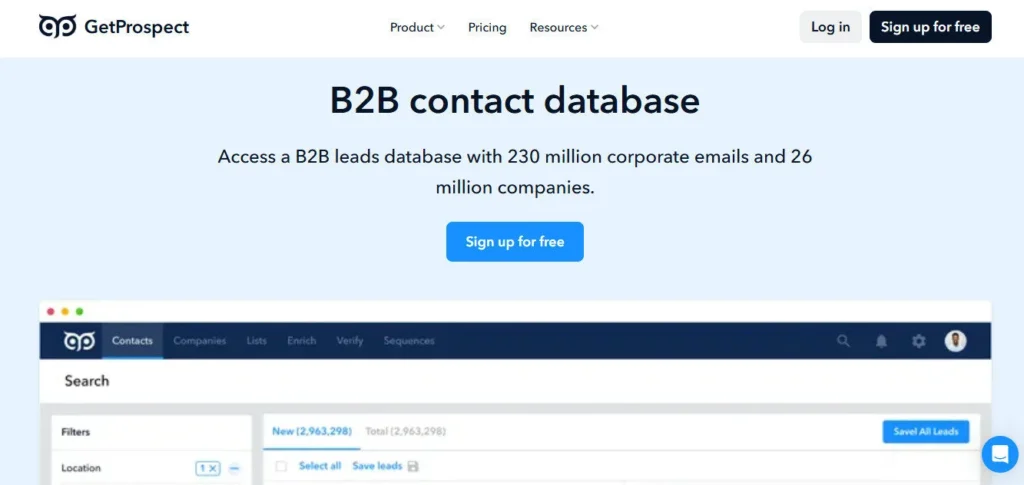
At its simplest, GetProspect helps sales teams, recruiters, and marketers find verified corporate emails fast — either via a LinkedIn Chrome extension, bulk CSV enrichment, or direct search in a 200M-record B2B contact database. A permanent free plan with 50 valid emails per month means you can start without a credit card and test data quality before spending a dollar.

Key Capabilities

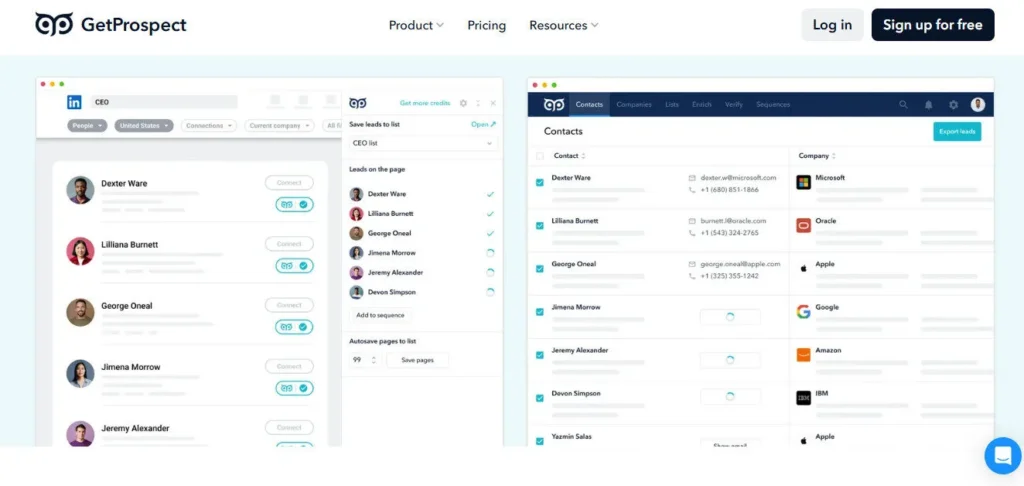
The Chrome extension is GetProspect's flagship tool. Install it, open LinkedIn or LinkedIn Sales Navigator, and extract entire search result pages into verified contact lists with a single click. The extension returns full name, company, job title, email, phone number, location, LinkedIn URL, and profile summary — up to 40+ data attributes per contact.

Crucially, you are never charged for emails that aren't found, duplicates are free, and unused credits roll over into the following month — three billing policies that meaningfully stretch your plan's value compared to competitors that charge regardless of outcome.

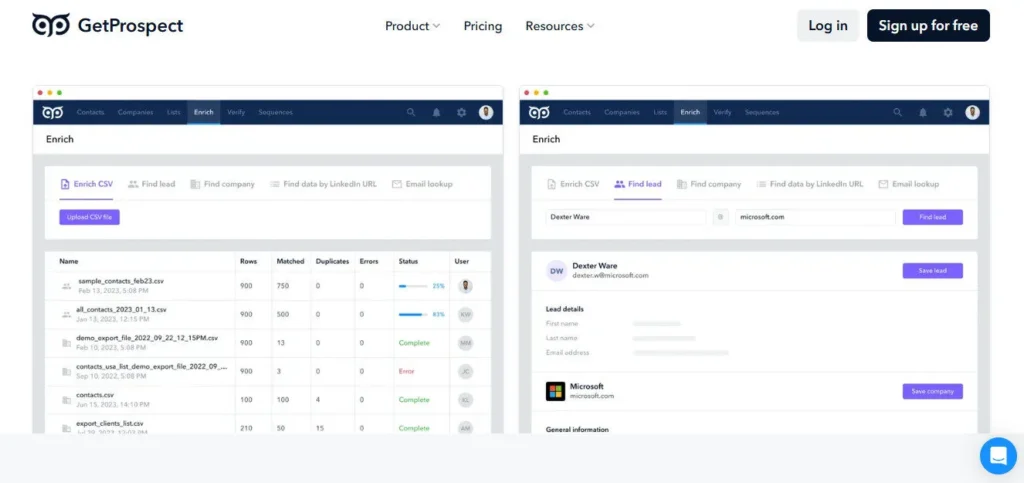
Bulk email enrichment lets you upload a CSV of names and company domains and have GetProspect populate verified emails, phone numbers, and company data at scale in minutes. The proprietary catch-all email verifier — a technical differentiator GetProspect specifically calls out — validates emails on catch-all domains where most other tools give up and mark the address as unverifiable.

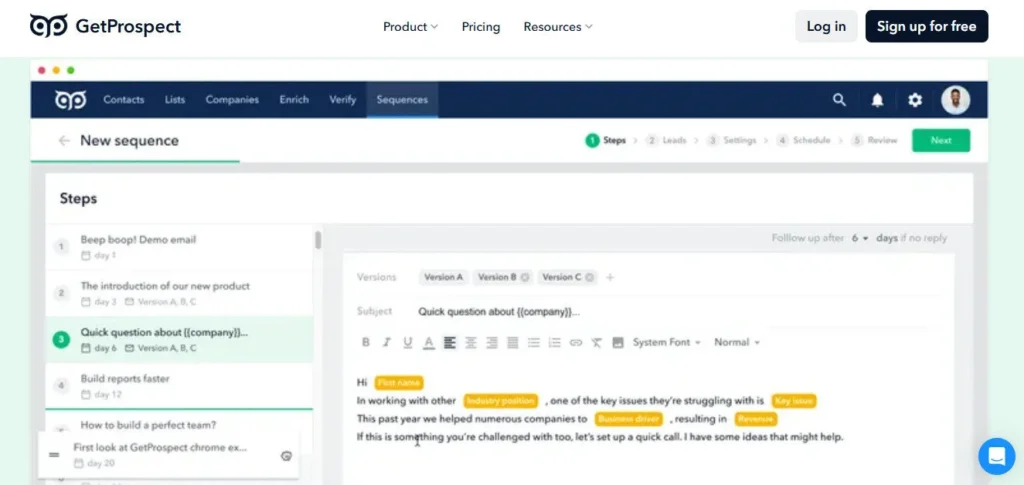
The built-in Cold Email Software module (included in the free plan) lets you send AI-personalized sequences, A/B test subject lines, add attachments, and run automated follow-ups without connecting a third-party tool.

Who Gets the Most Out of It

Freelancers and early-stage founders on the free plan get 50 verified emails and 100 verifications per month — enough to run a consistent personal outbound pipeline at zero cost. SDRs and small teams on the Starter plan ($49/mo) access 1,000 valid emails and 2,000 verifications with full CRM integration, API access, and Google Sheets connectivity.

Growth plan users choose their own exact credit volumes — starting from 5,000 emails/month — making GetProspect one of the few tools with truly flexible, pay-for-what-you-need scaling.

Recruiters on LinkedIn particularly benefit from the extension's ability to export entire Sales Navigator search result pages rather than visiting profiles one at a time.

Is It Worth It?

For the free tier alone, GetProspect is worth installing — 50 verified emails per month with no credit card is a genuinely useful free plan in a market full of tools offering only 5–10 lookups. The Starter plan at $49/mo for 1,000 verified emails works out to $0.049 per contact — competitive with AeroLeads and significantly cheaper than UpLead at $99/mo for 170 credits.

The honest limitation: G2 reviewers note occasional email accuracy inconsistencies, and phone number coverage (only 5 numbers included on Starter) is thin for teams prioritizing direct-dial outreach. For teams focused primarily on verified email prospecting and cold email campaigns, GetProspect delivers strong volume-per-dollar backed by a 95% accuracy guarantee.


GetProspect is a Ukrainian bootstrapped B2B email finder and lead generation platform founded by CEO Dmytro Shulha. It provides access to a 200M+ contact and 26M+ company database, a LinkedIn Chrome extension for one-click email extraction, bulk CSV enrichment across 40+ data attributes, a proprietary catch-all email verifier, a built-in cold email sequencing tool, and native CRM integrations. It offers a permanent free plan with 50 valid emails per month and is rated 4.8/5 on the Chrome Web Store from 1,000+ reviews.

• LinkedIn Chrome Extension — Extract verified emails, phone numbers, job titles, and 40+ data attributes from LinkedIn profiles and Sales Navigator search pages with one click; supports bulk export of entire search result pages.

• 200M+ B2B Contact Database — Search GetProspect's own database of 200M contacts and 26M companies using 17+ filters including job title, location, industry, company size, and technologies used; access 130M mobile phone numbers.

• Bulk CSV Enrichment — Upload a list of names and company domains and have GetProspect fill in verified emails, phone numbers, and company data across all rows in minutes; charged only for valid emails found.

• Proprietary Catch-All Email Verifier — Validates emails on catch-all domains where most competitor tools fail and mark contacts as unverifiable; guarantees 97% deliverability on verified emails at bulk scale.

• Cold Email Software (All Plans Including Free) — Send AI-personalized cold email sequences with automated follow-ups, A/B testing, attachment support, email preview, and inbox tracking — included at no extra cost on all plans.

• Flexible Growth Plan Credits — Choose your exact monthly email and phone credit volume on the Growth plan rather than fitting into a rigid tier; credits roll over month-to-month and you are never charged for unfound or duplicate contacts.

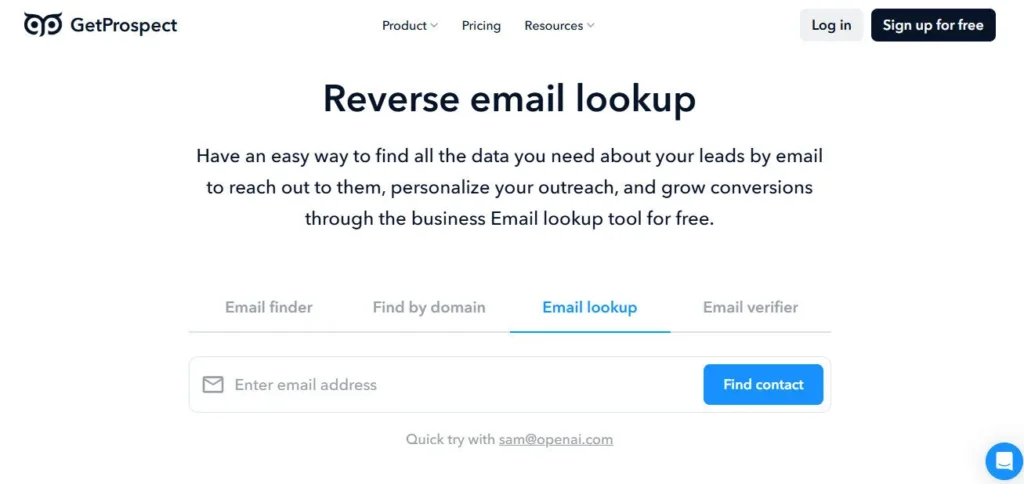
• Reverse Email Lookup — Paste any business email to instantly reveal the contact's full name, job title, and company — useful for enriching inbound leads or qualifying unknown email senders.

• Google Sheets Integration — Run email lookups and verifications directly from a Google Sheets spreadsheet via native integration, without downloading or re-uploading CSV files.

Pros
  • Permanent free plan with 50 verified emails and 100 verifications per month — no credit card required, no time limit
  • Unused credits roll over into the next billing month — a rare policy that prevents wasting your plan budget
  • You are never charged for emails not found or for duplicate contacts already in your account
  • Proprietary catch-all email verifier tackles a validation category that most competing tools mark as unresolvable
  • Built-in cold email sequencing with A/B testing and automated follow-ups is included even on the free plan
  • Rated 4.8/5 from 1,000+ Chrome Web Store reviews — consistently the highest Chrome rating in its category
  • Flexible Growth plan lets you dial in exact credit volumes rather than forcing you into over- or under-sized tiers
  • Google Sheets native integration eliminates the CSV upload/download cycle for teams working in spreadsheets
Cons
  • ×G2 reviewers note occasional email accuracy inconsistencies leading to bounces — real-world accuracy is closer to 70–80% on some LinkedIn lists, below the stated 95% for all found contacts
  • ×Phone number allocation is extremely thin on the Starter plan — only 5 phone numbers included per month
  • ×Growth plan pricing is not published on the pricing page beyond a starting credit count; you must use an on-page configurator or contact sales to get a final number for larger volumes
  • ×The cold email sending tool is newer and has fewer reviews and documented third-party benchmarks than standalone cold email platforms
  • ×No built-in LinkedIn outreach automation — GetProspect handles data only; it does not send LinkedIn connection requests or messages
  • ×Email sending volume on the free plan is capped and best suited for light testing; high-volume daily sending requires a paid plan

GetProspect is best suited for sales and marketing professionals who need verified B2B email data at affordable scale, with built-in cold email capability as a bonus.

• Freelancers and solopreneurs — The free plan's 50 verified emails per month is enough to run a personal outbound pipeline at zero cost; no credit card or time-limited trial pressure.

• SDRs and outbound sales reps — Starter plan at $49/mo for 1,000 emails makes list building affordable for reps doing daily cold outreach without an enterprise data budget.

• Recruiters and talent sourcers — The LinkedIn Chrome extension bulk-exports entire Sales Navigator search pages into verified contact lists, replacing hours of manual profile-by-profile lookups.

• Marketing teams and growth hackers — Bulk CSV enrichment, Google Sheets integration, and the flexible Growth plan credit configurator support data-heavy campaigns without manual research overhead.

• Startups and small businesses validating outbound channels — The no-card-required free plan and low Starter entry point let early-stage teams test email prospecting ROI before committing to a higher monthly budget.

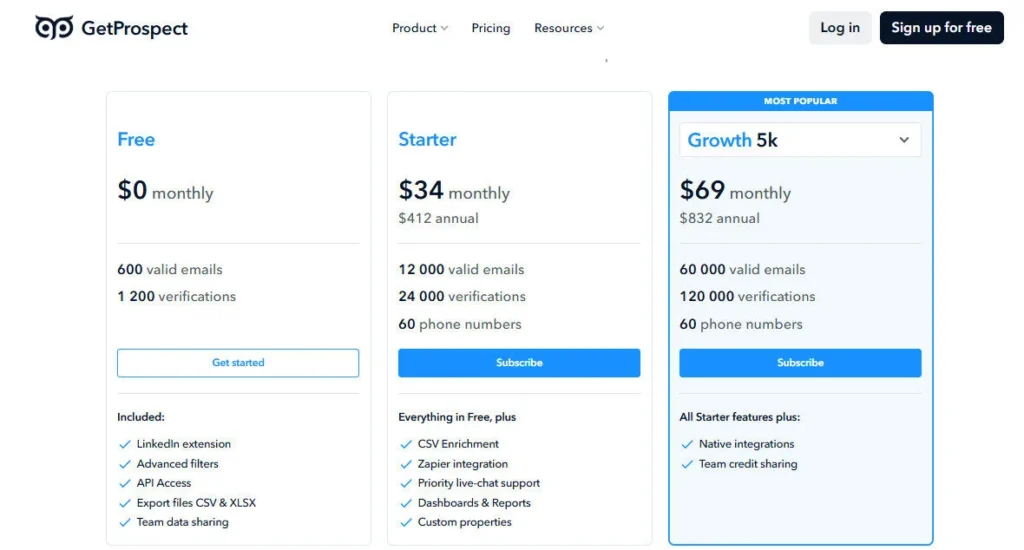
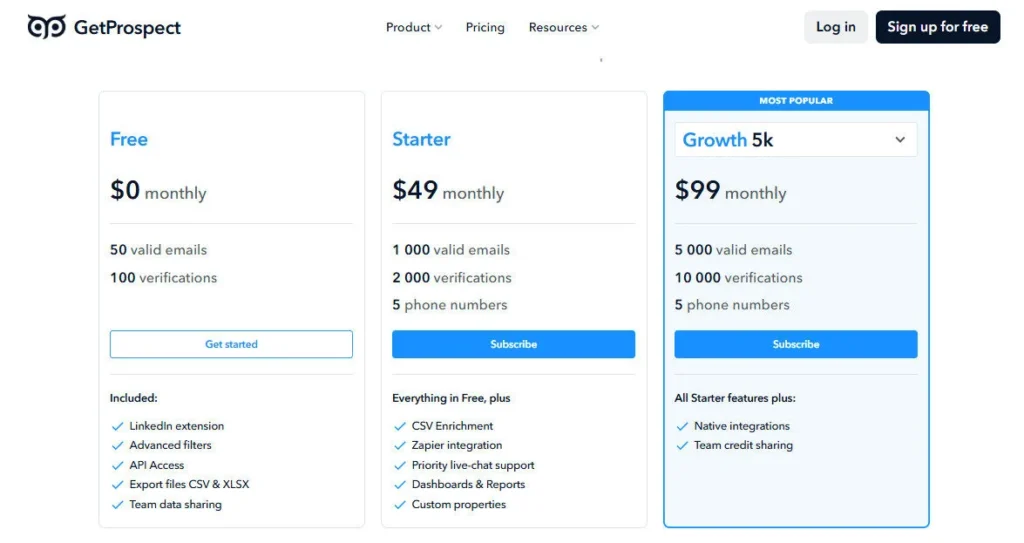
Free ($0/mo, permanent)50 valid emails/month, 100 email verifications/month, 5 phone numbers/month, Chrome extension, bulk email finder, CSV enrichment, advanced filters, CRM integrations, Google Sheets integration, API access, team accounts, cold email software (1 sequence), reverse email lookup, custom properties.
Starter ($49/mo or $34/mo billed annually at $408/yr)1,000 valid emails/month, 2,000 email verifications/month, 5 phone numbers/month, all Free plan features, credits roll over (up to 1 month's allowance), no charge for duplicates, proprietary catch-all email verification, full CRM native integrations (HubSpot, Salesforce, Pipedrive and others), full API access.
Growth (Custom pricing, configurator-based)Choose your own valid email credits starting from 5,000/month and scale upward; phone number credits configurable separately; all Starter features included; pricing available via on-page credit configurator at getprospect.com/pricing.
Email Verification Add-On (One-time, credits never expire)10,000 verifications for $29, 25,000 for $39, 50,000 for $69, 100,000 for $119, 500,000 for $249, 1,000,000 for $369, 5,000,000 for $1,419, 10,000,000 for $2,499; available independently of any subscription plan.

GetProspect stands apart from most B2B email finders through its billing transparency, technical verification depth, and all-in-one approach at genuinely accessible pricing.

• Never charged for emails not found or duplicates — Most B2B data tools deduct credits for every lookup attempt, whether or not a valid email is returned. GetProspect charges only for verified valid emails it successfully delivers, and queries for contacts already in your account are always free — a billing model that directly aligns the company's incentive with your data quality.

• Proprietary catch-all email verification — Catch-all domains (company mail servers that accept all incoming email regardless of whether the address is real) are the hardest category for email verification tools to handle. GetProspect's proprietary catch-all validation technology processes these addresses where tools like Hunter.io, Lusha, and others mark them unverifiable — producing a usable email rather than a blank field.

• Credits roll over month-to-month — Unused valid email credits carry forward into the next billing month, up to one full month's allowance. For teams with seasonal or uneven prospecting volume, this prevents budget waste in slow months and builds a small buffer for peak periods.

• Cold email software included on all plans including free — Rather than selling prospecting data and cold email as two separate paid subscriptions, GetProspect includes its AI-personalized cold email sequencing tool — with follow-ups, A/B testing, and inbox tracking — on every plan including free. This makes GetProspect one of the only tools where you can find a contact, verify their email, and send your first outreach sequence without paying for a second platform.

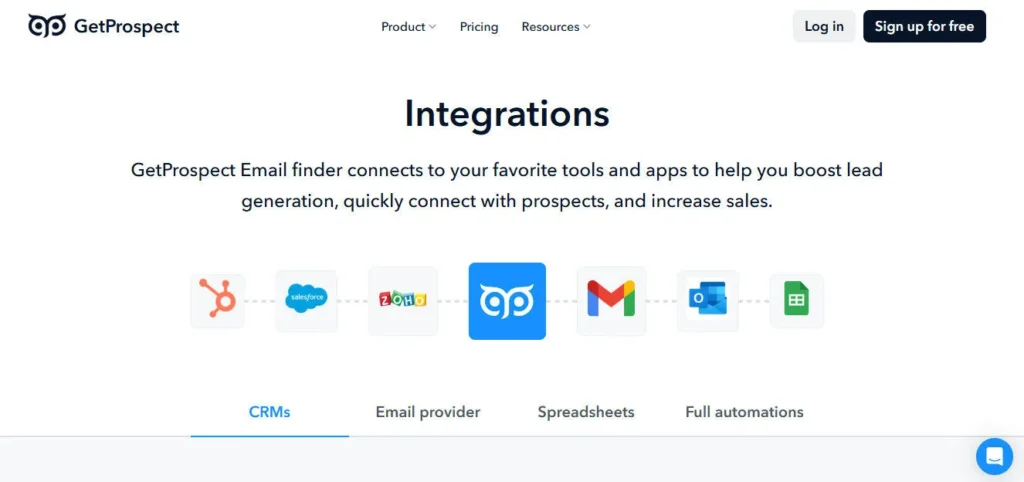
GetProspect connects natively with major CRMs, marketing platforms, spreadsheet tools, and automation apps across the B2B sales stack.

• HubSpot — Native CRM integration pushes verified contacts from GetProspect search results, LinkedIn extension exports, and CSV enrichment directly into HubSpot contact records and lists; available on all plans including free.

• Salesforce — Direct native integration syncs enriched lead and contact records from GetProspect into Salesforce in one click from the dashboard or Chrome extension; available on all plans.

• Pipedrive — Native integration exports contacts from GetProspect lists into Pipedrive deals and contact databases with full field mapping; available on all plans.

• Google Sheets — Native Google Sheets integration lets you run email lookups and verifications directly from a spreadsheet without downloading or re-uploading CSV files — a unique workflow feature among email finders at this price tier.

• Zapier — Connect GetProspect to 1,500+ third-party apps via Zapier for automated lead routing, Slack notifications, and custom CRM or outreach workflows triggered by new contact exports.

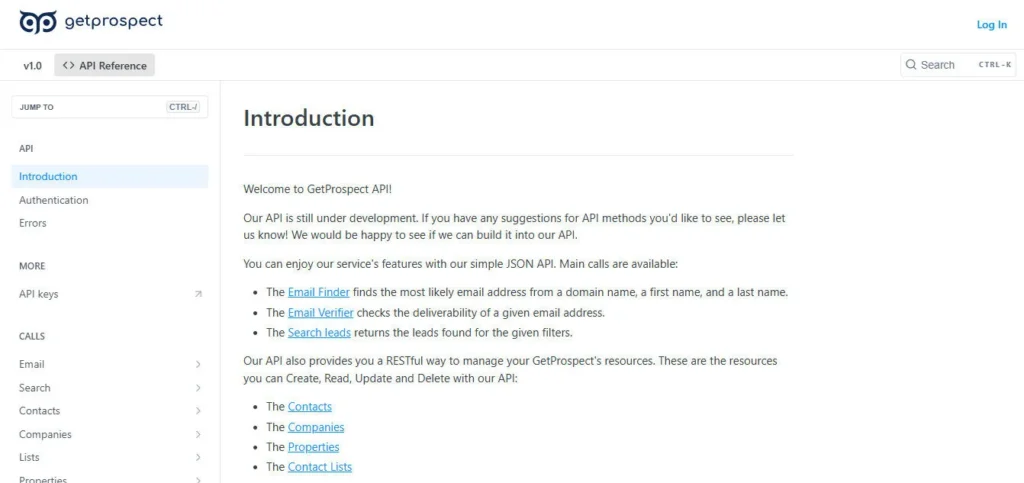
• REST API — Full API access is available on all plans including free, enabling programmatic bulk enrichment, contact search, email verification, and CRM push for development teams building custom prospecting pipelines.

CategoryScoreWhy It Matters
Accuracy & Reliability4.0/5GetProspect guarantees 95% accuracy for verified valid emails it successfully returns, and its own benchmark test found 84 valid emails out of 100 contacts — outperforming ZoomInfo, Hunter.io, Lusha, and ContactOut. The proprietary catch-all verifier handles a technically difficult email category that most tools skip. However, G2 reviewers note real-world accuracy on some LinkedIn lists falls to 70–80%, and the 4.0/5 G2 rating reflects occasional inconsistency that prevents a higher score.
Ease of Use4.5/5G2 reviewers consistently cite 'ease of use' and 'straightforward interface' as top pros, and multiple Capterra reviewers describe the platform as 'very easy to use, intuitive, seamless'. The Chrome extension requires no configuration beyond installation, and first contacts can be exported in under 2 minutes from sign-up. The flexible Growth plan credit configurator requires slightly more navigation than a simple pricing table, which is the main usability friction point.
Functionality & Features4.3/5GetProspect covers the full B2B prospecting stack for email-focused teams: 200M-record database, LinkedIn Chrome extension, bulk CSV enrichment, catch-all verifier, reverse email lookup, cold email sequences, A/B testing, Google Sheets integration, API, and CRM connectors — all available even on the free plan. The main gap is the absence of LinkedIn outreach automation and thin phone number coverage on lower tiers, which limits its utility as a true all-in-one tool for multichannel outbound.
Performance & Speed4.2/5The Chrome extension returns contact data in 5–15 seconds per profile and can bulk-export entire LinkedIn search pages without noticeable delay. Bulk CSV enrichment processes lists of hundreds in minutes. The cold email tool sends campaigns reliably with real-time inbox tracking. No significant downtime or latency complaints appear across major review platforms, and the Ukrainian team is noted for shipping product updates frequently.
Customization & Flexibility4.3/5The Growth plan's dial-your-own-credits model is genuinely flexible — letting teams match their exact monthly prospecting volume rather than paying for over-sized tiers. Custom properties let you organize and segment contacts with your own data fields. Google Sheets native integration and full API access on all plans — including free — enable deep workflow customization for technical users. Cold email A/B testing and sequence personalization add further flexibility to the outreach layer.
Data Privacy & Security4.0/5GetProspect is a Ukrainian company operating in compliance with GDPR, sourcing data from public professional profiles and business websites. Its Help Center provides guidance on ethical use for sales and recruiting purposes. As a bootstrapped, founder-led company, data governance documentation is present but less formally published (e.g., no SOC 2 certification listed) compared to enterprise-grade alternatives. The CEO's personal statement on the founding vision signals transparency about the company's data philosophy.
Support & Resources4.2/5GetProspect maintains an active YouTube channel with tutorials covering the Chrome extension, database search, enrichment workflows, and CRM integrations — with videos published as recently as mid-2025. A comprehensive Help Center covers all major features with step-by-step guides. Multiple G2 and Capterra reviewers specifically praise 'responsive customer support'. The bootstrapped team's direct involvement means support is personal but may be slower to scale than larger platforms during high-volume periods.
Cost-Efficiency4.6/5A permanent free plan with 50 verified emails per month, no credit card, and zero time limit is exceptional value in a category where most tools offer only 5–10 trial lookups. The Starter plan at $49/mo for 1,000 verified emails — $0.049 per contact — is among the lowest cost-per-verified-email in the market. The no-charge-for-not-found policy, rollover credits, and free duplicate queries stretch every plan's budget further than flat per-lookup competitors. Cold email software included at no extra cost eliminates a second subscription that competitors charge $30–$99/mo for separately.
Overall Score4.2/5GetProspect is the strongest free-tier B2B email finder in its category, combining a genuinely useful permanent free plan with fair billing policies, a proprietary catch-all verifier, and a built-in cold email tool that eliminates the need for a second subscription. It's best suited for email-first prospecting teams that prioritize volume, cost-efficiency, and LinkedIn-based list building. Teams needing high-volume phone data, LinkedIn outreach automation, or the strictest per-export accuracy guarantees will find UpLead or Humanlinker better suited.

GetProspect delivers a compelling combination of a generous permanent free tier, a fair pay-for-valid-results billing model, and a built-in cold email tool that most comparable platforms charge separately for. At $49/mo for 1,000 verified emails with rollover credits and no charge for duplicates or failed lookups, it's one of the most transparent and cost-efficient B2B email finders available.

Phone number coverage is thin on lower plans, and real-world accuracy on some LinkedIn lists falls below the stated 95%, but for teams primarily focused on email prospecting volume at a fair price, GetProspect is a highly capable and well-reviewed choice.

Q1.What is GetProspect and how does it work?
Ans:-GetProspect is a Ukrainian B2B email finder and lead generation platform founded by CEO Dmytro Shulha. It finds verified professional email addresses using a LinkedIn Chrome extension, a direct search in its 200M-record B2B database, or bulk CSV enrichment where you upload a list of names and company domains and receive verified emails back. It also includes a built-in cold email sequencing tool on all plans, including the free tier.
Q2.Is GetProspect really free?
Ans:-Yes. GetProspect offers a permanent free plan — not a time-limited trial — that includes 50 valid verified emails per month, 100 email verifications, 5 phone numbers, full Chrome extension access, CRM integrations, API access, and the cold email sequencing tool. No credit card is required to sign up and use the free plan indefinitely.
Q3.How accurate is GetProspect's email data?
Ans:-GetProspect guarantees 95% accuracy for emails it successfully finds and returns, and states it found 84 valid emails out of 100 contacts in its own benchmark tests — outperforming ZoomInfo, Hunter.io, Lusha, and ContactOut in that test. However, G2 and Capterra reviewers note that real-world accuracy on certain LinkedIn lists can be closer to 70–80%, particularly for contacts at smaller companies with limited public data. Running found emails through the built-in verifier before sending further reduces bounce risk.
Q4.Do unused GetProspect credits roll over?
Ans:-Yes. Unused valid email credits roll over into the following billing month, up to a maximum of one full month's allowance. For example, if you're on the Starter plan with 1,000 credits and use only 600 in January, the 400 unused credits carry into February — giving you up to 1,400 available that month. Verification add-on credits purchased separately never expire.
Q5.Does GetProspect charge for emails it doesn't find?
Ans:-No. GetProspect only deducts credits when it successfully returns a verified valid email. If it can't find an email for a contact you search, no credit is consumed. Similarly, searching for a contact already in your account is always free — duplicates never cost a credit. This billing model makes your monthly allocation go further than tools that charge per search attempt regardless of outcome.
Q6.What is catch-all email verification and why does it matter?
Ans:-A catch-all domain is a mail server configured to accept all incoming emails regardless of whether the specific address is real. Most email verification tools can't determine if a specific address on a catch-all domain actually exists, so they mark it as 'risky' or 'unverifiable'. GetProspect uses proprietary technology to validate catch-all addresses more accurately than standard SMTP verification — returning a usable result rather than a blank, which meaningfully increases your contact discovery rate on certain company domains.
Q7.What CRMs does GetProspect integrate with?
Ans:-GetProspect has native one-click integrations with HubSpot, Salesforce, and Pipedrive, available on all plans including free. It also integrates natively with Google Sheets for in-spreadsheet lookups, and connects to 1,500+ additional tools via Zapier. A full REST API is available on all plans — including free — for programmatic contact search, enrichment, and CRM sync.
Q8.Can GetProspect send cold emails or just find them?
Ans:-GetProspect does both. Its built-in Cold Email Software is included on all plans — even the free tier — and supports AI-personalized sequences, automated follow-ups, A/B testing of subject lines and copy, attachment support, email preview before sending, and inbox reply tracking. It is recommended to send no more than 100 emails per day from a single domain to avoid spam filters. For sending 10,000 emails, plans start at $99.
Q9.How does GetProspect's LinkedIn Chrome extension work?
Ans:-Install the GetProspect Chrome extension from the Chrome Web Store, then open LinkedIn or LinkedIn Sales Navigator. Run a people or company search, click the extension, and choose to export individual profiles or entire search result pages into a verified contact list. The extension captures up to 40+ data attributes per contact including email, phone number, job title, company, location, and LinkedIn URL — and returns them in seconds.
Q10.Is GetProspect GDPR compliant?
Ans:-GetProspect states that it collects business contact data ethically from public sources including LinkedIn and business websites, and that its usage is appropriate for legitimate sales, marketing, and recruiting purposes in compliance with applicable data regulations. The platform is used by businesses across Europe, where GDPR applies. For specific GDPR documentation and data processing agreements, GetProspect provides relevant details in its privacy policy and help center.

Promote This Tool

Help others discover this tool by sharing this page.

✓ Link copied to clipboard!

GetProspect Reviews

0.0
Based on 0 reviews
5 star
0%
4 star
0%
3 star
0%
2 star
0%
1 star
0%

Write a Review

Your Rating:

No reviews yet. Be the first to share your thoughts!

48 Similar GetProspect Tools