Home Categories Deals Sign Up
Updated: April 25, 2026

AI HomeDesign in Action: A Full Real Estate Photo Toolkit in 30 Seconds

AI HomeDesign is an AI-powered property photo editing platform built exclusively for real estate professionals, agents, and homeowners who need listing-ready visuals fast.

Upload a photo, select a tool, and get results in about 30 seconds — no design skills, no editing software, no waiting days for a staging company.

The free tier gives you watermarked credits to test every core tool before entering a credit card, making the barrier to entry genuinely low. At $0.24 per photo on the Enterprise plan, it's also one of the most cost-competitive AI staging tools available in 2026.

Key Capabilities

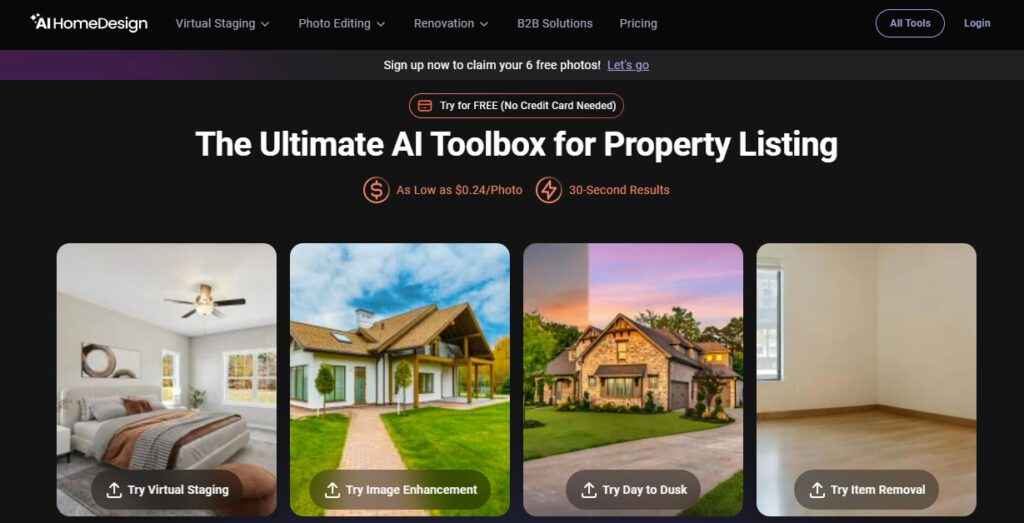
AI HomeDesign covers four core real estate photo editing workflows under one credit system. Virtual Staging furnishes empty rooms, removes existing furniture for a clean slate, and applies interior design styles across different room types — with the ability to adjust furnishings in the final result.

Item Removal lets you either remove all items in a single step or select and remove specific objects (clutter, personal items, unwanted furniture) without affecting the rest of the image. Image Enhancement improves lighting, fixes dark interiors, cleans up skies, and applies multiple enhancements in a single edit pass.

Day-to-Dusk converts daytime exterior shots to twilight lighting for more dramatic listing photos that consistently outperform standard daylight shots in listing view metrics — while also removing shadows for a natural, realistic result.

All plans include unlimited storage, free regenerations, credit rollover (on yearly plans and monthly Enterprise), and 8 extra AI tools available without consuming coins. The Enterprise plan adds API access and Priority Support for teams and platforms operating at scale.

Who Gets the Most Out of It

Listing agents handling empty or cluttered properties get the clearest immediate value — four core editing tools under one subscription at $0.24 per photo eliminates the need to juggle multiple specialist platforms.

Real estate photographers can add AI staging, item removal, and day-to-dusk as premium upsell services without changing their existing workflow. House flippers and property investors use AI HomeDesign to show renovation potential in pre-listed properties without staging budgets.

The Enterprise plan's API access makes it viable for PropTech companies and brokerages that want to automate photo editing directly in their listing management or CRM systems.

Solo agents on tighter budgets benefit from the Pro plan's credit rollover — unused photos carry forward so slow months don't feel wasted.

Is It Worth It?

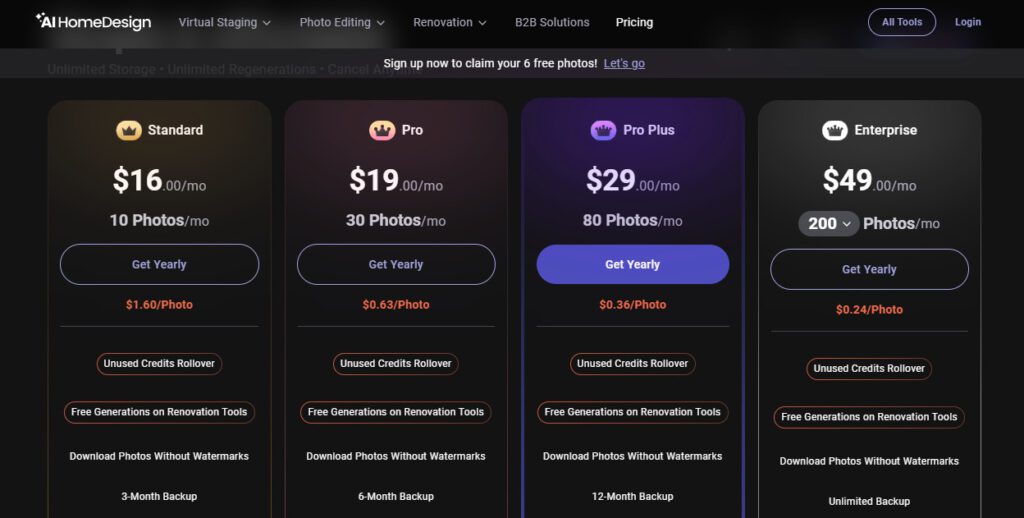
At $19/month for 30 photos with credit rollover, the Pro plan is a reasonable entry point for agents managing a handful of listings per month — equivalent to $0.63 per staged photo, which is dramatically cheaper than agency staging fees of $30–$300 per image.

For higher-volume agents, the Pro Plus plan at $29/month for 80 photos ($0.36/photo) or the Enterprise plan at $49/month for 200 photos ($0.24/photo) deliver progressively better per-photo economics. The 7-day full refund policy (for users with fewer than 4 generations) adds meaningful purchase protection.

The combination of a free watermarked trial, credit rollover, free regenerations, and cancel-anytime flexibility makes AI HomeDesign one of the lower-risk entry points in the AI virtual staging market.


AI HomeDesign is an AI-powered real estate photo editing platform offering virtual staging, item removal, image enhancement, and day-to-dusk exterior transformation — all delivering MLS-ready results in about 30 seconds.

Built for real estate agents, photographers, house flippers, and property teams, it operates on a credit-based system starting at $19/month (30 photos) with a free watermarked trial and no credit card required. Enterprise plan delivers 200 photos/month at $0.24 per photo with API access and Priority Support.

• AI Virtual Staging — Furnish empty rooms or restage furnished spaces with AI-selected furniture and decor across multiple room types and interior design styles; adjust furnishings in the final result without full regeneration.

• Item Removal — Remove all room contents in a single click for a clean empty-room view, or use selective removal to target specific objects (clutter, personal items, unwanted furniture) while preserving the rest of the scene.

Image Enhancement — Automatically improve lighting, fix dark or uneven exposures, enhance sky elements, and apply multiple visual corrections in a single edit pass — without manual photo editing software.

• Day-to-Dusk Conversion — Transform daytime exterior photos into dramatic twilight scenes with realistic dusk lighting, glowing interior windows, and shadow removal for evening-appeal listing shots.

• Credit Rollover — Unused monthly photo credits roll over to the next billing period on all yearly plans and monthly Enterprise subscriptions — unused credits are not wasted at the end of the month.

• 8 Extra AI Tools Without Coins — All paid plans include access to 8 additional AI editing tools that consume no photo credits — extending the platform's editing capabilities beyond the four core tools.

• Free Regenerations — Every plan includes free unlimited regenerations on any image — explore different style variations or outputs from the same photo without consuming additional credits.

• API Access (Enterprise) — The Enterprise plan provides API integration for automating property visual workflows into existing platforms, CRMs, and listing management systems.

Pros
  • Free watermarked trial available with no credit card required — test core tools before committing to any payment
  • Credit rollover on yearly plans and monthly Enterprise means slow months don't waste your subscription allowance
  • Free unlimited regenerations on all plans — iterate on any image without consuming extra credits
  • 8 extra AI tools included without consuming credits on every paid plan
  • Day-to-Dusk exterior conversion included alongside virtual staging, item removal, and enhancement under one credit system
  • 7-day full refund policy (for users with fewer than 4 generations) adds meaningful purchase protection
  • Accepts JPG, JPEG, PNG, WEBP, and HEIC/RAW files up to 50MB — broad format compatibility for professional photographers
Cons
  • ×Pro plan's 30 photos per month ($19/mo) runs out in 2–3 multi-room listings — most active agents will need the $29 or $49 tier
  • ×Credit rollover only applies to yearly plans and monthly Enterprise — monthly Pro and Pro Plus subscribers lose unused credits at reset
  • ×Free tier results include a watermark — not usable in MLS listings without upgrading to a paid plan
  • ×API access is only available on the Enterprise plan ($49/mo) — smaller teams have no automation path on lower tiers
  • ×Limited design style customization compared to some competitors — element-level furniture control (swapping individual pieces) is constrained
  • ×Trustpilot score is based on a relatively small review pool (55 reviews), limiting independent quality signals compared to more established tools

AI HomeDesign is built for real estate professionals and property stakeholders who need fast, affordable, MLS-compliant photo editing across multiple tools without switching between platforms.

• Listing agents — Stage empty rooms, remove clutter, enhance dark interiors, and add twilight conversion under one subscription at $0.24–$0.63 per photo — a fraction of agency staging fees.

• Real estate photographers — Offer AI staging, item removal, and day-to-dusk as premium upsell services using the same listing photos already captured on-site, with no additional equipment or editing software.

• House flippers and property investors — Use AI HomeDesign to show renovation potential and staged room previews on pre-listed properties that lack physical staging budgets.

• PropTech companies and brokerages — Leverage the Enterprise plan's API access to embed AI HomeDesign's staging and editing workflow directly into existing listing management platforms, CRM systems, or marketing automation tools.

Free (Sign-up, No Credit Card Required)Watermarked free credits to test core tools — Virtual Staging, Item Removal, Image Enhancement, Day-to-Dusk. Watermarked downloads only. No commercial use.
Pro ($19/mo monthly, billed $228/yr annually)30 photos per month, $0.63/photo effective rate, Unused Credits Rollover (yearly plan only), 8 Extra AI Tools Without Coins, Download Photos Without Watermarks, 6-Month Backup, Free Regenerations, Unlimited Storage, Cancel Anytime.
Pro Plus ($29/mo monthly, billed $348/yr annually)80 photos per month, $0.36/photo effective rate, Unused Credits Rollover (yearly plan only), 8 Extra AI Tools Without Coins, Download Photos Without Watermarks, 12-Month Backup, Free Regenerations, Unlimited Storage, Cancel Anytime.
Enterprise ($49/mo monthly, billed $588/yr annually)200 photos per month, $0.24/photo effective rate, Unused Credits Rollover (yearly and monthly), 8 Extra AI Tools Without Coins, Download Photos Without Watermarks, Unlimited Backup, Priority Support, API Access, Free Regenerations, Unlimited Storage, Cancel Anytime.
Business (Custom)Contact for pricing — custom plans available for large-scale or brokerage-level requirements via the Business tab on the pricing page.
Add-on Photo PacksAvailable for purchase to add extra photos to any current plan without upgrading the base subscription.

AI HomeDesign differentiates itself from single-purpose virtual staging tools through its unified multi-tool real estate photo editing workflow under one credit system.

• Four Core Real Estate Tools Under One Credit — Virtual Staging, Item Removal, Image Enhancement, and Day-to-Dusk all operate under the same credit system in a single workspace — eliminating the need for separate platform subscriptions for each editing type.

• Free Unlimited Regenerations Across All Plans — Unlike most credit-based competitors that charge per regeneration, AI HomeDesign provides free unlimited regenerations on every plan — you can iterate on results without accumulating additional costs.

• 8 Extra AI Tools Without Coins — All paid plans include 8 bonus AI tools (beyond the four core offerings) that consume no credits — extending the platform's editing capabilities at no additional cost per use.

• MLS-Focused Lighting Accuracy — AI HomeDesign's own comparison testing against competitors demonstrates better preservation of original natural room lighting compared to tools that alter ambient illumination during staging — a meaningful differentiator for MLS compliance and buyer trust.

AI HomeDesign is fully browser-based with no installation required, and supports enterprise-level API integration for automated workflows.

• Web Browser — Accessible on Chrome, Safari, Firefox, and Edge on desktop and mobile; no plugin, app, or download needed — usable directly from any device including smartphones on-site at a listing.

Image Formats — Accepts JPG, JPEG, PNG, WEBP, and HEIC/RAW files up to 50MB per image — the broadest format compatibility in its category, including native iPhone HEIC files directly without conversion.

• API Integration (Enterprise) — REST API access on the Enterprise plan enables property visual workflow automation into third-party platforms, CRMs, and listing management systems for brokerages and PropTech companies.

• Stripe Payments — All billing is processed via Stripe with industry-standard encryption; supports major credit and debit cards with a 7-day full refund window for first-time purchases under 4 generations.

CategoryScoreWhy It Matters
Accuracy & Reliability4.2/5AI HomeDesign's own comparative testing and Nixron's March 2026 review confirm strong photorealistic output with accurate furniture placement and notably better natural lighting preservation than several competitors. Independent reviewers note occasional furniture proportion issues in large or complex rooms — a known limitation acknowledged by user Phil Radtke in the platform's own testimonials.
Ease of Use4.6/5The three-step workflow — upload, select tool, generate — requires no design skills and delivers results in 30 seconds. The free trial with no credit card required allows hands-on testing before any commitment. Real estate agent testimonials on the official homepage consistently describe the platform as quick and easy, even for first-time users.
Functionality & Features4.3/5Four core real estate editing tools (staging, item removal, image enhancement, day-to-dusk) plus 8 bonus coin-free tools under a single credit system is a strong all-in-one offering at this price point. Free unlimited regenerations and broad file format support (including HEIC/RAW) add meaningful workflow flexibility. API access is restricted to the Enterprise tier, limiting automation options for smaller teams.
Performance & Speed4.3/530-second generation time is consistently reported across the official site and independent reviews. AI HomeDesign's own blog notes its slightly longer processing time versus Virtual Staging AI (10–20 seconds) reflects higher-quality rendering, which is a fair trade-off. No significant user reports of server slowdowns under normal usage conditions.
Customization & Flexibility3.9/5Style selection across room types and design preferences provides adequate staging variety for standard real estate use. The ability to adjust furnishings in the final result adds a useful layer of control. However, element-level furniture swapping without full regeneration is limited compared to tools with drag-and-drop editors, and design style naming and differentiation could be clearer per independent reviewer notes.
Data Privacy & Security4.2/5All payments are processed via Stripe with industry-standard encryption. The platform explicitly states financial data is protected by industry-standard methods. No public data retention policy for uploaded property photos is documented on the official site — Enterprise API clients should confirm data handling terms directly before integration.
Support & Resources4.0/5Priority Support is included on the Enterprise plan. Standard and Pro Plus users rely on email support at [email protected] with no documented SLA. The pricing FAQ is comprehensive covering billing, rollover, refunds, and cancellation in detail. A blog-based knowledge base covers platform comparisons and best practices. No live chat is visible on the public site.
Cost-Efficiency4.7/5At $0.24/photo on the Enterprise plan, AI HomeDesign is among the lowest effective per-photo costs in the AI virtual staging category — approximately 50% cheaper than Virtual Staging AI's $0.46/photo rate. Credit rollover on yearly plans, free regenerations, and 8 bonus coin-free tools per plan all maximize value within the subscription. The Pro plan's 30-photo cap is tight for active agents but fairly priced at $19/month as an entry point.
Overall Score4.3/5AI HomeDesign is a well-priced, multi-tool real estate photo editing platform that delivers strong value for agents, photographers, and property teams who need staging, item removal, image enhancement, and day-to-dusk under one subscription. Free regenerations, credit rollover, and a no-credit-card free trial reduce risk significantly. Limited design customization and the absence of credit rollover on monthly lower-tier plans are real friction points, but the per-photo cost economics are among the best in its category.

AI HomeDesign is a strong all-in-one real estate photo editing platform that delivers genuine value at every tier — from the free watermarked trial to the Enterprise plan's $0.24-per-photo rate with API access.

The combination of four core editing tools (staging, item removal, enhancement, day-to-dusk), free regenerations, and credit rollover under a single subscription makes it more flexible than single-purpose staging tools at comparable pricing.

The Pro plan's 30-photo cap is tight for active listing agents, but stepping up to the $29 or $49 tier quickly brings the per-photo cost in line with the most competitive options in the market.

Q1.Is AI HomeDesign free to use?
Ans:-Yes — AI HomeDesign offers a free tier with watermarked credits on sign-up, and no credit card is required to start. Free results include a watermark, so you can evaluate speed and quality before upgrading. Paid plans start at $19/month for 30 photos with watermark-free MLS-ready downloads.
Q2.What are AI HomeDesign's pricing plans in 2026?
Ans:-AI HomeDesign offers three paid plans: Pro ($19/mo, 30 photos, $0.63/photo), Pro Plus ($29/mo, 80 photos, $0.36/photo), and Enterprise ($49/mo, 200 photos, $0.24/photo). All are billed monthly or annually (51% savings). Custom Business plans are available on request. Add-on Photo Packs are also purchasable on any plan.
Q3.Do AI HomeDesign credits roll over if unused?
Ans:-Credit rollover applies to yearly subscribers on Pro and Pro Plus plans, and to Enterprise plan subscribers on both monthly and yearly billing. Monthly Pro and Pro Plus subscribers do not receive credit rollover — unused credits expire at the end of each billing month.
Q4.Can I use AI HomeDesign images in MLS listings?
Ans:-Yes. Paid plan downloads are watermark-free and MLS-compliant. AI HomeDesign is built to produce listing-ready visuals that meet Zillow, Realtor.com, and standard MLS platform requirements. As with all virtual staging, check your local MLS guidelines for photo editing disclosure requirements.
Q5.What tools are included in AI HomeDesign beyond virtual staging?
Ans:-All plans include four core tools: Virtual Staging, Item Removal, Image Enhancement, and Day-to-Dusk exterior conversion. Additionally, 8 extra AI tools are available on all paid plans without consuming any credits, extending the platform's editing capabilities at no additional per-use cost.
Q6.Does AI HomeDesign charge for regenerations?
Ans:-No. AI HomeDesign offers free unlimited regenerations on every plan — you can regenerate any image as many times as needed to explore different styles and results without consuming extra photo credits. This is a significant advantage over competitors that charge per regeneration.
Q7.What file formats does AI HomeDesign accept?
Ans:-AI HomeDesign accepts JPG, JPEG, PNG, WEBP, and HEIC/RAW files up to 50MB. This includes native iPhone HEIC photos without conversion — one of the broadest format compatibility ranges in the AI virtual staging category.
Q8.Does AI HomeDesign offer API access for agencies and platforms?
Ans:-Yes — API access is available exclusively on the Enterprise plan ($49/month or $588/year). It allows brokerages, PropTech companies, and real estate platforms to integrate AI HomeDesign's photo editing capabilities directly into their existing systems for automated, at-scale property visual workflows.
Q9.What is AI HomeDesign's refund policy?
Ans:-AI HomeDesign offers a full refund within 7 days of the first purchase, provided you have generated or regenerated fewer than 4 times. If you exceed 4 generations, you can cancel but won't receive a full refund. Human Virtual Staging orders have a separate 48-hour refund window with a one-revision limit.
Q10.How does AI HomeDesign compare to Virtual Staging AI?
Ans:-AI HomeDesign covers a broader workflow — staging, item removal, image enhancement, and day-to-dusk — under one credit system at $0.24/photo (Enterprise). Virtual Staging AI focuses solely on staging at approximately $0.46/photo. AI HomeDesign also preserves original room lighting more accurately in independent testing, while Virtual Staging AI is faster (10–20 seconds vs. 30 seconds) for agents who only need pure staging.

Promote This Tool

Help others discover this tool by sharing this page.

✓ Link copied to clipboard!

AI HomeDesign Reviews

0.0
Based on 0 reviews
5 star
0%
4 star
0%
3 star
0%
2 star
0%
1 star
0%

Write a Review

Your Rating:

No reviews yet. Be the first to share your thoughts!

9 Similar AI HomeDesign Tools